
Rental Management
by Viindoo
| Lines of Code | 2612 |
| Technical name | viin_rental |
| License | OPL-1 |
| Website | https://viindoo.com/apps/modules/17.0/viin_rental |
| Read description for | v 15.0 v 16.0 v 18.0 |
| Required Apps | Invoicing (account) Discuss (mail) |
| Included Dependencies | Viindoo Base Viindoo Accounting Recurring - Accounting Recurring Sale Web Gantt |
| Extensions | Rental Stock Management |

Hire it out, get it back, and know what is still on the yard
Rental orders where every line carries its own from and to, pricing that follows the duration, a Gantt of everything currently on hire, and a late return that charges itself.
Rental Management (technical name viin_rental) is an Odoo 17.0 app for Odoo Community and Odoo Enterprise and Viindoo Cloud, built for rental clerk, yard or warehouse, account manager, finance.

At a Glance
The facts of Rental Management, version 0.1.5, in one place. Published by Viindoo.
Key Features
A rental is not a sale with a note on it. The same table goes out on Monday, comes back short on Thursday, and is promised to someone else on Friday - and the money depends on the hours between those events. This app makes each order line a hire with its own start and end, prices it from a periodic rate rather than a fixed one, and records pick-up and return as quantities so a partial hand-over is an ordinary Tuesday rather than a workaround. The status of the order is then arithmetic on those quantities, not a field somebody remembers to change.
The schedule is the product
A Gantt of every hire, drag-free and read-only on purpose: it is the answer to "can we promise this?".
Calendar of hires
The same data by day, for the people who plan in weeks rather than in rows.
What the yard earns
Rental analysis by product, customer and period - which items pay for themselves and which sit in the corner.
A catalogue with rates
Rentable products carry their own periodic price and show how many units are currently out.
How It Works
Four steps, in the order a hire actually moves.
Quote the hire
Pick the product, set the from and to on the line, and the price comes off the periodic rate for that duration. One order can carry lines with different periods, because a real hire usually does.

Confirm, then hand it over
Confirming schedules the recall activity. Handing over records the quantity picked up - all of it, or the eight chairs of twenty that fitted in the van, which is what Partial Picked-up means.

Watch the yard, not the inbox
The schedule puts each rented item on a Gantt row. A gap is availability and an overlap is a promise you cannot keep - both are visible before the phone call, not after it.
Take it back, and bill what is late
Returning records the quantity back. Anything still out past the grace period is flagged late, and the delay-cost product turns the extra time into a line on the order instead of an argument.

What You Get
Every line has its own from and to, so one order can mix a three-day meeting table with a three-month desk
Pricing follows the duration off a periodic rate - by the hour, day, week, month, quarter or year
Pick-up and return are quantities, so partial pick-up and partial return are first-class; the app refuses to return more than went out
Rental status is computed - Quotation, Confirmed, Partial Picked-up, Picked-up, Returned - nobody sets it by hand
A Gantt schedule of every item on hire, so a double booking is visible before it is promised
Late returns measured against a grace period you set, with a delay-cost product that bills the extra time
An activity per end date - "Get back the rented goods" - so overdue kit is chased by the system rather than by memory
More Screens
Everything below was taken on a database seeded with real business data, on this series - not a mock-up and not a screenshot from an older version.
Every hire with its status, dates and total
The pipeline: quotation, confirmed, picked-up, returned

Hires on a calendar

Hire value by month and customer

What each customer hires

A rentable product with its periodic rate

The grace period before a return counts as late
What This App Does Not Do
Read this before you buy. Everything below is something the app deliberately leaves to another app or to you.
There are no pickings, no reservations and no serial tracking of the exact unit that went out; availability is what the schedule shows. Rental Stock is the companion app that adds the stock side.
Two orders can confirm the same units over the same window; the conflict shows on the schedule, not on the order. Check the Gantt before you promise, or add Rental Stock so the units are real stock.
Hires are created by your team in the back office. A customer-facing rental shop is a different product.
The automatic extra is the delay cost. A deposit or a repair charge is an ordinary order line you add.
Getting the kit to site and back is a fleet job; this app tracks the hire, not the van.
Works Well With
Apps from the same stack, built to fit this one:
Rental Stock
When the rented units have to leave and re-enter the warehouse as real stock moves.
Rental Stock ManagementPeriodic Sales
The periodic pricing engine this app rents on, usable for subscriptions too.
Recurring SaleFleet Trip Planning
Deliver and collect the kit with the same vehicles you already plan.
Fleet OperationsRecurring Accounting
Where a hire that spans months gets its revenue in the right period.
Recurring - AccountingWho Should Use Rental Management?
Rental clerk
Quotes the hire, confirms it, and hands the kit over line by line.
Yard or warehouse
Sees on one Gantt what is out, what is due back today, and what is already late.
Account manager
Knows the customer's open hires before promising the same table twice.
Finance
Invoices the hire and the delay cost from the same order.
Frequently Asked Questions
What does Rental Management do?
Rental orders where every line carries its own from and to, pricing that follows the duration, a Gantt of everything currently on hire, and a late return that charges itself.
What does Rental Management not do?
It does not move stock. There are no pickings, no reservations and no serial tracking of the exact unit that went out; availability is what the schedule shows. Rental Stock is the companion app that adds the stock side. It does not block a double booking when you quote. Two orders can confirm the same units over the same window; the conflict shows on the schedule, not on the order. Check the Gantt before you promise, or add Rental Stock so the units are real stock. No website booking. Hires are created by your team in the back office. A customer-facing rental shop is a different product. Deposits and damage are not modelled. The automatic extra is the delay cost. A deposit or a repair charge is an ordinary order line you add. It does not plan the transport. Getting the kit to site and back is a fleet job; this app tracks the hire, not the van.
Who is Rental Management for?
Rental clerk: Quotes the hire, confirms it, and hands the kit over line by line. Yard or warehouse: Sees on one Gantt what is out, what is due back today, and what is already late. Account manager: Knows the customer's open hires before promising the same table twice. Finance: Invoices the hire and the delay cost from the same order.
Which Odoo version and editions does it support?
Odoo 17.0 - Odoo Community, Odoo Enterprise, Viindoo Cloud. Upgrades to a newer Odoo series are a separate purchase for that series.
What does it depend on?
It installs on top of: viin_sale_recurring, viin_web_gantt. Odoo installs them with it.
How do I set it up?
Four steps, in the order a hire actually moves.
What works well with it?
Rental Stock (viin_rental_stock): When the rented units have to leave and re-enter the warehouse as real stock moves. Periodic Sales (viin_sale_recurring): The periodic pricing engine this app rents on, usable for subscriptions too. Fleet Trip Planning (viin_fleet_planning): Deliver and collect the kit with the same vehicles you already plan. Recurring Accounting (viin_account_recurring): Where a hire that spans months gets its revenue in the right period.
Can I try it before buying?
Yes - the Live Preview button at the top of this page opens the module's own screen on a working database.
How do I get support?
Write to apps.support@viindoo.com with your Odoo version and the technical name viin_rental; pre-sales questions go to sales@viindoo.com.
See Rental Management in Action
Hire it out, get it back, and know what is still on the yard
Need help with Rental Management?
For questions, implementation support, or consulting services, contact Viindoo.
Pre-Sales & Partnership
sales@viindoo.comWhen contacting us, please include:
- Odoo/Viindoo version (Odoo CE / Viindoo Editions).
- Number of users and business scope.
- Other modules currently in use.
Technical Support
apps.support@viindoo.comFor faster troubleshooting, please provide:
- Order number or app reference.
- Odoo/Viindoo version & edition.
- Steps to reproduce the issue.
- Screenshots/logs if available.
Upgrades to a newer Odoo series are a separate purchase for that series.
Technical Requirement
Changes log
0.1.5 - Latest on the 17.0 line
- Equipment can be rented, and a service line can sit on a rental order beside the hired goods.
- The overdue-return reminder email renders again on 17.0 - it referenced fields the series had dropped.
- Fixed the quantity-at-date widget on the rental product, so current availability reads correctly.
- Rental products of type Equipment no longer raise on order confirmation.
Installation
- Navigate to Apps.
- Search with keyword viin_rental.
- Press Install.
When installing the viin_rental app, the following modules will also be automatically installed:
- viin_product_recurring;
- viin_sale_recurring.
Instructions
Instruction video: Rental Management
Configure rental products
Step 1: Configure the general information in the General Information Tab.
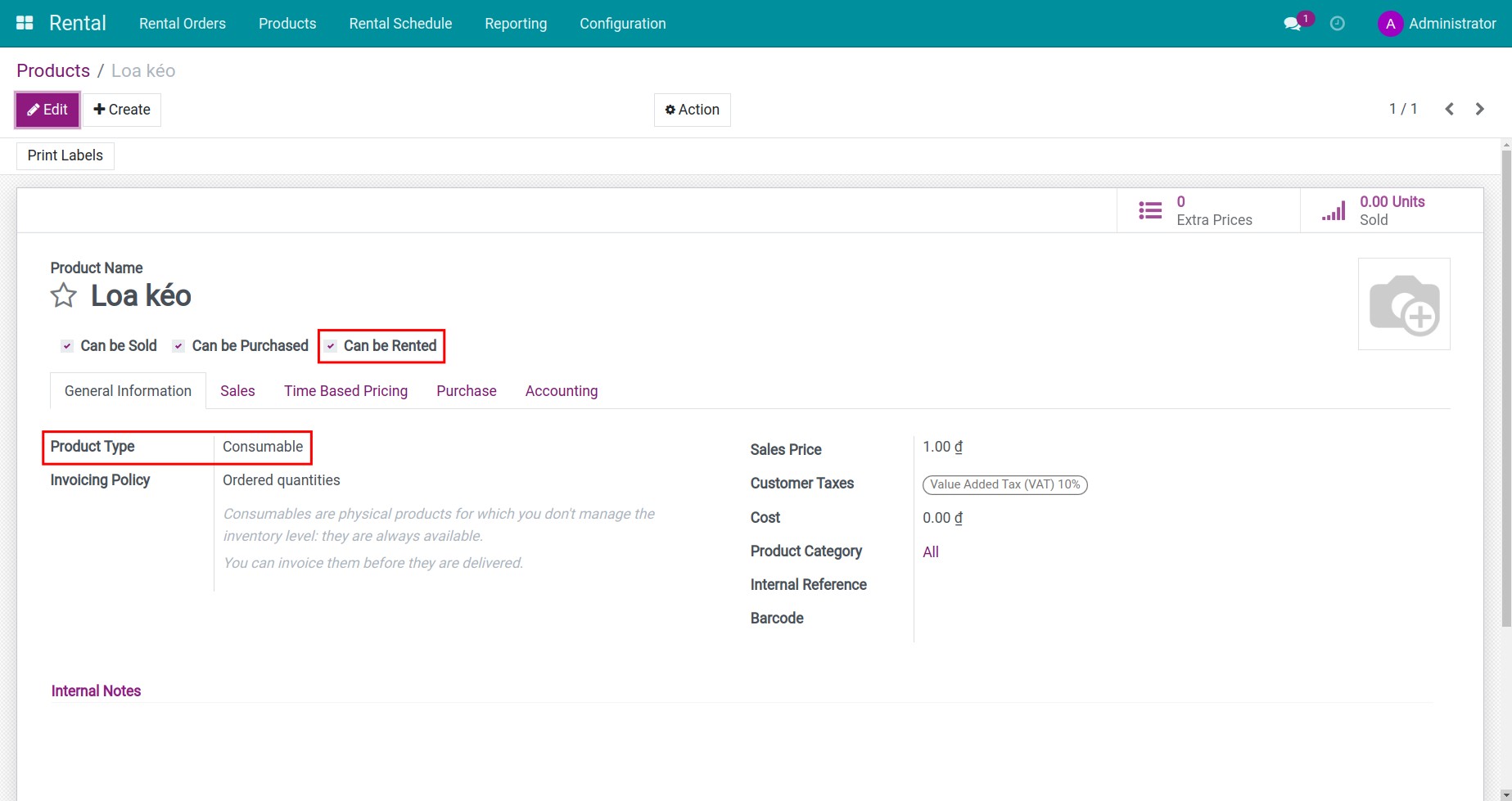
- Can be Rented: Check this box so that the product can be used for rental.
- Product Type: The rental product needs to be selected as Consumable.
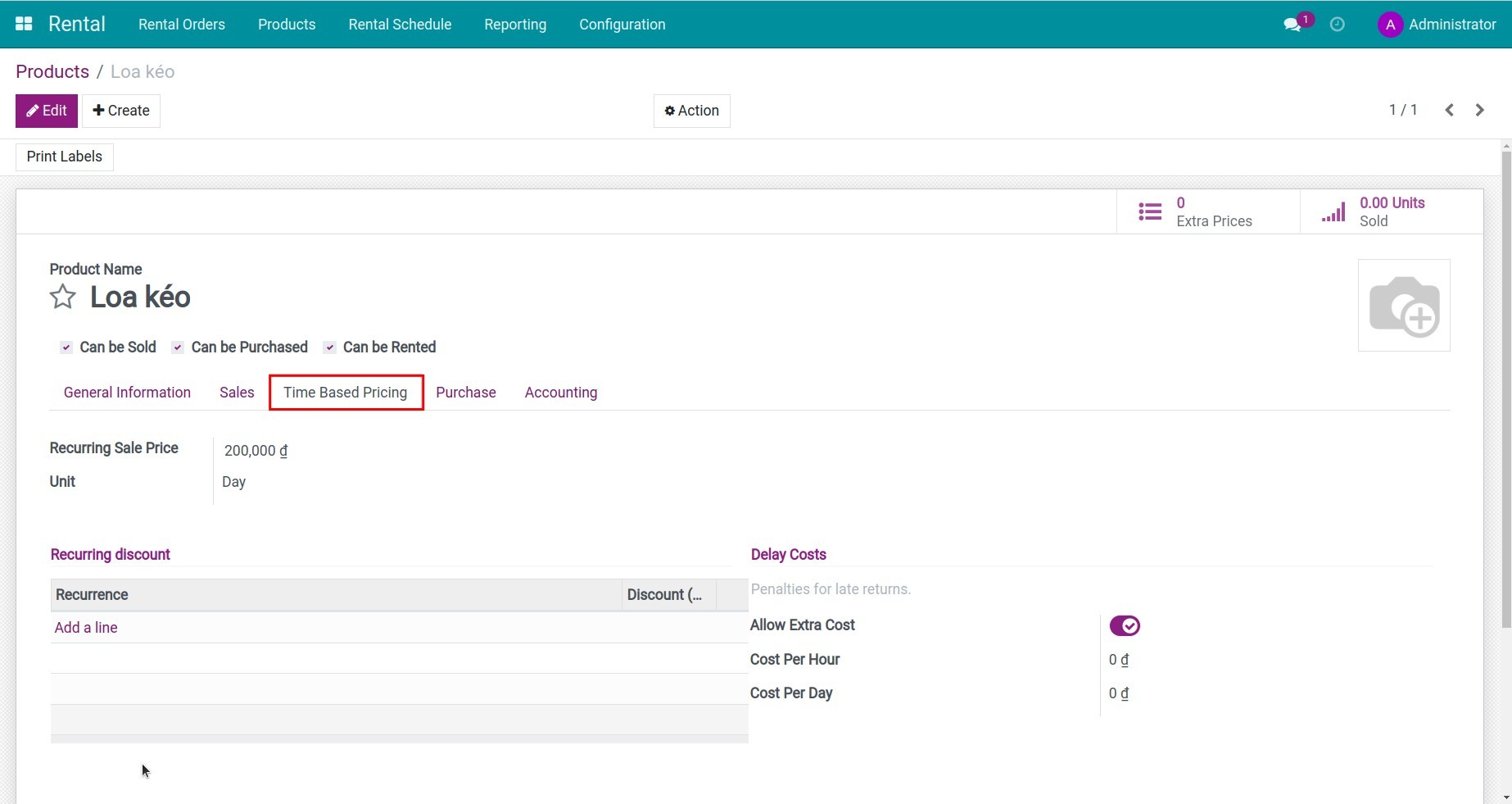
Step 2: Configure the Time Based Pricing tab.
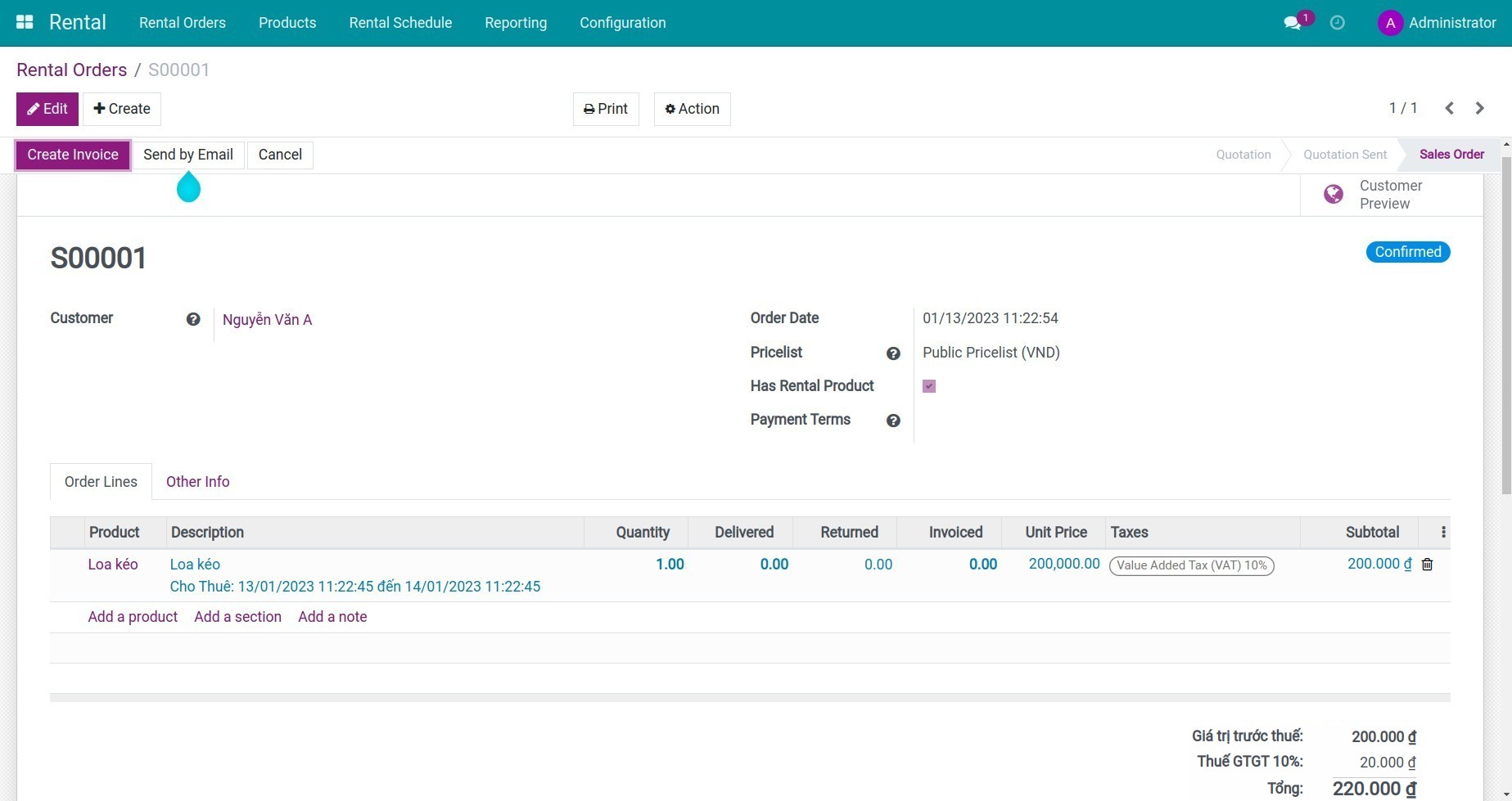
How to create a rental order
After creating a rental product, you create a rental order.
Navigate to Rental > Rental Orders > Create.
The Rental delivery process
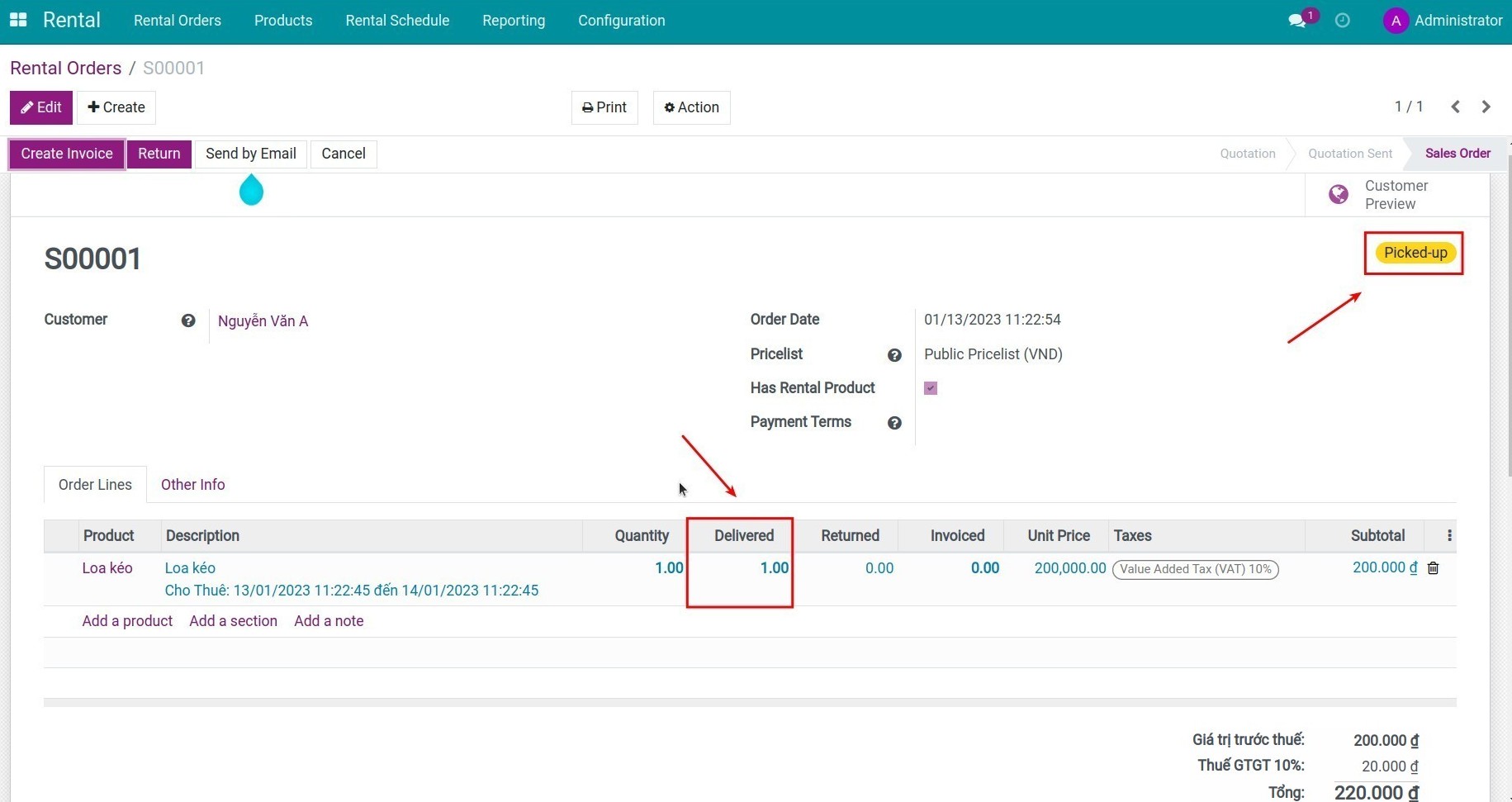
On the Rental Order interface, click the Edit button. Enter the quantity you want to deliver in the Delivered column then click the Save button. Once completed, the status Picked-up will appear on the Rental Order.
The process of getting the rental products back
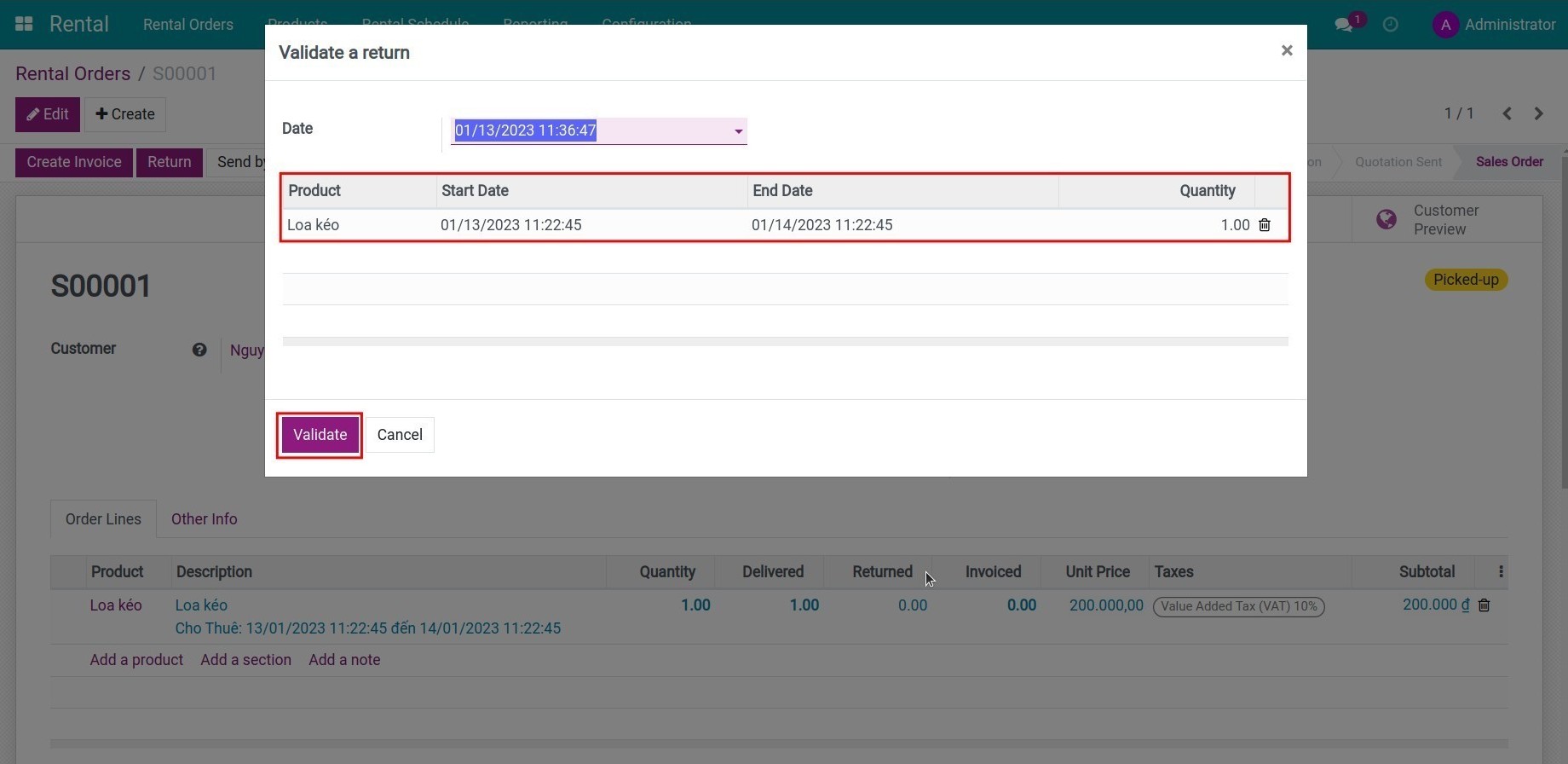
On the Rental Orders view, you press the Return button, in the pop-up window, you choose the product returned by the customer. Then press the Validate button.
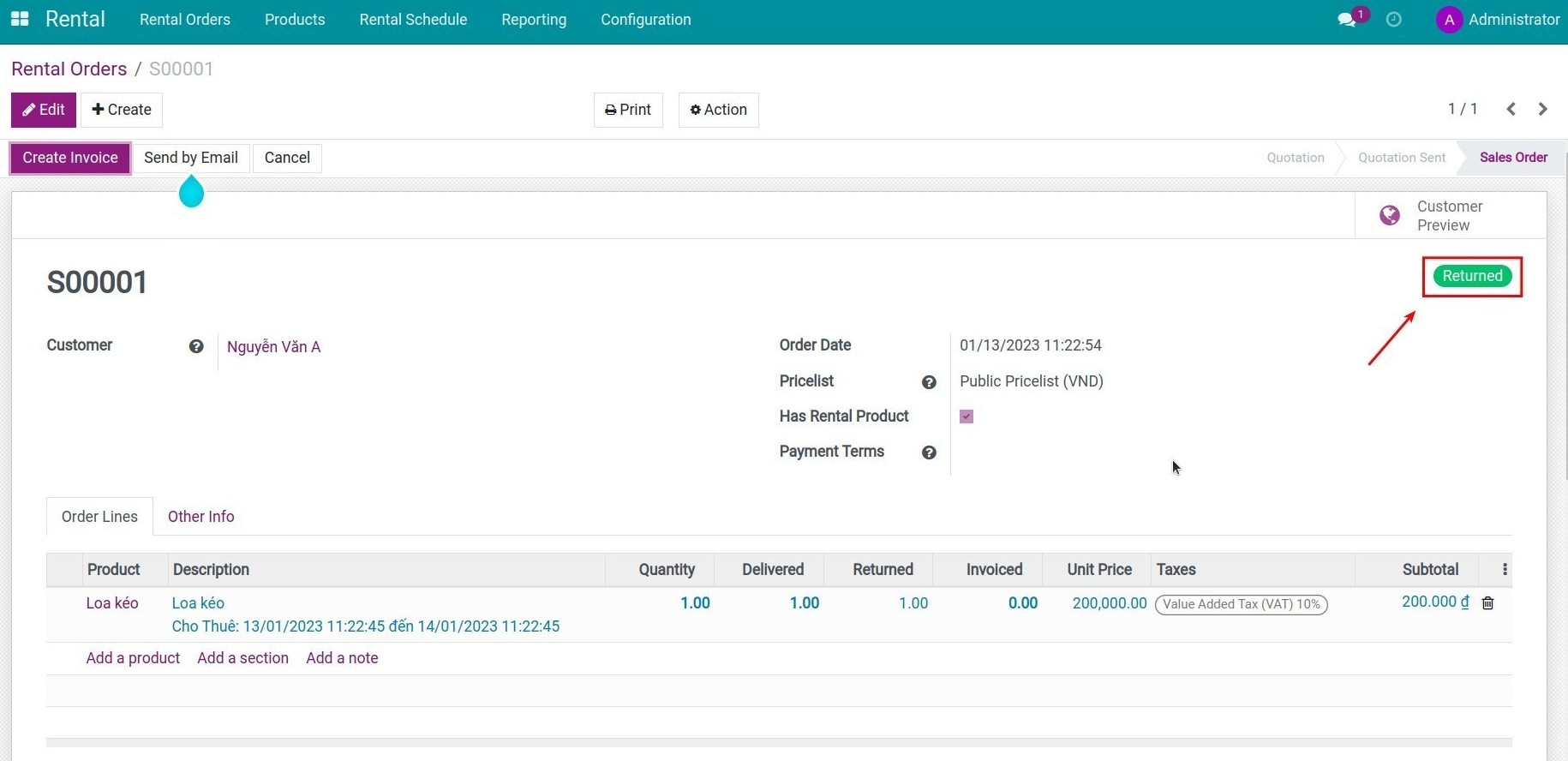
Once completed, the status of Returned appears on the Rental Order.
Rental Reporting
The Rental Management app provides you with reports on Rental Schedule, Rental Analysis. Details can be found at Rental Report Overview.
This software and associated files (the "Software") may only be used (executed, modified, executed after modifications) if you have purchased a valid license from the authors, typically via Odoo Apps, or if you have received a written agreement from the authors of the Software (see the COPYRIGHT file).
You may develop Odoo modules that use the Software as a library (typically by depending on it, importing it and using its resources), but without copying any source code or material from the Software. You may distribute those modules under the license of your choice, provided that this license is compatible with the terms of the Odoo Proprietary License (For example: LGPL, MIT, or proprietary licenses similar to this one).
It is forbidden to publish, distribute, sublicense, or sell copies of the Software or modified copies of the Software.
The above copyright notice and this permission notice must be included in all copies or substantial portions of the Software.
THE SOFTWARE IS PROVIDED "AS IS", WITHOUT WARRANTY OF ANY KIND, EXPRESS OR IMPLIED, INCLUDING BUT NOT LIMITED TO THE WARRANTIES OF MERCHANTABILITY, FITNESS FOR A PARTICULAR PURPOSE AND NONINFRINGEMENT. IN NO EVENT SHALL THE AUTHORS OR COPYRIGHT HOLDERS BE LIABLE FOR ANY CLAIM, DAMAGES OR OTHER LIABILITY, WHETHER IN AN ACTION OF CONTRACT, TORT OR OTHERWISE, ARISING FROM, OUT OF OR IN CONNECTION WITH THE SOFTWARE OR THE USE OR OTHER DEALINGS IN THE SOFTWARE.