
Account Counterparts
| Lines of Code | 1864 |
| Technical name | to_account_counterpart |
| License | OPL-1 |
| Website | https://viindoo.com/apps/modules/17.0/to_account_counterpart |
| Read description for | v 10.0 v 11.0 v 12.0 v 13.0 v 14.0 v 15.0 v 16.0 v 18.0 v 19.0 |
| Required Apps | Invoicing (account) Discuss (mail) |
| Included Dependencies | Viindoo Base Viindoo Accounting |
| Extensions | Accounting & Financial Reports Accounting Report Flag On-behalf Payments E-Wallet Account Counterpart - Account Reconciliation Account - Allow updating tax grids - Without Counterpart Update |

Which debit went against which credit - on every entry, computed
Odoo tells you an entry balances. This tells you what balanced against what: every debit line paired with the credit line it offsets, with the amount, on the entry and in one searchable list.
Account Counterparts (technical name to_account_counterpart) is an Odoo 17.0 app for Odoo Community and Odoo Enterprise and Viindoo Cloud, built for accountant, chief accountant, auditor, anyone filing statutory books.

At a Glance
The facts of Account Counterparts, version 1.0.7, in one place. Published by Viindoo.
Key Features
A journal entry with two lines needs no explanation. A journal entry with eleven does: which part of the receivable was the goods, which was the tax, which line of the payment covered which invoice line. Odoo stores the entry as a flat list of debits and credits that happens to balance; the pairing exists only in the accountant's head, and in the statutory reports of several countries it is required on paper. This module computes the pairing and stores it: for every posted entry, each debit line is matched to the credit lines it offsets, with the countered amount, and the entry carries a status - fully countered, partially, not at all. There is a list of every pair in the database, a wizard to generate them for entries posted before the module was installed, and a scheduled job that keeps up with new ones.
On the journal item too
The counterpart is available where the line is, not only on the entry.
Miscellaneous entries
The pairing is most useful exactly where entries are least obvious.
How It Works
Three steps, and every entry explains itself.
Post the entry as usual
Nothing changes in how entries are made. On posting, the pairs are computed - here the receivable against the product line and against the tax line, each with its amount, and the entry marked Fully Countered.
Read the pairs across the ledger
One list, searchable and groupable: which accounts face each other, how often, for how much. This is the view that answers "what was this account offset against last month".

Catch up on history
Entries posted before the module was installed are covered by the generator - a date range, the journals you choose, a batch limit, and a rule to skip entries above a line count. After that the scheduled job keeps up on its own.

What You Get
Debit line to credit line pairs, with the countered amount, computed on every posted entry
A Counterparts Mapping tab on the entry, and a Countered Status - fully, partially, not countered
One searchable list of every pair in the database, groupable by account, journal or period
A generator wizard for history: by date range, by journal, with a limit and a skip rule for very large entries
A scheduled job that counters new entries without anyone remembering to run it
The counterpart of a line is also on the journal item itself, so the answer is where the question is asked
More Screens
Everything below was taken on a database seeded with real business data, on this series - not a mock-up and not a screenshot from an older version.
Every counterpart pair

A miscellaneous entry, explained
The generator wizard

Journal items
What This App Does Not Do
Read this before you buy. Everything below is something the app deliberately leaves to another app or to you.
Counterparts are a computed mapping; nothing is posted, moved or reconciled by this module.
The generator has a line-count threshold on purpose - pairing a thousand-line entry is expensive and rarely useful. The threshold is yours to set.
Matching an invoice to its payment is reconciliation; this pairs the debit and credit sides inside one entry.
Nothing is computed retroactively on install; run the wizard for the periods you care about.
Works Well With
Apps from the same stack, built to fit this one:
Reconciliation Widget
For the other question: which payment settles which invoice.
Account Reconciliation WidgetWho Should Use Account Counterparts?
Accountant
Reads a large entry without reconstructing it on paper.
Chief accountant
Checks that an account was offset against the accounts it should have been.
Auditor
Follows a figure to the exact line on the other side, not to the entry as a whole.
Anyone filing statutory books
Has the debit-credit correspondence the format asks for, without a spreadsheet.
Frequently Asked Questions
What does Account Counterparts do?
Odoo tells you an entry balances. This tells you what balanced against what: every debit line paired with the credit line it offsets, with the amount, on the entry and in one searchable list.
What does Account Counterparts not do?
It explains entries, it does not change them. Counterparts are a computed mapping; nothing is posted, moved or reconciled by this module. Very large entries can be skipped. The generator has a line-count threshold on purpose - pairing a thousand-line entry is expensive and rarely useful. The threshold is yours to set. It is not reconciliation. Matching an invoice to its payment is reconciliation; this pairs the debit and credit sides inside one entry. Historic entries need the generator. Nothing is computed retroactively on install; run the wizard for the periods you care about.
Who is Account Counterparts for?
Accountant: Reads a large entry without reconstructing it on paper. Chief accountant: Checks that an account was offset against the accounts it should have been. Auditor: Follows a figure to the exact line on the other side, not to the entry as a whole. Anyone filing statutory books: Has the debit-credit correspondence the format asks for, without a spreadsheet.
Which Odoo version and editions does it support?
Odoo 17.0 - Odoo Community, Odoo Enterprise, Viindoo Cloud. Upgrades to a newer Odoo series are a separate purchase for that series.
What does it depend on?
It installs on top of: to_base, viin_account. Odoo installs them with it.
How do I set it up?
Three steps, and every entry explains itself.
What works well with it?
Accounting Foundation (viin_account): The accounting layer it extends, installed with it. Accounting Analysis (to_accounting_bi): Slice the pairs by account and period in a pivot. Reconciliation Widget (viin_account_reconciliation): For the other question: which payment settles which invoice.
Can I try it before buying?
Yes - the Live Preview button at the top of this page opens the module's own screen on a working database.
How do I get support?
Write to apps.support@viindoo.com with your Odoo version and the technical name to_account_counterpart; pre-sales questions go to sales@viindoo.com.
See Account Counterparts in Action
Which debit went against which credit - on every entry, computed
Need help with Account Counterparts?
For questions, implementation support, or consulting services, contact Viindoo.
Pre-Sales & Partnership
sales@viindoo.comWhen contacting us, please include:
- Odoo/Viindoo version (Odoo CE / Viindoo Editions).
- Number of users and business scope.
- Other modules currently in use.
Technical Support
apps.support@viindoo.comFor faster troubleshooting, please provide:
- Order number or app reference.
- Odoo/Viindoo version & edition.
- Steps to reproduce the issue.
- Screenshots/logs if available.
Upgrades to a newer Odoo series are a separate purchase for that series.
Technical Requirement
Changes log
1.0.7 - Latest on the 17.0 line
- Counterpart pairs are computed on posting and carried on the entry as a Countered Status.
- The generator covers history by date range and journal, with a batch limit and a line-count threshold.
- A scheduled job counters new entries in the background.
Installation
- Navigate to Apps.
- Search with keyword to_account_counterpart.
- Press Install.
Note:
- After installing to_account_counterpart module, Invoicing app is auto-installed.
- To have a full feature-related observation of this module, you need to install Accounting app.
- The journal entries can be automatically or manually accounted.
Instruction
Instruction video: Account Counterparts
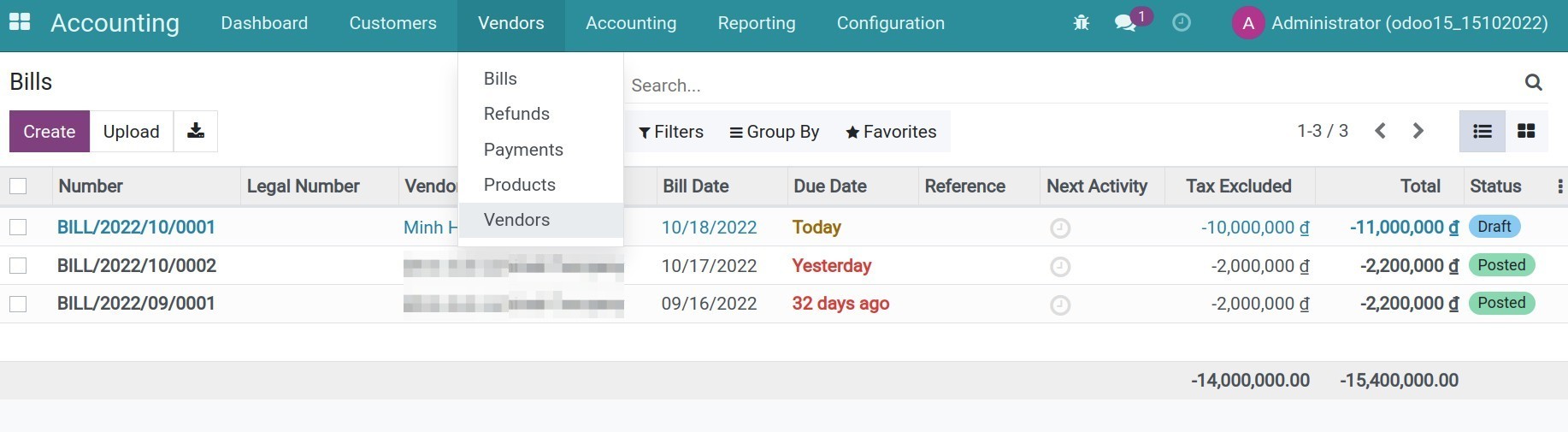
Step 1: Go to Accounting App > Vendors > Bills, press Create button to create a bill.
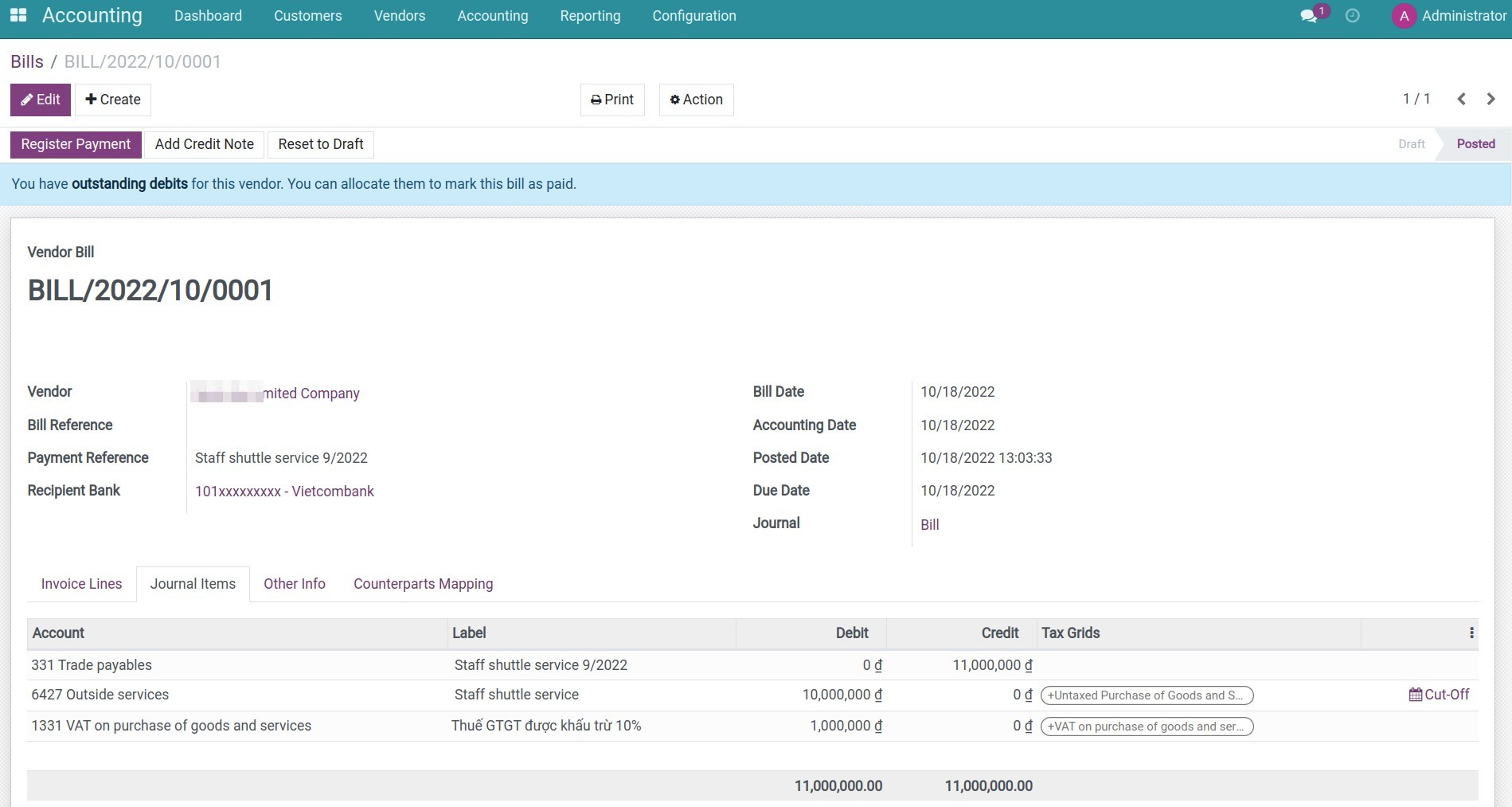
Step 2: Press Confirm button and review the journal items on the Journal Items tab.
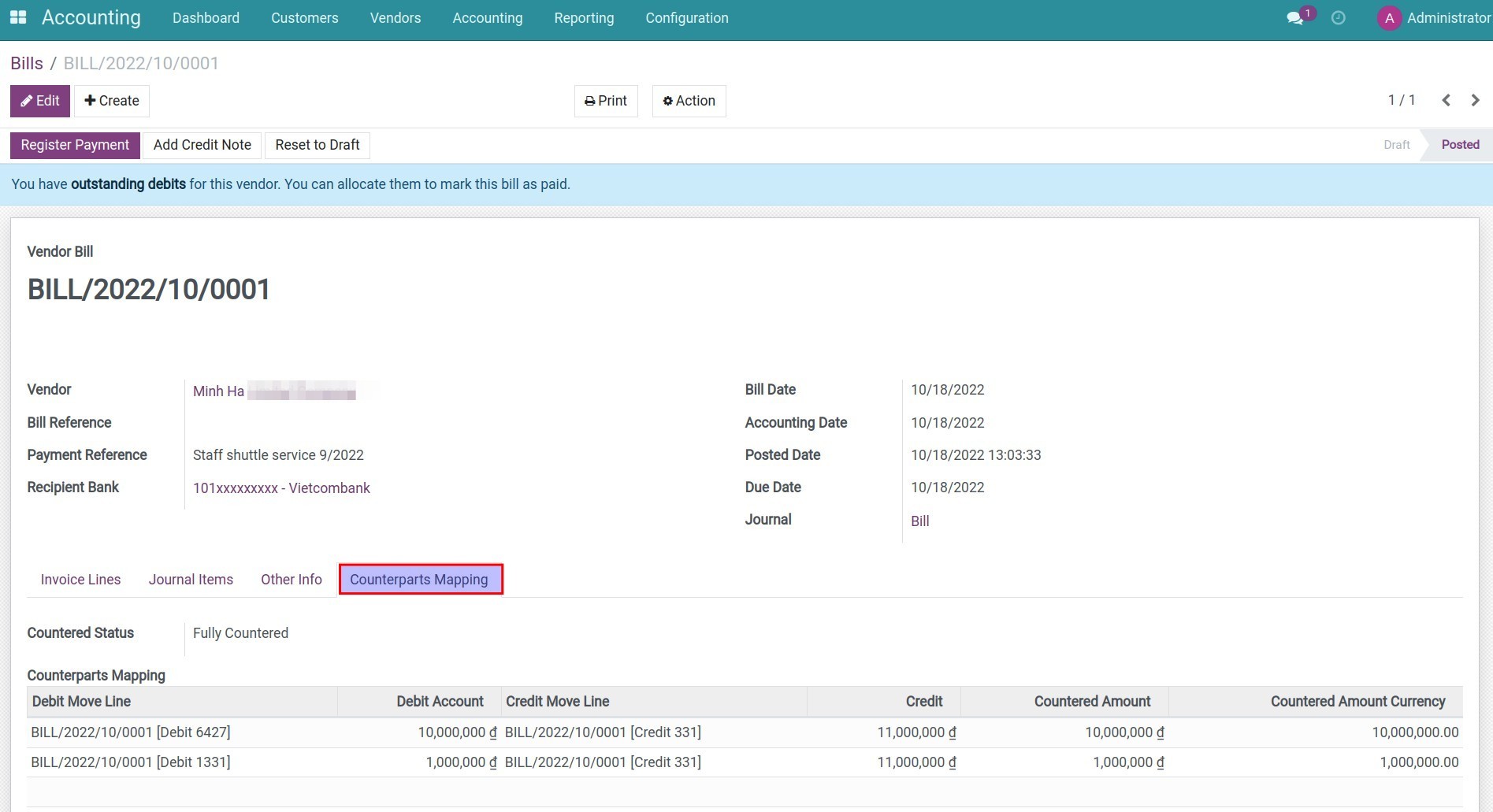
Step 3: Check the accounting information in Counterparts Mapping tab.
Step 4: Print the accounting template related to countered accounts. For example, print Ledger (S03b-DN).
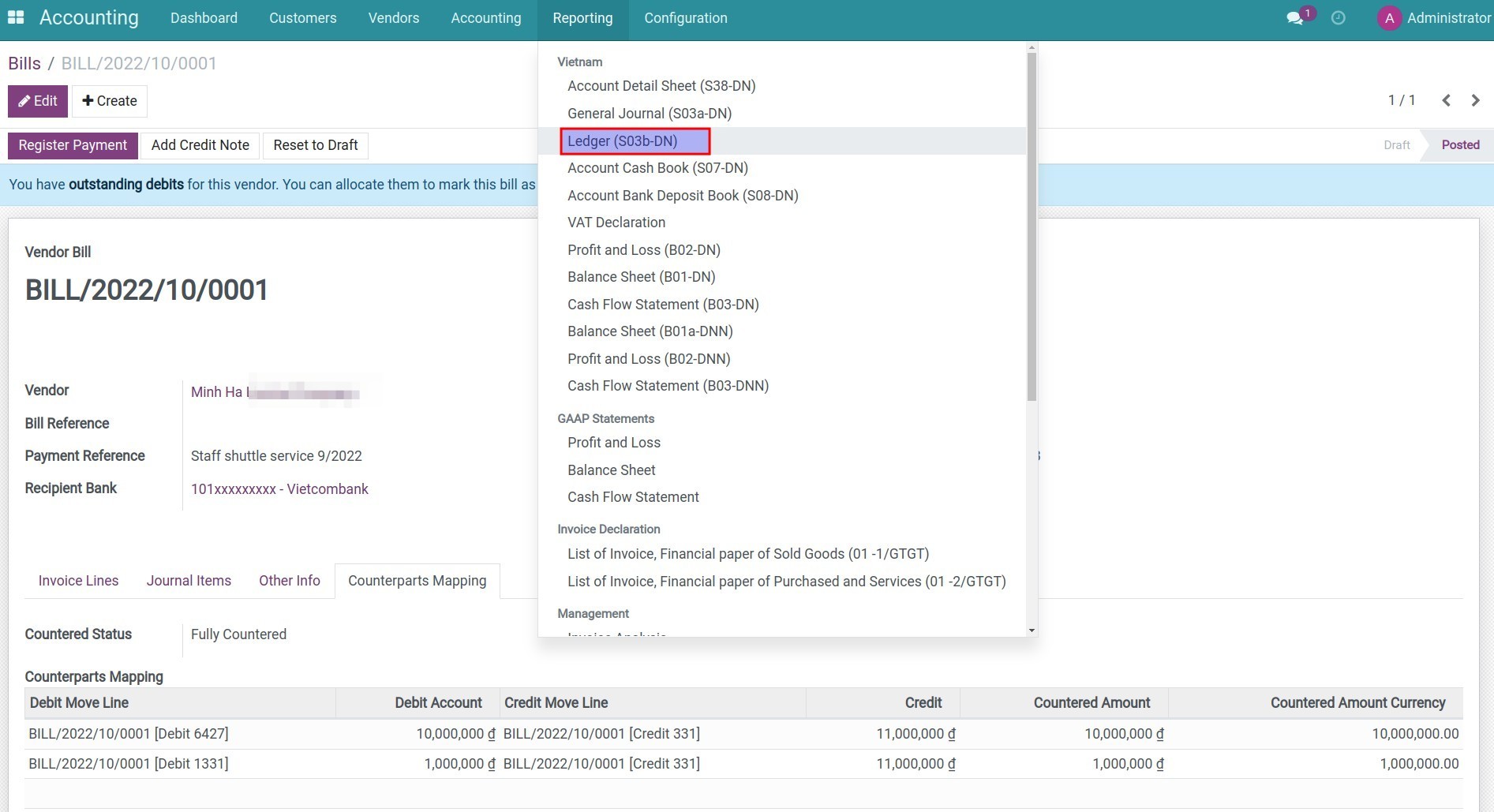
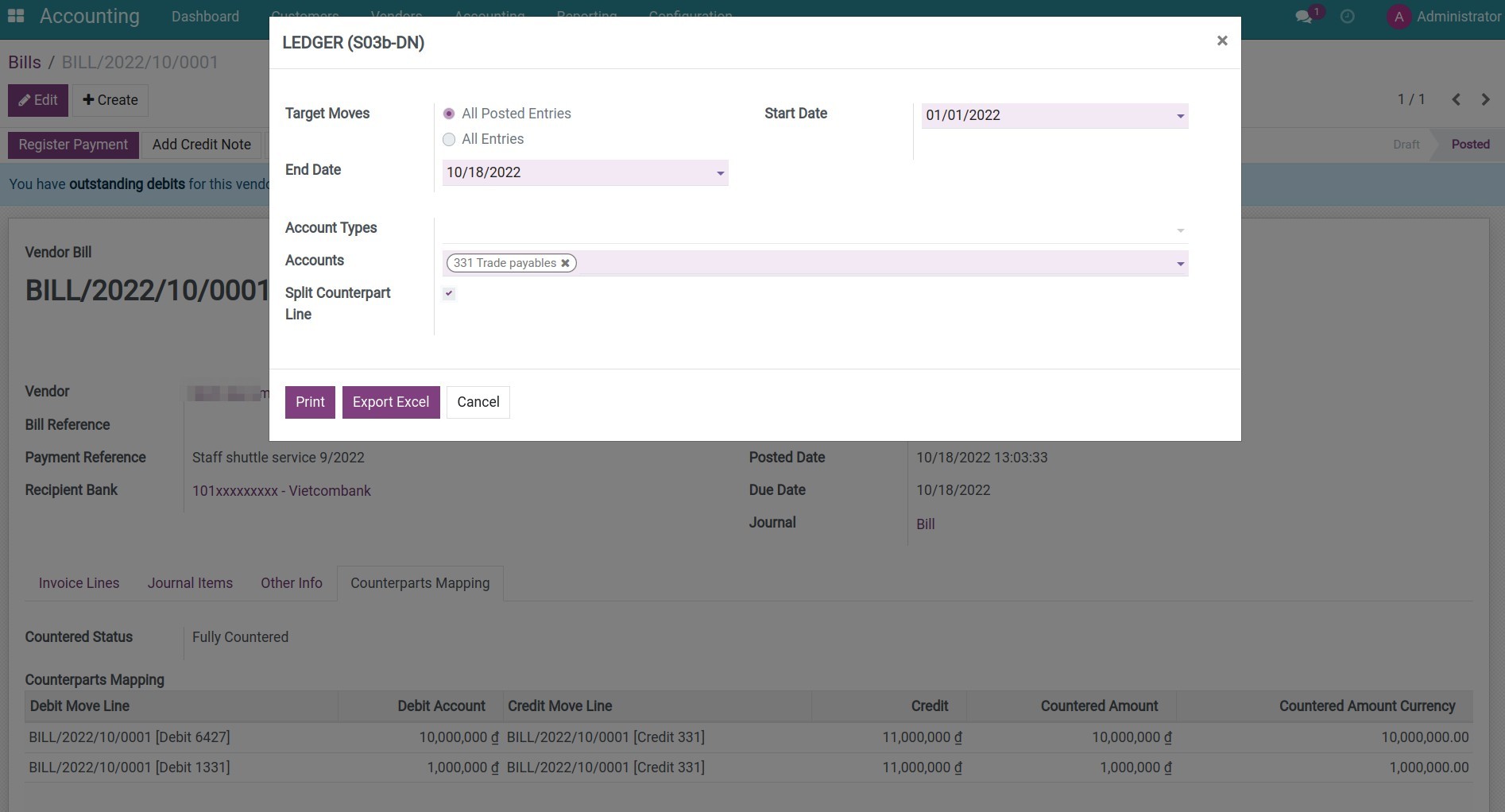
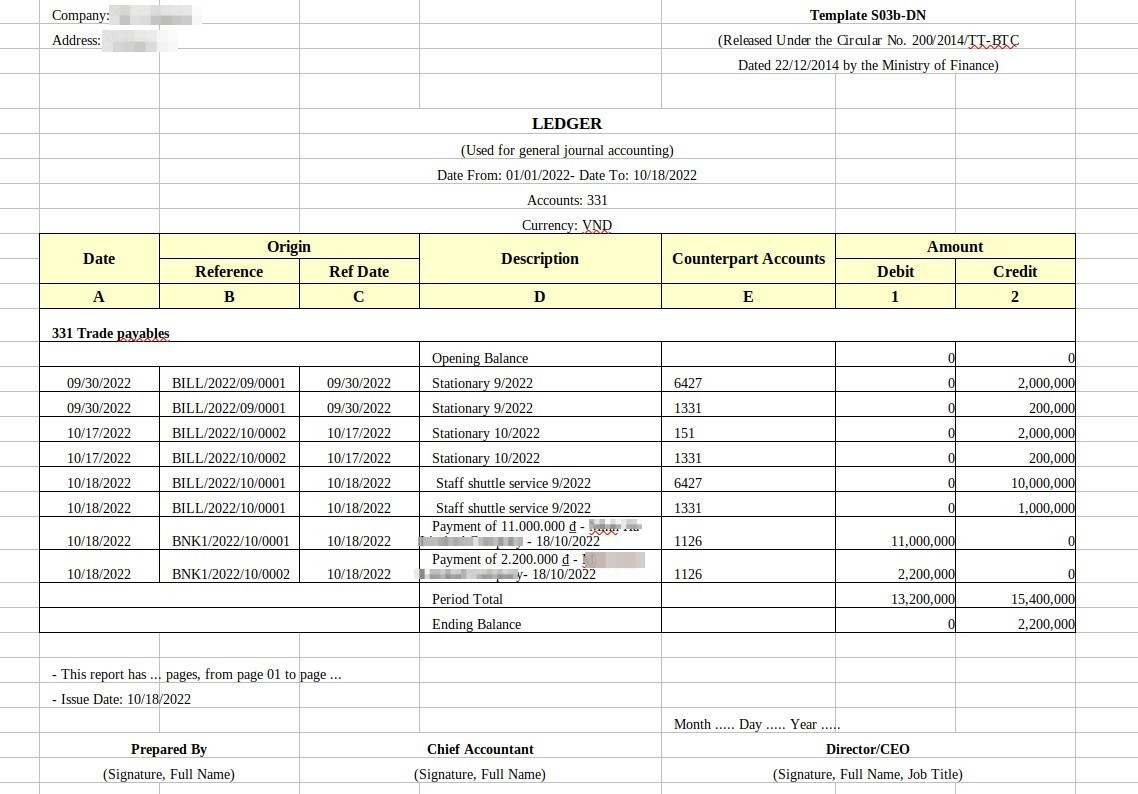
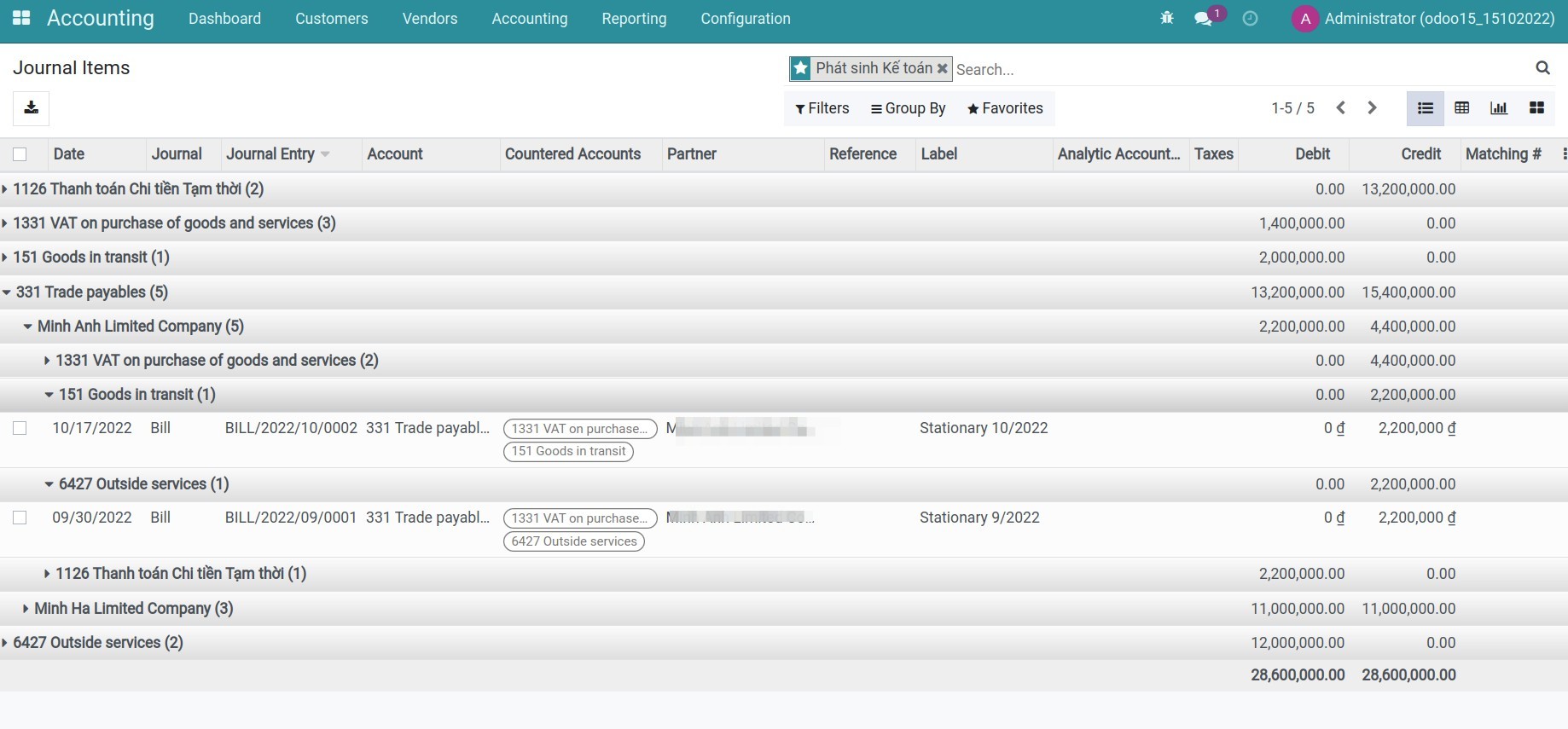
Step 5: Go to Accounting app > Accounting > Journal Items, search the information related to countered accounts by the filter/groups tool. For example, control the balance of account 331 according to the partners and the countered accounts.
Note: You need activate developer mode (debug mode) to see Journal Items menu.
This software and associated files (the "Software") may only be used (executed, modified, executed after modifications) if you have purchased a valid license from the authors, typically via Odoo Apps, or if you have received a written agreement from the authors of the Software (see the COPYRIGHT file).
You may develop Odoo modules that use the Software as a library (typically by depending on it, importing it and using its resources), but without copying any source code or material from the Software. You may distribute those modules under the license of your choice, provided that this license is compatible with the terms of the Odoo Proprietary License (For example: LGPL, MIT, or proprietary licenses similar to this one).
It is forbidden to publish, distribute, sublicense, or sell copies of the Software or modified copies of the Software.
The above copyright notice and this permission notice must be included in all copies or substantial portions of the Software.
THE SOFTWARE IS PROVIDED "AS IS", WITHOUT WARRANTY OF ANY KIND, EXPRESS OR IMPLIED, INCLUDING BUT NOT LIMITED TO THE WARRANTIES OF MERCHANTABILITY, FITNESS FOR A PARTICULAR PURPOSE AND NONINFRINGEMENT. IN NO EVENT SHALL THE AUTHORS OR COPYRIGHT HOLDERS BE LIABLE FOR ANY CLAIM, DAMAGES OR OTHER LIABILITY, WHETHER IN AN ACTION OF CONTRACT, TORT OR OTHERWISE, ARISING FROM, OUT OF OR IN CONNECTION WITH THE SOFTWARE OR THE USE OR OTHER DEALINGS IN THE SOFTWARE.