
OmniApproval™ - Timesheet Approvals
| Lines of Code | 1046 |
| Technical name | viin_approval_hr_timesheet |
| License | OPL-1 |
| Website | https://viindoo.com/apps/modules/18.0/to_hr_timesheet_approval |
| Read description for | v 13.0 v 14.0 v 15.0 v 16.0 v 17.0 v 19.0 |
| Required Apps | Time Off (hr_holidays) Project (project) Discuss (mail) Calendar (calendar) Employees (hr) Employee Contracts (hr_contract) |
| Included Dependencies | Viindoo Base OmniApproval™: One platform. Every approval. HR Timesheet Timer Advanced HR Management OmniApproval™ - Project & Task Approvals OmniApproval™ - Analytic Accounting Approvals Safe IR Metadata Proxies Countup Timer Widget |
| Extensions | Overtime Timesheet Approval |

Timesheets that someone actually approved
Timesheet lines routed through the approval engine - submitted, checked by the manager who can see them, and locked once approved.
OmniApproval™ - Timesheet Approvals (technical name viin_approval_hr_timesheet) is an Odoo 18.0 app for Odoo Community and Odoo Enterprise and Viindoo Cloud, built for employee, manager, finance, payroll.
At a Glance
The facts of OmniApproval™ - Timesheet Approvals, version 0.1.4, in one place. Published by Viindoo.
How It Works
Two screens.
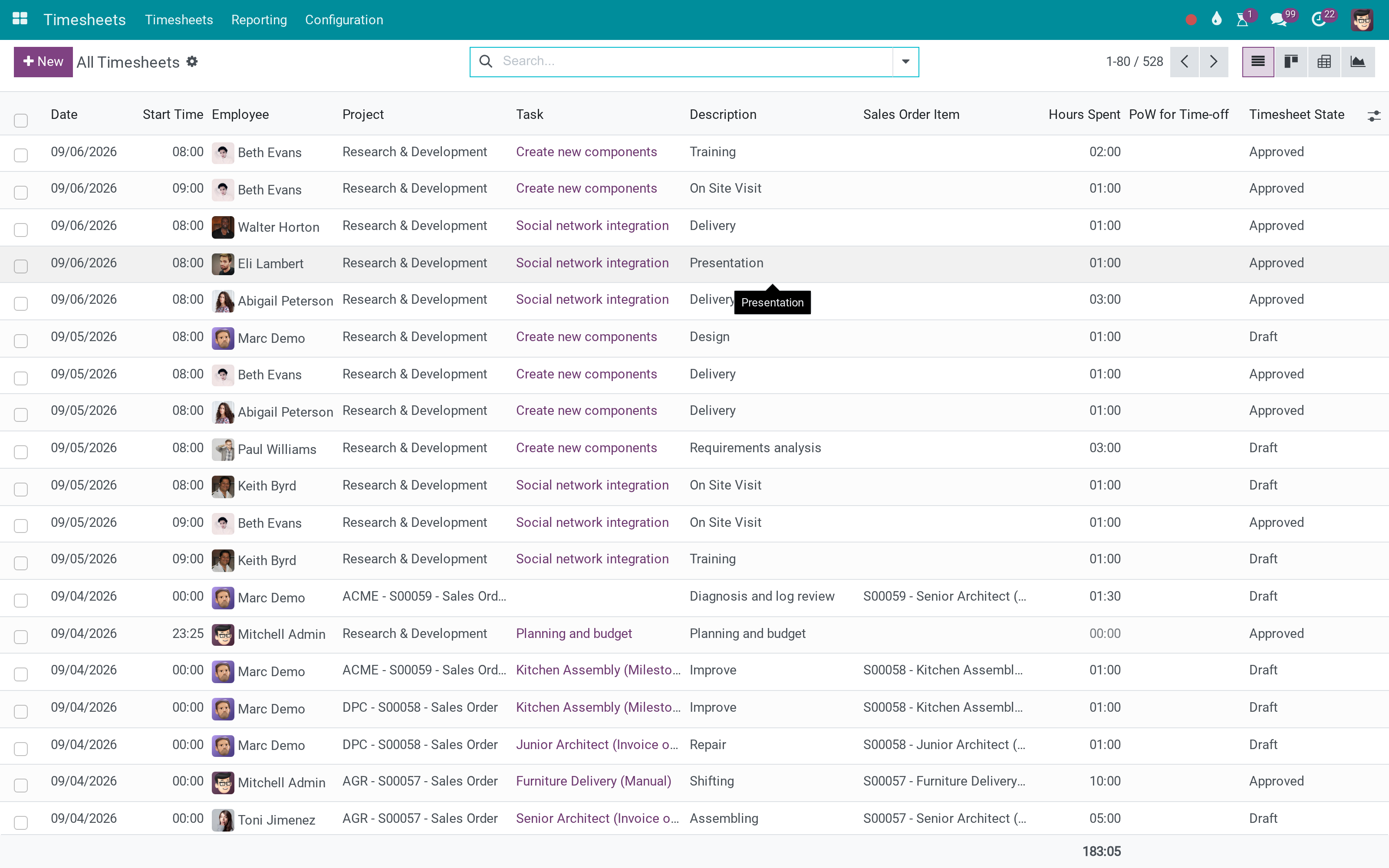
The lines, with their state
Draft and approved side by side - the difference between what was typed and what was agreed.
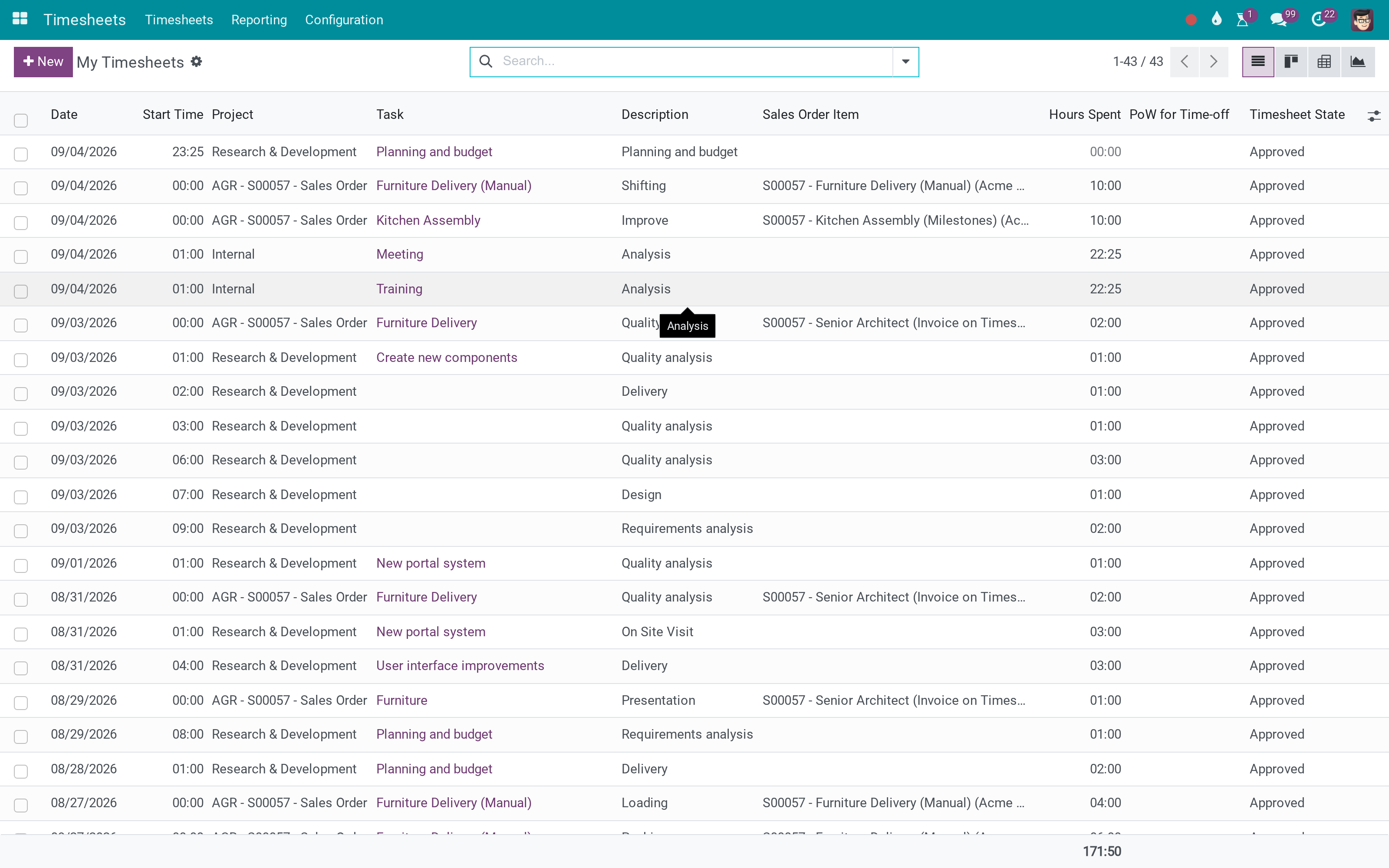
And a person's own week
The same lines from the employee's side, before they are submitted.
What You Get
Timesheet lines attached to an approval request
Routed through the approval engine: sequential approvers, minimums, deadlines
The request shows the employees and projects it covers
Refusal returns the lines with a reason
Approved time is locked against further editing
Managers only see the requests they are entitled to act on
More Screens
Everything below was taken on a database seeded with real business data, on this series - not a mock-up and not a screenshot from an older version.
My timesheets
What This App Does Not Do
Read this before you buy. Everything below is something the app deliberately leaves to another app or to you.
Who may approve is configured there, per approval type.
Payroll reads approved time; the calculation stays payroll's.
Approval locks the time entries, not the work.
Corrections are made by the person who entered the time.
Works Well With
Apps from the same stack, built to fit this one:
Who Should Use OmniApproval™ - Timesheet Approvals?
Employee
Submits the week instead of having it silently consumed.
Manager
Approves the time of the people they are responsible for.
Finance
Bills from hours somebody signed for.
Payroll
Reads approved time rather than typed time.
Frequently Asked Questions
What does OmniApproval™ - Timesheet Approvals do?
Timesheet lines routed through the approval engine - submitted, checked by the manager who can see them, and locked once approved.
What does OmniApproval™ - Timesheet Approvals not do?
It needs the approval engine. Who may approve is configured there, per approval type. It does not compute pay. Payroll reads approved time; the calculation stays payroll's. It does not lock projects. Approval locks the time entries, not the work. Refusal is a reason, not a rewrite. Corrections are made by the person who entered the time.
Who is OmniApproval™ - Timesheet Approvals for?
Employee: Submits the week instead of having it silently consumed. Manager: Approves the time of the people they are responsible for. Finance: Bills from hours somebody signed for. Payroll: Reads approved time rather than typed time.
Which Odoo version and editions does it support?
Odoo 18.0 - Odoo Community, Odoo Enterprise, Viindoo Cloud. Upgrades to a newer Odoo series are a separate purchase for that series.
What does it depend on?
It installs on top of: hr_contract, hr_timesheet, viin_approval, viin_hr_timesheet_timer, viin_approval_project, project_timesheet_holidays. Odoo installs them with it.
How do I set it up?
Two screens.
What works well with it?
OmniApproval (viin_approval): The engine the requests run through. Timesheet Timer (viin_hr_timesheet_timer): Recording the time in the first place. Timesheets in Payroll (to_hr_timesheet_payroll): Where approved time becomes money.
Can I try it before buying?
Yes - the Live Preview button at the top of this page opens the module's own screen on a working database.
How do I get support?
Write to apps.support@viindoo.com with your Odoo version and the technical name viin_approval_hr_timesheet; pre-sales questions go to sales@viindoo.com.
See OmniApproval™ - Timesheet Approvals in Action
Live demo: v18demo-int.viindoo.com/web#action=hr_timesheet.timesheet_action_all
Need help with OmniApproval™ - Timesheet Approvals?
For questions, implementation support or a custom feature, contact Viindoo.
Pre-Sales & Partnership
sales@viindoo.comUpgrades to a newer Odoo series are a separate purchase for that series.
All Viindoo apps: Viindoo Apps
Technical Requirement
Changes log
0.1.4 - Latest on the 17.0 line
- A request computes the employees and projects it involves, so an approver sees its scope.
- Approved lines are protected from further editing.
Timesheet Approvals
For: employees who log time, timesheet managers and approvers, and the approval administrator.
Note
Extends Timesheets - see the hr_timesheet documentation.
Note
Extends Approval for projects - see the viin_approval_project documentation.
Note
Extends Approval - see the viin_approval documentation.
Overview
Timesheet entries can feed payroll, project costing and performance reviews, so a manager has to confirm them first. This module adds a Timesheet approval type: an employee submits a set of timesheet lines in one approval request, and an approver accepts or refuses it. Every timesheet line shows its approval status, so everybody can see at a glance which hours are confirmed.
| Role | What they do | Access right to assign |
|---|---|---|
| Employee | Logs time and asks for approval of the lines. | The Timesheets access right of the employee |
| Approver | Approves or refuses the request. | Timesheets: User: all timesheets, plus an Approvals access right |
| Approval administrator | Sets up the approval type and the contracts. | Approvals: Administrator |
Setup (for the Administrator)
Installation
- Navigate to Apps.
- Search for Timesheet Approvals (viin_approval_hr_timesheet).
- Press Install.
Access rights
Navigate to Settings ‣ Users & Companies ‣ Users and open a user. Under Timesheets, give every approver User: all timesheets. Under Approvals, give the approval access right that matches their role.
Choose who needs approval
Timesheet lines of an employee are confirmed automatically unless their contract asks for approval. On the employee's contract, tick Timesheet Approval. The box is ticked by default when the contract's department or job position has Timesheet Approval switched on, so you can decide once per department or job position.
Approval type
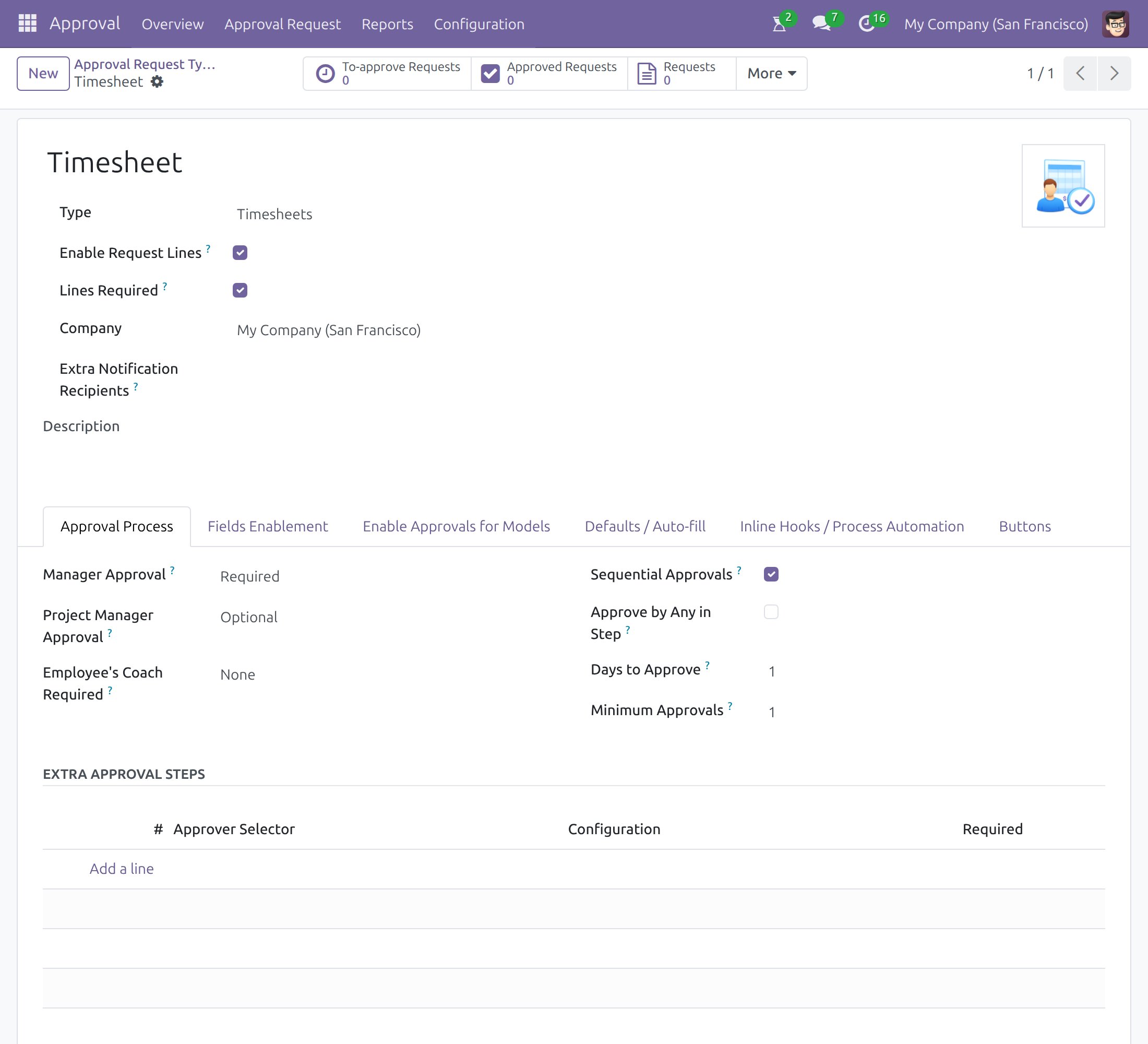
Navigate to Approval ‣ Configuration ‣ Approval Types and open Timesheet. The type is created for you: the employee's manager approves each request, and you can add further steps and approvers in the Approval Process tab.
Employee: log time and ask for approval
Log time
Log your hours in the Timesheets app as usual. Each line shows its Timesheet State - Draft until it is part of a submitted request.
Ask for approval
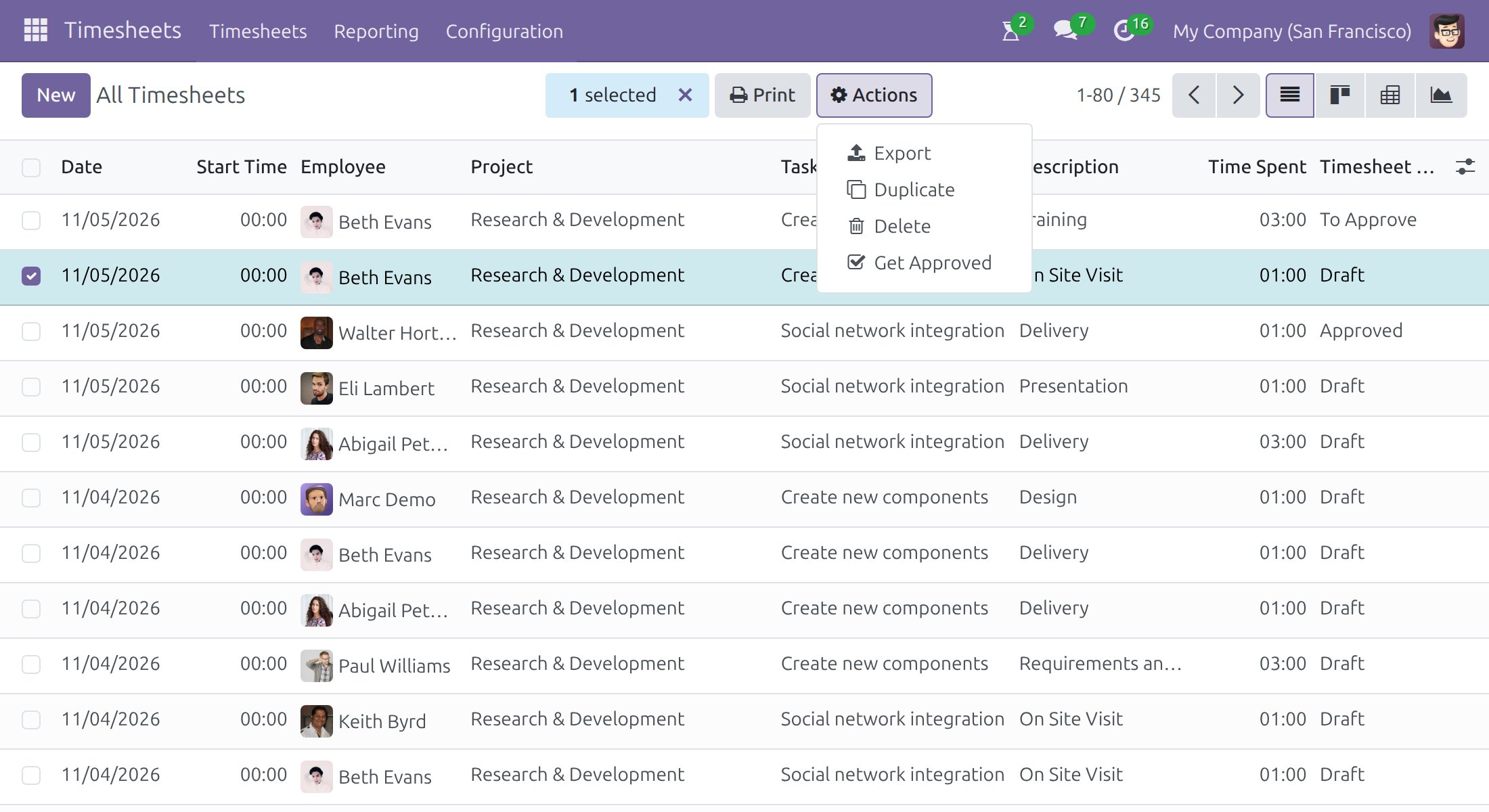
- In the Timesheets app, open the list of your timesheets and select the lines you want approved.
- Press Actions ‣ Get Approved.
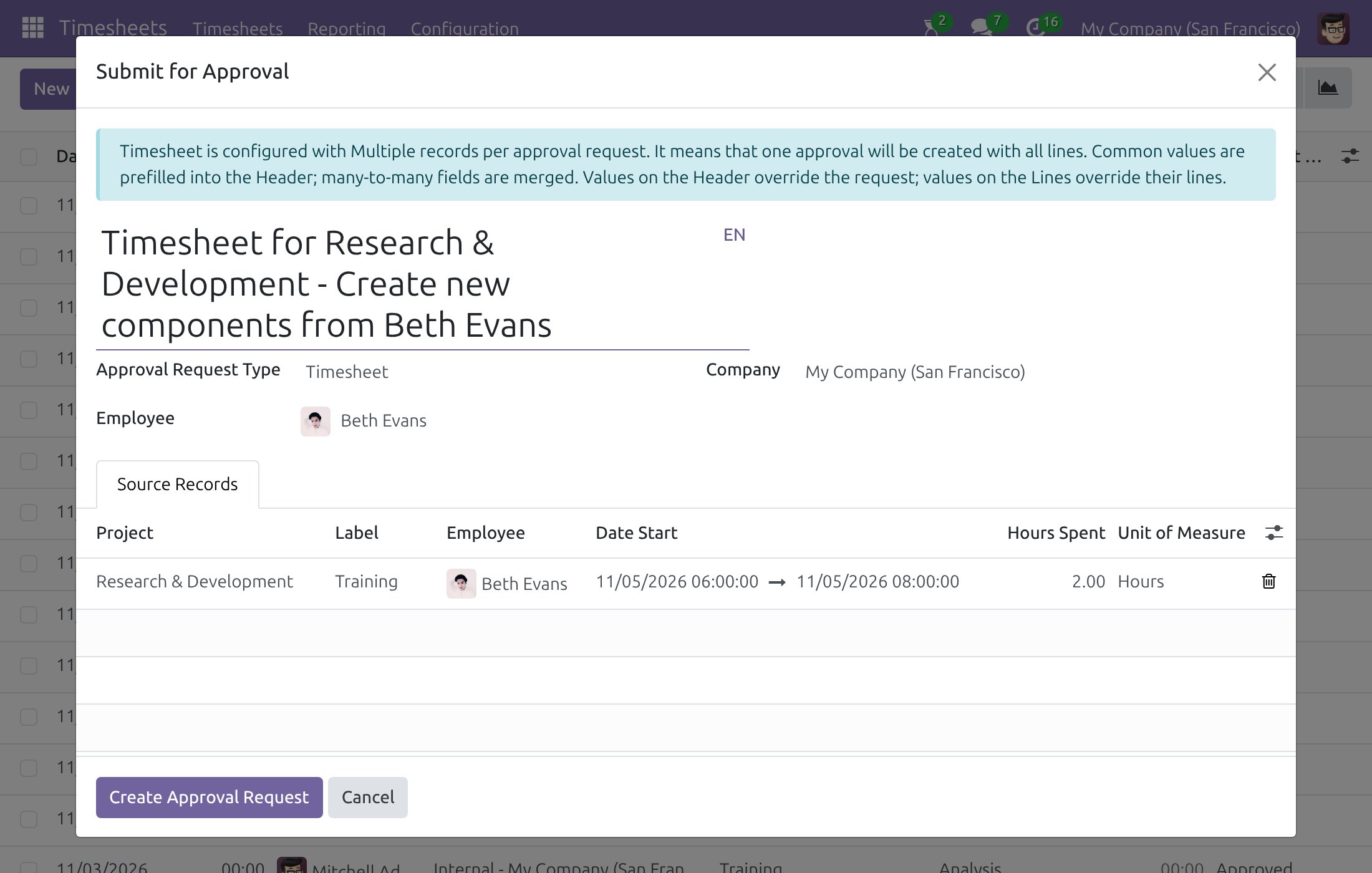
- Check the title and the lines, then press Create Approval Request.
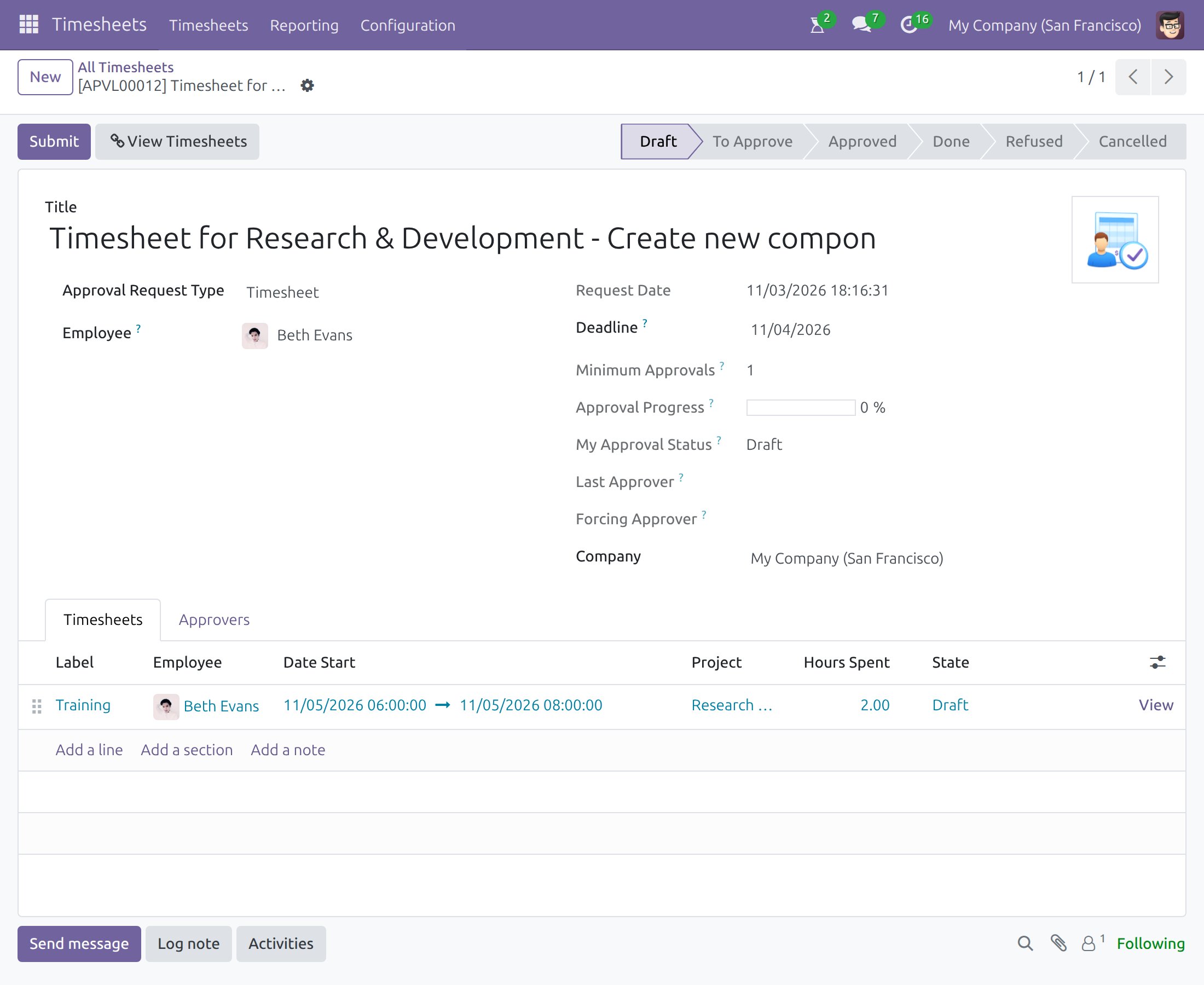
The request opens in the Draft stage. Review the lines on the Timesheets tab, then press Submit.
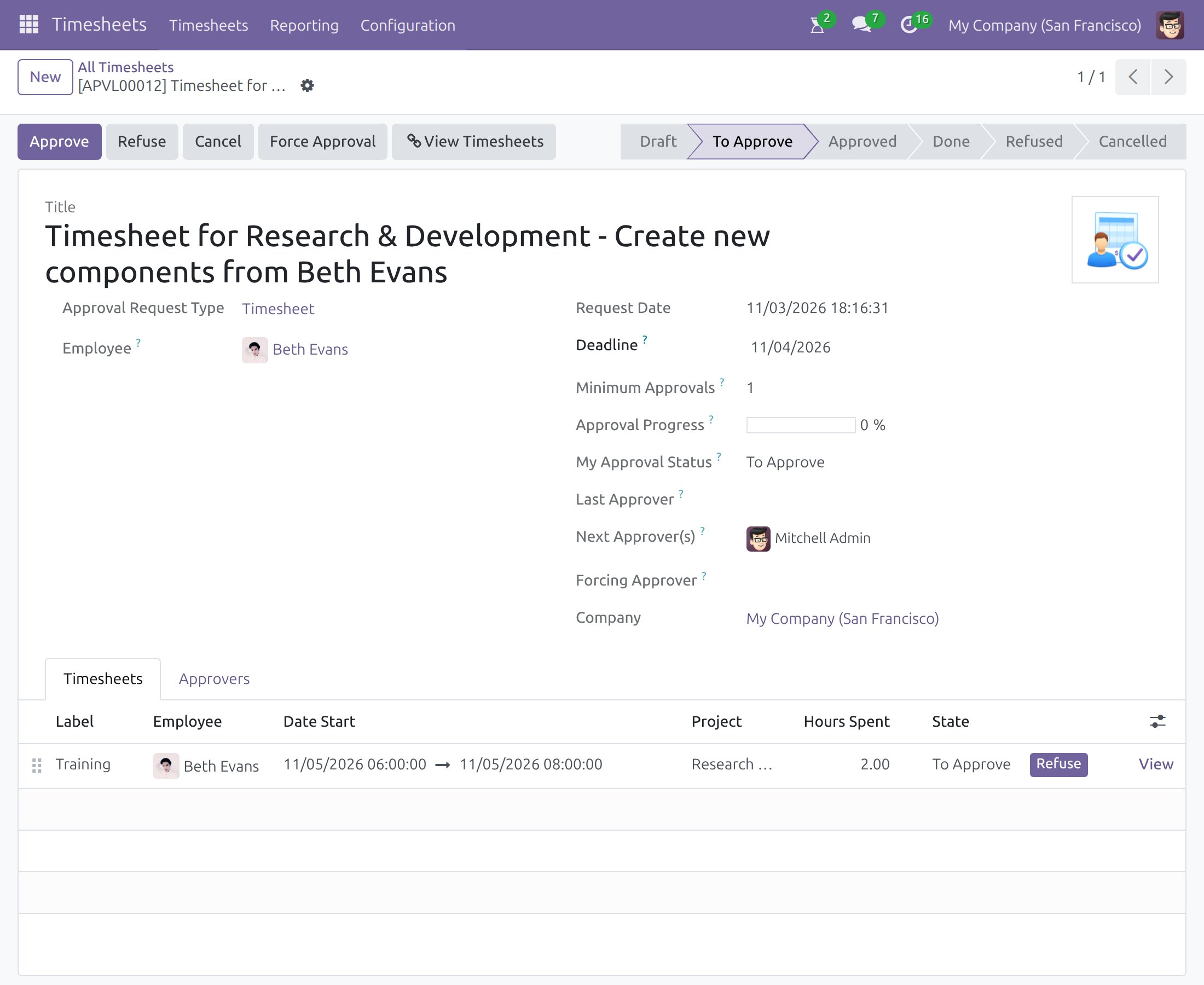
The request moves to To Approve and the approver is notified.
Correct hours while the request is pending
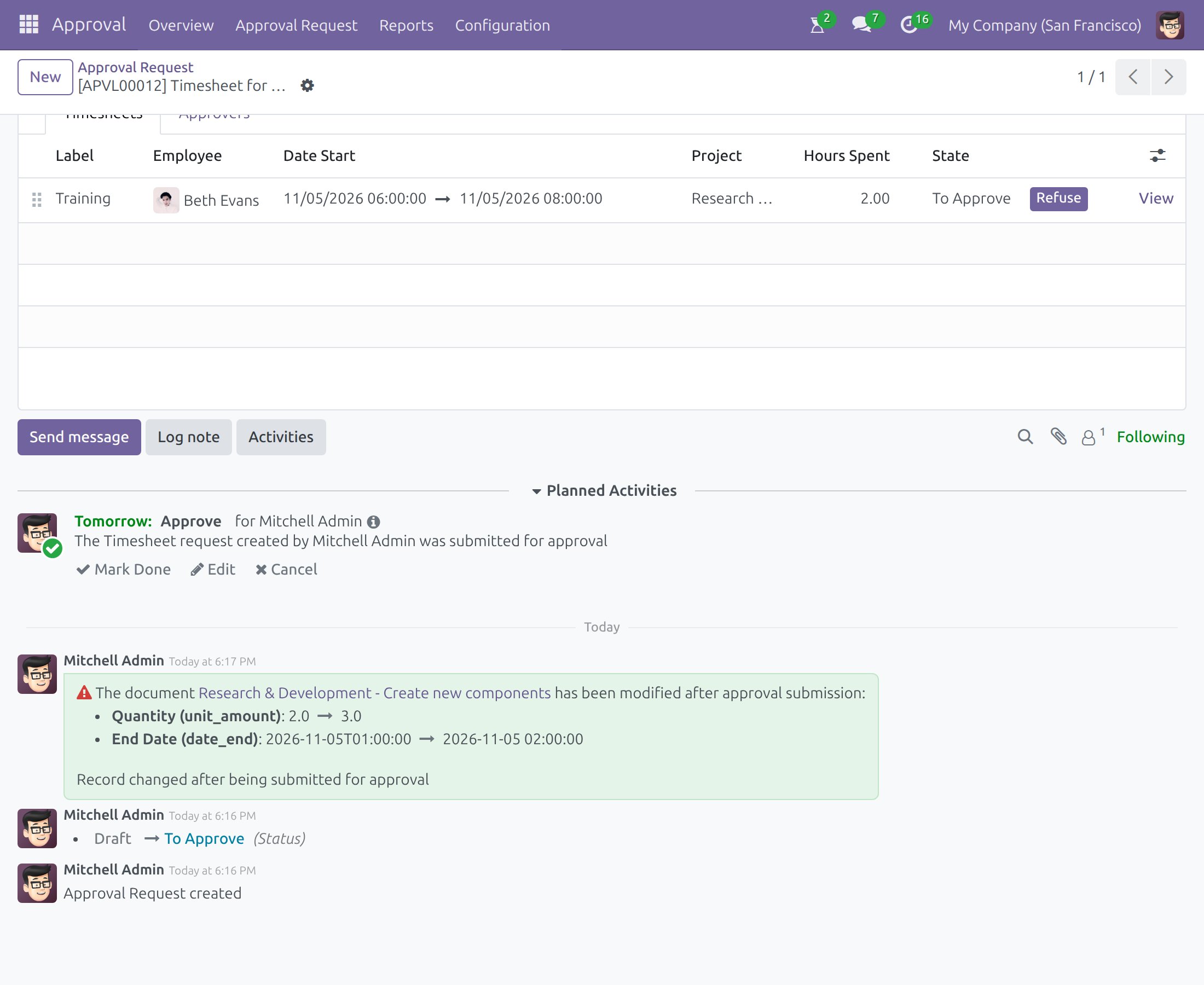
Timesheet lines stay open while their request is waiting for approval. You can change a line (for example its hours) or delete it, and the approval carries on. Each change is written in the request's discussion thread as a note listing the old and the new value, so the approver always sees what moved after submission. Deleting a line leaves the request in place and adds a note that a linked document was deleted.
Approver: approve or refuse
Open Approval ‣ Approval Request, or use the activity you received, and open the request. Review the lines, then press Approve or Refuse. Use Cancel to withdraw the request. Force Approval is reserved for the approval administrator. View Timesheets opens the underlying lines.
Where a request has several steps, it stays To Approve until the last required step is done.
Follow the approval status
Everyone involved can follow the stage of a request in its status bar. In the Timesheets app, the Timesheet State column of the list shows the outcome for each line, and you can filter or group the list by it.
Troubleshooting
A line cannot be added to a request. Only lines of one employee in the Draft state that are not already in another request can be submitted together.
A line shows Approved without a request. The employee's contract does not have Timesheet Approval ticked, or the line comes from a time off, so it is confirmed automatically.
This software and associated files (the "Software") may only be used (executed, modified, executed after modifications) if you have purchased a valid license from the authors, typically via Odoo Apps, or if you have received a written agreement from the authors of the Software (see the COPYRIGHT file).
You may develop Odoo modules that use the Software as a library (typically by depending on it, importing it and using its resources), but without copying any source code or material from the Software. You may distribute those modules under the license of your choice, provided that this license is compatible with the terms of the Odoo Proprietary License (For example: LGPL, MIT, or proprietary licenses similar to this one).
It is forbidden to publish, distribute, sublicense, or sell copies of the Software or modified copies of the Software.
The above copyright notice and this permission notice must be included in all copies or substantial portions of the Software.
THE SOFTWARE IS PROVIDED "AS IS", WITHOUT WARRANTY OF ANY KIND, EXPRESS OR IMPLIED, INCLUDING BUT NOT LIMITED TO THE WARRANTIES OF MERCHANTABILITY, FITNESS FOR A PARTICULAR PURPOSE AND NONINFRINGEMENT. IN NO EVENT SHALL THE AUTHORS OR COPYRIGHT HOLDERS BE LIABLE FOR ANY CLAIM, DAMAGES OR OTHER LIABILITY, WHETHER IN AN ACTION OF CONTRACT, TORT OR OTHERWISE, ARISING FROM, OUT OF OR IN CONNECTION WITH THE SOFTWARE OR THE USE OR OTHER DEALINGS IN THE SOFTWARE.