
Legal Invoice Number
| Lines of Code | 486 |
| Technical name | to_legal_invoice_number |
| License | OPL-1 |
| Website | https://viindoo.com/apps/modules/17.0/to_legal_invoice_number |
| Read description for | v 10.0 v 11.0 v 12.0 v 13.0 v 14.0 v 15.0 v 16.0 v 18.0 v 19.0 |
| Required Apps | Invoicing (account) Discuss (mail) |
| Extensions | GDT Invoice API Vietnamese E-Invoice Integration Accounting Reports - Vietnam Accounting |

The number the tax authority gave the invoice
A legal number alongside Odoo's sequence, tracked - and a manager-only action that promotes it to the invoice's number.
Legal Invoice Number (technical name to_legal_invoice_number) is an Odoo 17.0 app for Odoo Community and Odoo Enterprise and Viindoo Cloud, built for accountant, chief accountant, customer, auditor.

At a Glance
The facts of Legal Invoice Number, version 0.1.2, in one place. Published by Viindoo.
How It Works
Two screens.
On the invoice
Recorded as its own field, tracked, and independent of Odoo's sequence until you decide otherwise.
Across the invoices
Nothing changes in how invoices are made, posted or paid.

What You Get
A Legal Number on invoices and receipts, tracked
An Old Number kept when the legal number is promoted
The payment reference updated with it, so the customer pays against the right number
The action restricted to accounting managers
A chatter note recording the change on every invoice it touches
Odoo's own sequence left intact
More Screens
Everything below was taken on a database seeded with real business data, on this series - not a mock-up and not a screenshot from an older version.
Invoices
What This App Does Not Do
Read this before you buy. Everything below is something the app deliberately leaves to another app or to you.
An e-invoicing integration issues it; this records it.
Renumbering a posted invoice is an accounting decision, not an automation.
Journal entries, payments and reports keep their own references.
A replacement is a new document, as the law usually requires.
Works Well With
Apps from the same stack, built to fit this one:
Who Should Use Legal Invoice Number?
Accountant
Records the authority's number where it belongs.
Chief accountant
Promotes it deliberately, as a manager-only action.
Customer
Receives an invoice bearing the number their own books expect.
Auditor
Sees both numbers and the note that connects them.
Frequently Asked Questions
What does Legal Invoice Number do?
A legal number alongside Odoo's sequence, tracked - and a manager-only action that promotes it to the invoice's number.
What does Legal Invoice Number not do?
It does not obtain the number for you. An e-invoicing integration issues it; this records it. Promoting it is manual and manager-only. Renumbering a posted invoice is an accounting decision, not an automation. It does not renumber anything else. Journal entries, payments and reports keep their own references. One legal number per invoice. A replacement is a new document, as the law usually requires.
Who is Legal Invoice Number for?
Accountant: Records the authority's number where it belongs. Chief accountant: Promotes it deliberately, as a manager-only action. Customer: Receives an invoice bearing the number their own books expect. Auditor: Sees both numbers and the note that connects them.
Which Odoo version and editions does it support?
Odoo 17.0 - Odoo Community, Odoo Enterprise, Viindoo Cloud. Upgrades to a newer Odoo series are a separate purchase for that series.
What does it depend on?
It installs on top of: account. Odoo installs them with it.
How do I set it up?
Two screens.
What works well with it?
E-invoicing (l10n_vn_viin_edi): Where the number often comes from. Accounting Reports (to_account_reports): The reports the number turns up in. Accounting Foundation (viin_account): The accounting layer underneath.
Can I try it before buying?
Yes - the Live Preview button at the top of this page opens the module's own screen on a working database.
How do I get support?
Write to apps.support@viindoo.com with your Odoo version and the technical name to_legal_invoice_number; pre-sales questions go to sales@viindoo.com.
See Legal Invoice Number in Action
The number the tax authority gave the invoice
Need help with Legal Invoice Number?
For questions, implementation support, or consulting services, contact Viindoo.
Pre-Sales & Partnership
sales@viindoo.comWhen contacting us, please include:
- Odoo/Viindoo version (Odoo CE / Viindoo Editions).
- Number of users and business scope.
- Other modules currently in use.
Technical Support
apps.support@viindoo.comFor faster troubleshooting, please provide:
- Order number or app reference.
- Odoo/Viindoo version & edition.
- Steps to reproduce the issue.
- Screenshots/logs if available.
Upgrades to a newer Odoo series are a separate purchase for that series.
Technical Requirement
Changes log
0.1.2 - Latest on the 17.0 line
- Synchronising the legal number also updates the payment reference and logs the change in the chatter.
Installation
- Navigate to Apps.
- Search with keyword to_legal_invoice_number.
- Press Install.
Instruction
Instruction video: Legal Invoice Number
Add a Legal Number
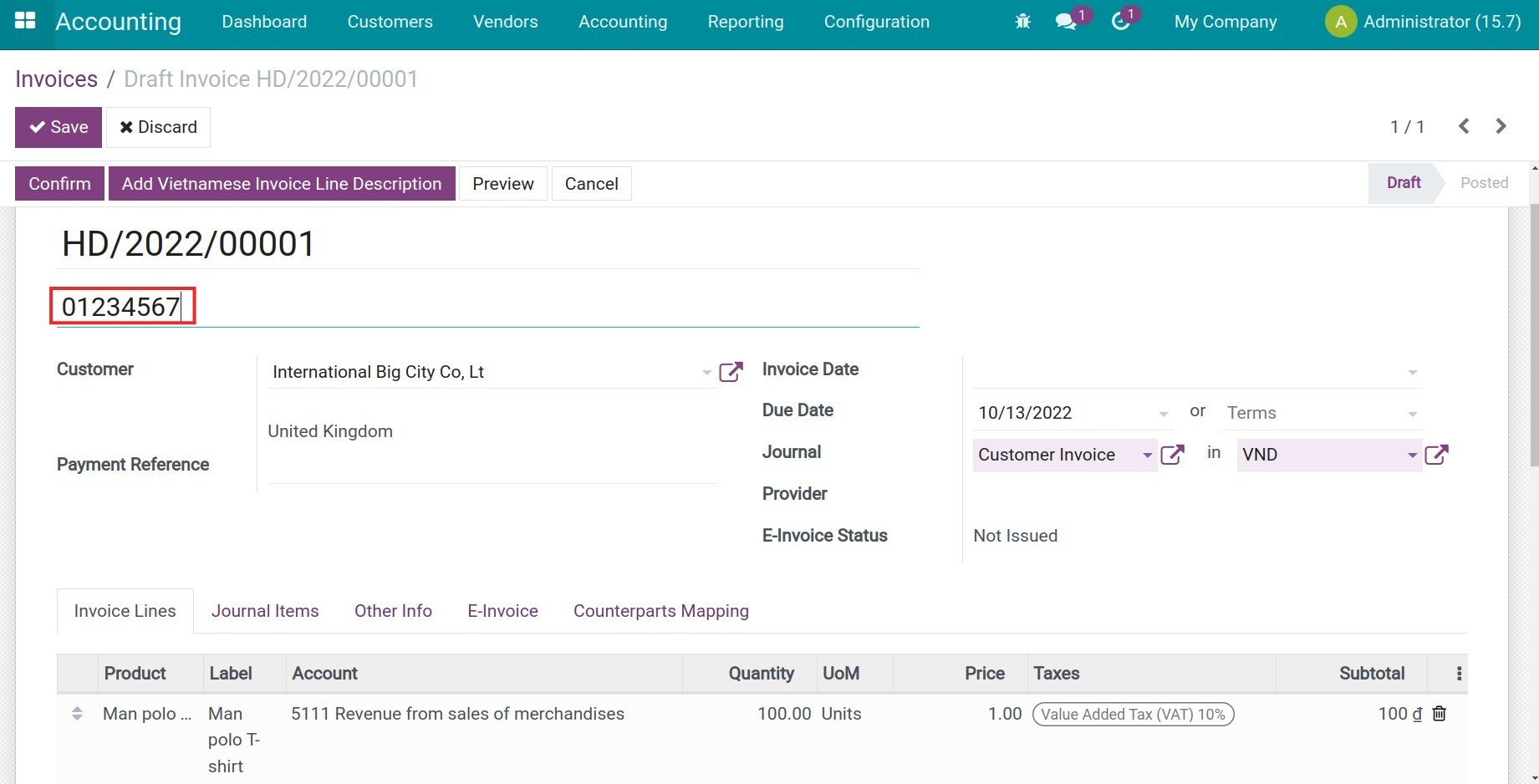
After installing this module, the Legal Number field will be displayed on the invoice interface.
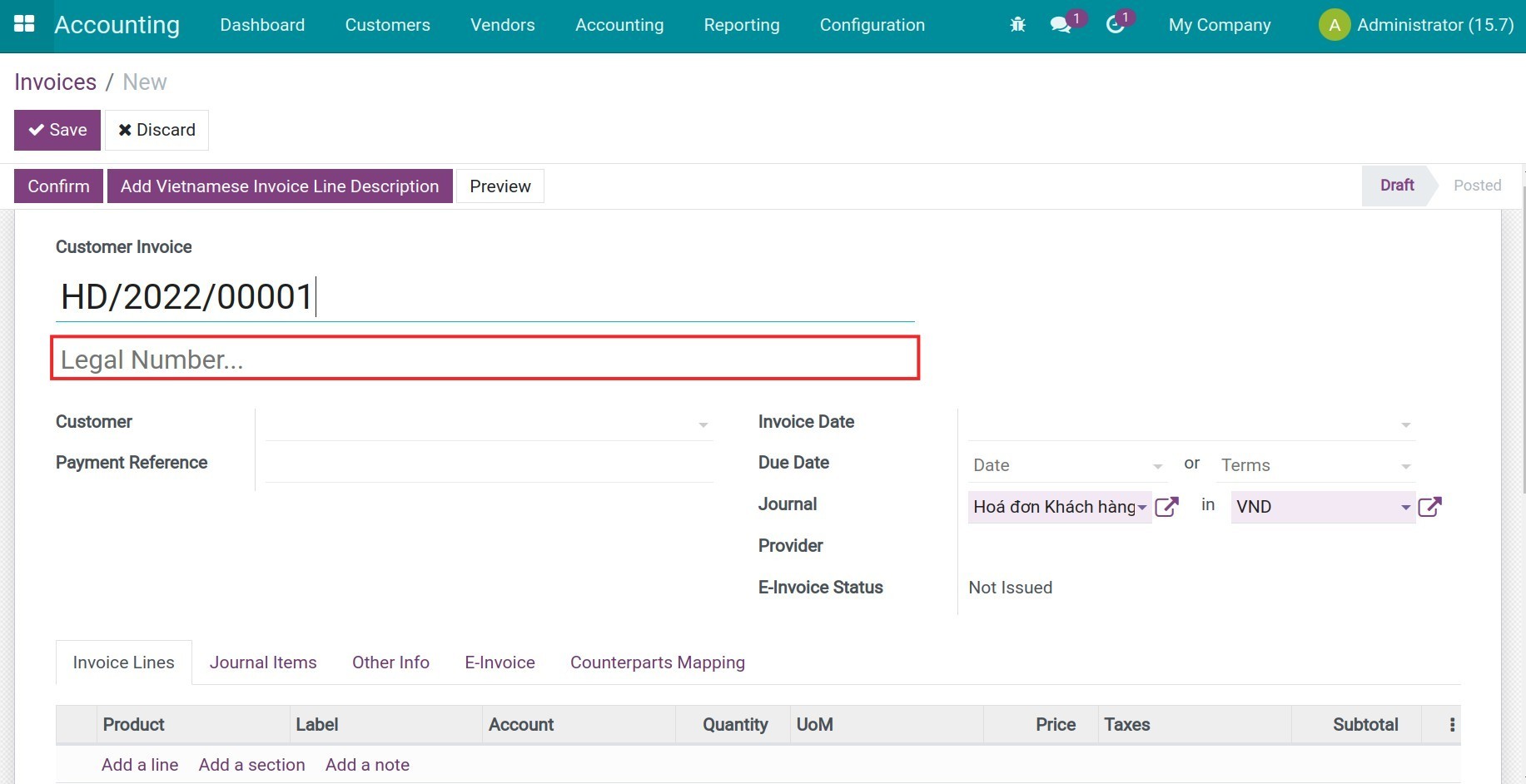
Add a Legal Number for this invoice and save it.
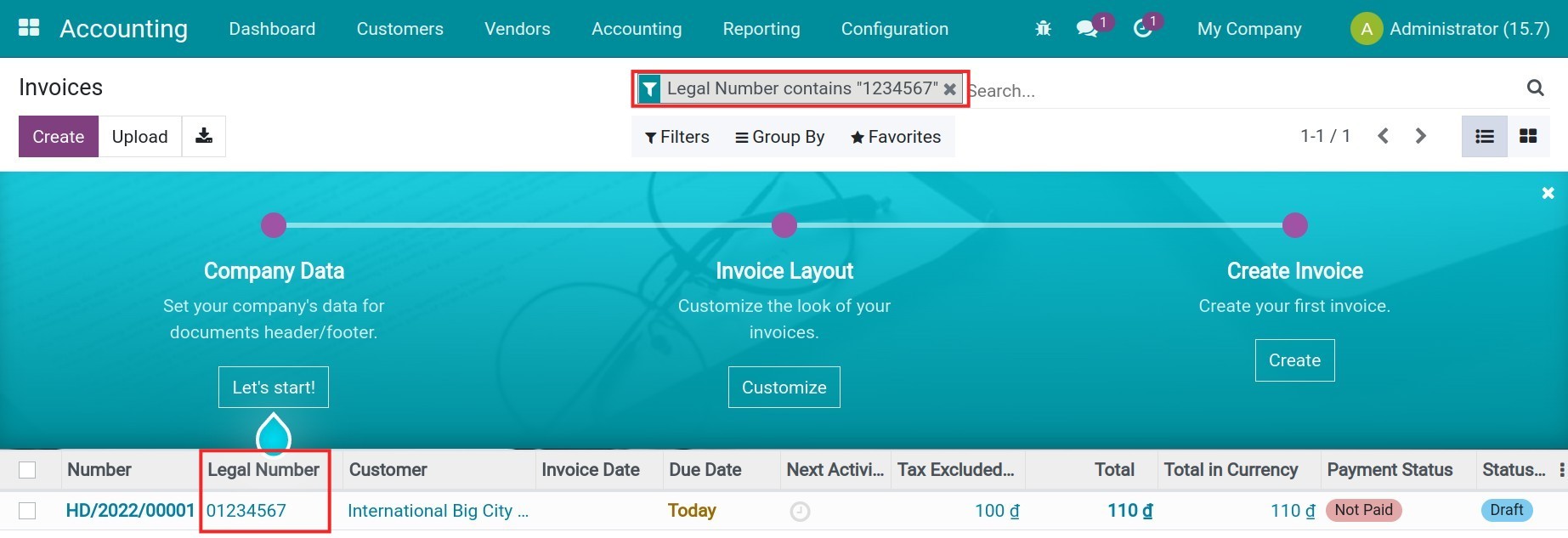
Manage invoices by legal number
On the invoices list, use the filter and grouping tool to categorize and search for an invoice using the Legal Number.
This software and associated files (the "Software") may only be used (executed, modified, executed after modifications) if you have purchased a valid license from the authors, typically via Odoo Apps, or if you have received a written agreement from the authors of the Software (see the COPYRIGHT file).
You may develop Odoo modules that use the Software as a library (typically by depending on it, importing it and using its resources), but without copying any source code or material from the Software. You may distribute those modules under the license of your choice, provided that this license is compatible with the terms of the Odoo Proprietary License (For example: LGPL, MIT, or proprietary licenses similar to this one).
It is forbidden to publish, distribute, sublicense, or sell copies of the Software or modified copies of the Software.
The above copyright notice and this permission notice must be included in all copies or substantial portions of the Software.
THE SOFTWARE IS PROVIDED "AS IS", WITHOUT WARRANTY OF ANY KIND, EXPRESS OR IMPLIED, INCLUDING BUT NOT LIMITED TO THE WARRANTIES OF MERCHANTABILITY, FITNESS FOR A PARTICULAR PURPOSE AND NONINFRINGEMENT. IN NO EVENT SHALL THE AUTHORS OR COPYRIGHT HOLDERS BE LIABLE FOR ANY CLAIM, DAMAGES OR OTHER LIABILITY, WHETHER IN AN ACTION OF CONTRACT, TORT OR OTHERWISE, ARISING FROM, OUT OF OR IN CONNECTION WITH THE SOFTWARE OR THE USE OR OTHER DEALINGS IN THE SOFTWARE.