
Overtime - Compensatory Time Off - Attendance
by Viindoo
| Lines of Code | 418 |
| Technical name | viin_hr_overtime_hr_holidays_attendance |
| License | OPL-1 |
| Website | https://viindoo.com/apps/modules/19.0/viin_hr_overtime_hr_holidays_attendance |
| Required Apps | Attendances (hr_attendance) Time Off (hr_holidays) Discuss (mail) Employees (hr) Calendar (calendar) |
| Included Dependencies | Viindoo Base Overtime Advanced HR Management HR Contracts (Viindoo) Work Entry Work Entry - Contract Base Addendum Viindoo Holiday & WorkDay Manager Overtime - Compensatory Time Off Safe IR Metadata Proxies |

Overtime hours are used once: as compensatory time off, or as an extra-hours deduction, never both
For HR administrators who set up compensatory time off
Keep leave types that deduct extra attendance hours out of the compensatory time off setting.
Completes Overtime - Compensatory Time Off for companies that also use Time Off with Attendances. Built on Overtime.
What changes
The same overtime hours could be repaid as time off and also be deducted from extra hours.
→ Compensatory time off is only offered from time off types that do not deduct extra hours.
Setting up compensatory time off means remembering which time off types deduct extra hours.
→ The list of choices already leaves them out, so there is nothing to check by hand.
One more rule to learn usually means one more screen to maintain.
→ No new menu, screen or access right: the existing setting simply offers the right choices.
Key Features
Only the right types are offered
The Compensatory Time Off Type setting lists time off types that are granted through allocations and do not deduct extra hours.
Nothing new to learn
The setting looks and works as before. Employees, team leads and overtime officers see no change in their screens.
Installs itself
It is installed automatically when Overtime - Compensatory Time Off and the Time Off and Attendances apps are installed together.
Who it is for
Administrators
Choose the compensatory time off type of the company from a list that is already clean.
Time off managers
Keep control of which time off types deduct extra hours, from Time Off Types, with the effect visible in the setting.
Everyone else
Employees, team leads and overtime officers keep working exactly as before.
Best for: companies that give time off for overtime and also let time off deduct extra attendance hours.
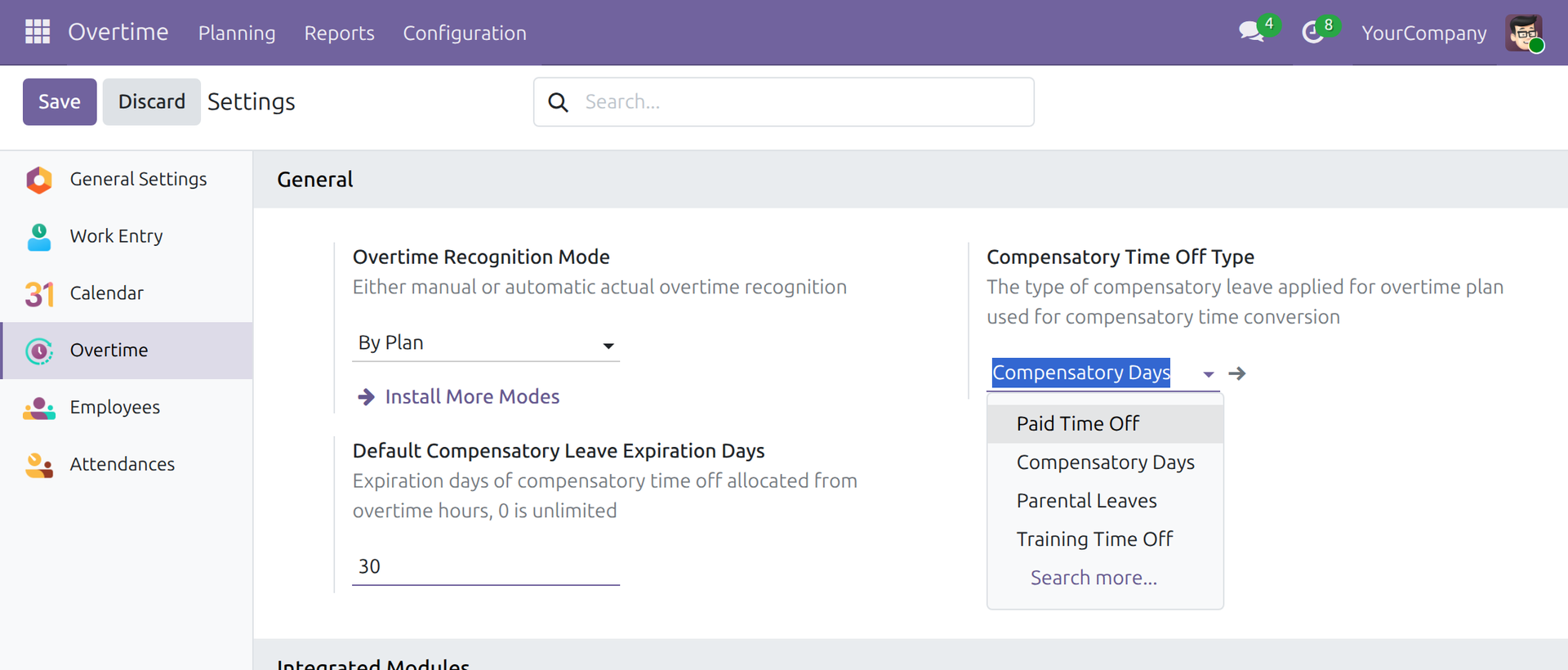
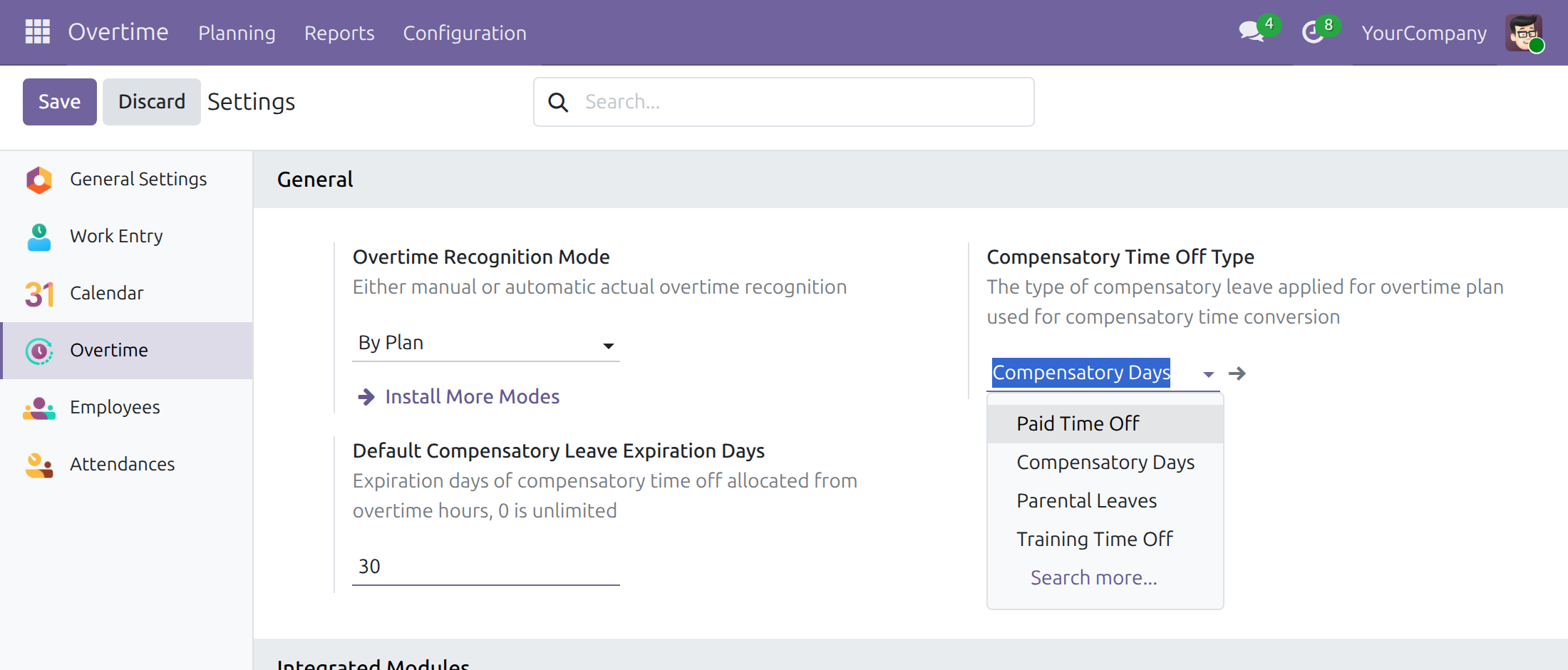
The compensatory time off type, without the types that deduct extra hours
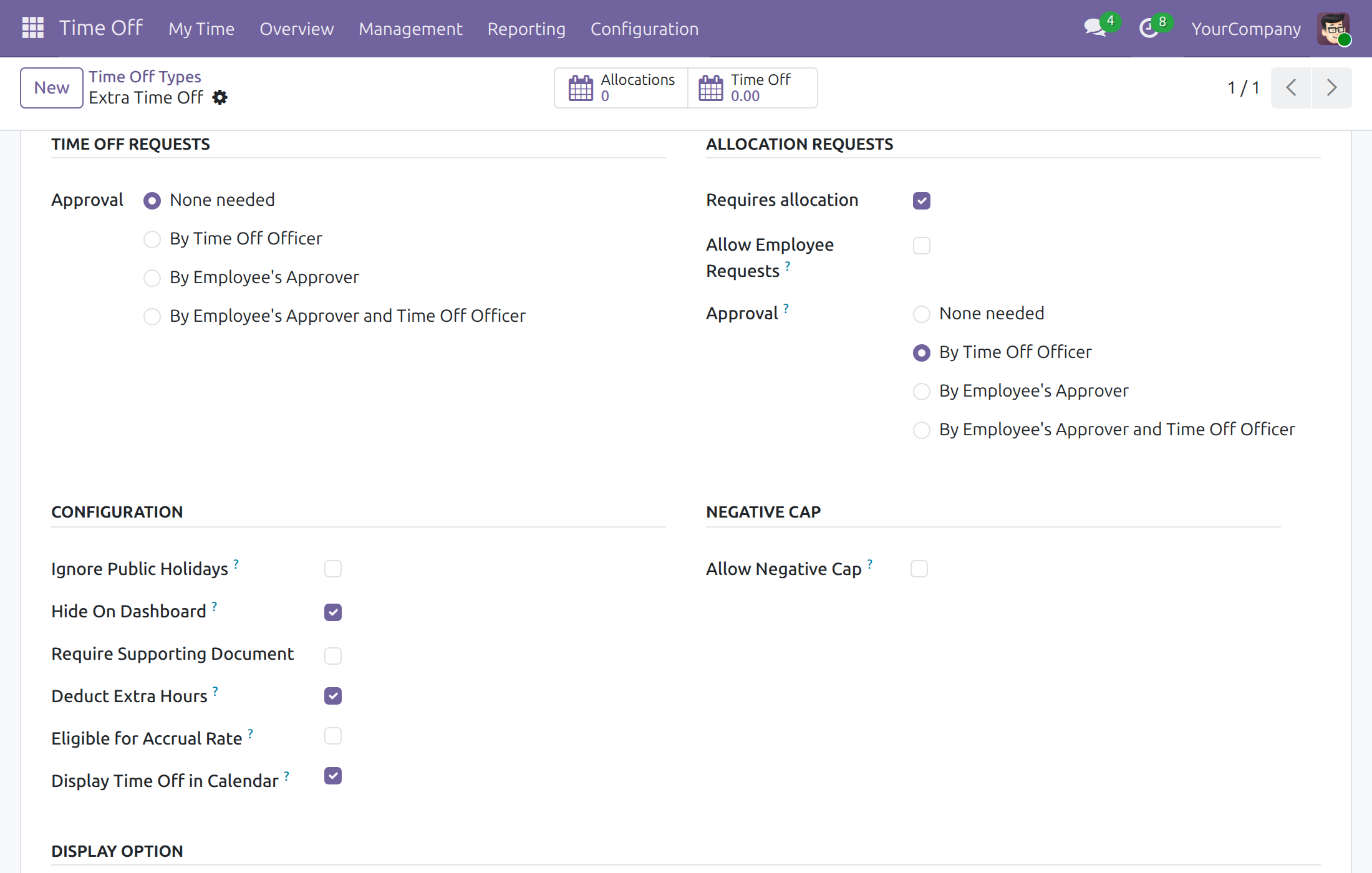
A time off type with Deduct Extra Hours ticked
Frequently Asked Questions
Do I need to install or set anything up?
No. The module installs itself when Overtime - Compensatory Time Off and the Time Off and Attendances apps are installed together. It adds no menu, screen or access right.
Which time off types can be chosen as the compensatory time off type?
Time off types that are granted through allocations, shared or of the company, and that do not have Deduct Extra Hours ticked.
What if I want to use a type that has Deduct Extra Hours ticked?
Choose another time off type in Overtime > Configuration > Settings, or untick Deduct Extra Hours on the type in Time Off > Configuration > Time Off Types. A time off type then serves either the compensatory time off of overtime or the deduction of extra attendance hours.
How does attendance feed overtime?
Read Overtime Attendance and Overtime - Compensatory Time Off for the full picture.
Need help with Overtime - Compensatory Time Off - Attendance?
Pre-Sales & Partnership
viindoo.com/contactusTechnical Support
viindoo.com/ticketTechnical Requirement
- Odoo version: 19.0
- Editions: Odoo Community, Odoo Enterprise
- Required modules: Overtime - Compensatory Time Off, HR Attendance Holidays
- Installation: Automatic, as soon as all required modules are installed.
- License: OPL-1
This guide is written for administrators: the people who set which time off type receives the time off earned from overtime. Employees, team leads and overtime officers see no change in their screens.
Note
Extends Overtime - Compensatory Time Off - see the documentation of Overtime - Compensatory Time Off.
Overview
Overtime hours can be used in two ways: converted into compensatory time off (Overtime - Compensatory Time Off), or spent on time off of a type that deducts extra attendance hours (Time Off with Attendances). The same hours must not serve both purposes.
This module keeps the two apart. Once Time Off and Attendances are installed, a time off type with Deduct Extra Hours ticked is no longer offered as the Compensatory Time Off Type of the company. The overtime of a plan is therefore never converted into time off of a type that also deducts extra hours.
The module adds no menu, screen or access right: it only narrows the list of choices of an existing setting.
Installation
The module is installed automatically, with no action from you, as soon as Overtime - Compensatory Time Off and the Time Off and Attendances apps are installed together:
- Navigate to Apps;
- Search with keyword viin_hr_overtime_hr_holidays_attendance to check that it is installed.
To see how attendance records feed overtime, read the documentation of Overtime Attendance.
Administrator: choose the compensatory time off type
1. Open the setting
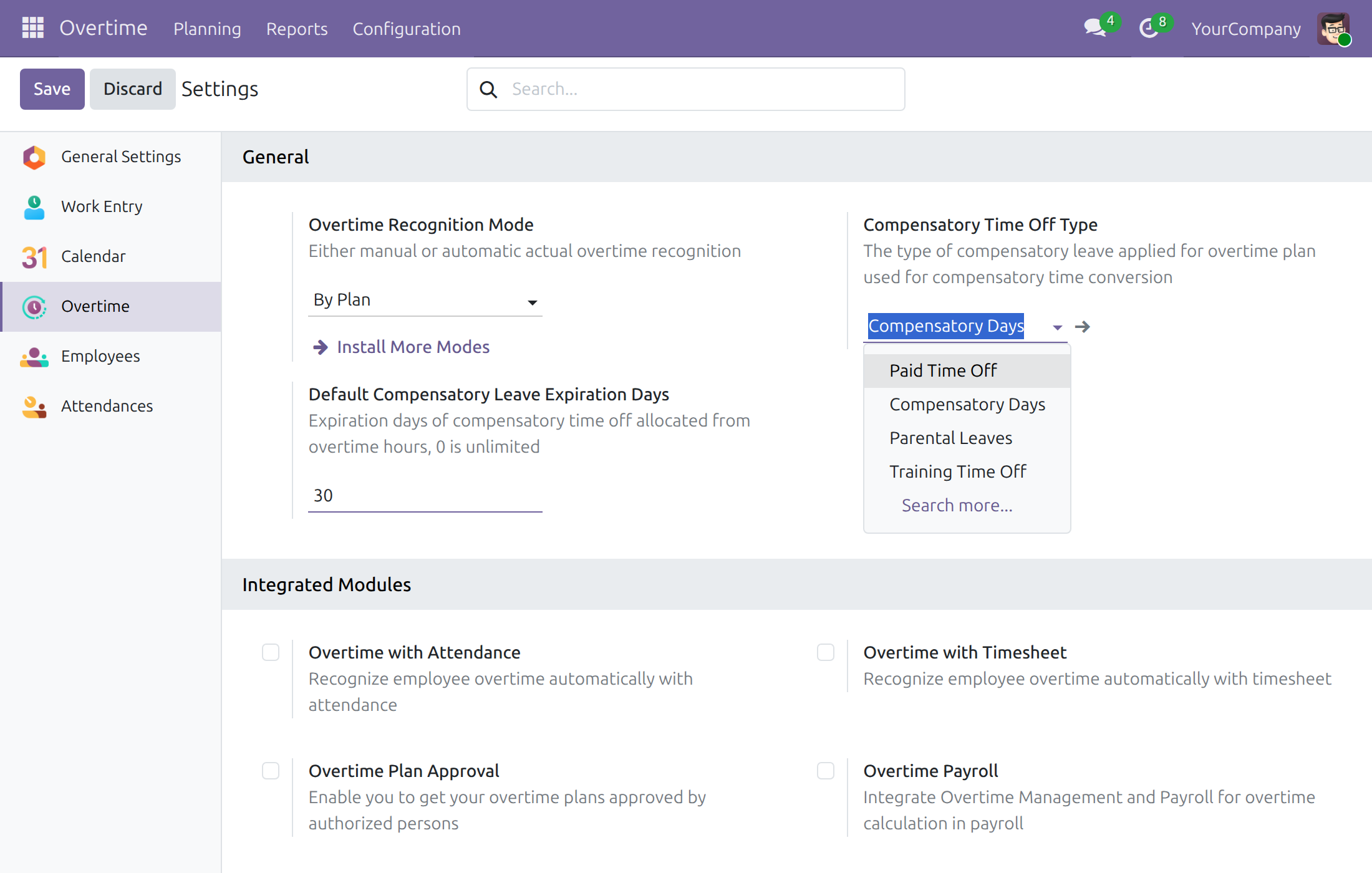
Navigate to Overtime ‣ Configuration ‣ Settings and look at the General block. Open the list of Compensatory Time Off Type:
The list offers the time off types that are granted through allocations and do not deduct extra hours. In this example, Extra Time Off has Deduct Extra Hours ticked and is missing from the list, while Paid Time Off, Compensatory Days, Parental Leaves and Training Time Off are offered. Choose one and press Save.
Note
A time off type that needs no allocation, such as Sick Time Off, Unpaid or the Extra Hours type of the Attendances app, is not offered either: only types granted through allocations can receive compensatory time off.
2. When a deductible type must be used
A time off type is left out of the list while it has Deduct Extra Hours ticked. To check or change it, navigate to Time Off ‣ Configuration ‣ Time Off Types (this menu is reserved for the Time Off administrator) and open the type:
In the Configuration block, Deduct Extra Hours is ticked. Two ways out:
- Pick another time off type for the compensatory time off in Overtime ‣ Configuration ‣ Settings; or
- Untick Deduct Extra Hours on the time off type and press Save. The type is offered in the setting again, and it is no longer tied to the extra attendance hours.
Choose the way that matches the policy of your company: a time off type serves either the compensatory time off of overtime, or the deduction of extra attendance hours.
This software and associated files (the "Software") may only be used (executed, modified, executed after modifications) if you have purchased a valid license from the authors, typically via Odoo Apps, or if you have received a written agreement from the authors of the Software (see the COPYRIGHT file).
You may develop Odoo modules that use the Software as a library (typically by depending on it, importing it and using its resources), but without copying any source code or material from the Software. You may distribute those modules under the license of your choice, provided that this license is compatible with the terms of the Odoo Proprietary License (For example: LGPL, MIT, or proprietary licenses similar to this one).
It is forbidden to publish, distribute, sublicense, or sell copies of the Software or modified copies of the Software.
The above copyright notice and this permission notice must be included in all copies or substantial portions of the Software.
THE SOFTWARE IS PROVIDED "AS IS", WITHOUT WARRANTY OF ANY KIND, EXPRESS OR IMPLIED, INCLUDING BUT NOT LIMITED TO THE WARRANTIES OF MERCHANTABILITY, FITNESS FOR A PARTICULAR PURPOSE AND NONINFRINGEMENT. IN NO EVENT SHALL THE AUTHORS OR COPYRIGHT HOLDERS BE LIABLE FOR ANY CLAIM, DAMAGES OR OTHER LIABILITY, WHETHER IN AN ACTION OF CONTRACT, TORT OR OTHERWISE, ARISING FROM, OUT OF OR IN CONNECTION WITH THE SOFTWARE OR THE USE OR OTHER DEALINGS IN THE SOFTWARE.