
Viindoo Brain
| Lines of Code | 27482 |
| Technical name | viin_brain |
| License | OPL-1 |
| Website | https://viindoo.com/apps/app/17.0/viin_brain |
| Read description for | |
| Required Apps | Discuss (mail) |
| Included Dependencies | Viindoo Web Editor |
| Extensions | Viindoo AI - Brain Bridge Viindoo Brain - Account Reports Bridge Viindoo AI - Chat Brain Bridge Viindoo Brain - Recruitment Viindoo Brain - HR Viindoo Brain - Warehouse Viindoo Brain - Project Viindoo Brain - Knowledge Suite Viindoo Brain - Accounting Viindoo Brain - Purchase Viindoo Brain - Sales Viindoo Brain - Website Viindoo Brain - Helpdesk Viindoo Brain - CRM test_viin_brain |

A knowledge base that lives next to your records: vaults, pages, wikilinks, properties and live snapshots
Vaults hold pages written in the Odoo editor; pages link to each other with [[wikilinks]] and to any record (a sale order, a ticket, a partner); database pages carry properties and views; a block can embed a live snapshot of records that is refreshed and flagged when stale; pages are shared by link with moderated comments, and every app record shows how many Brain pages mention it.
Viindoo Brain (technical name viin_brain) is an Odoo 17.0 app for Odoo Community and Viindoo Cloud, built for sales manager, warehouse lead, everyone.

At a Glance
The facts of Viindoo Brain, version 1.0.0, in one place. Published by Viindoo.
How It Works
Create a vault, invite members with a role, write pages; type [[ to link a page, use the record dialog to link a document, embed a snapshot from the picker.
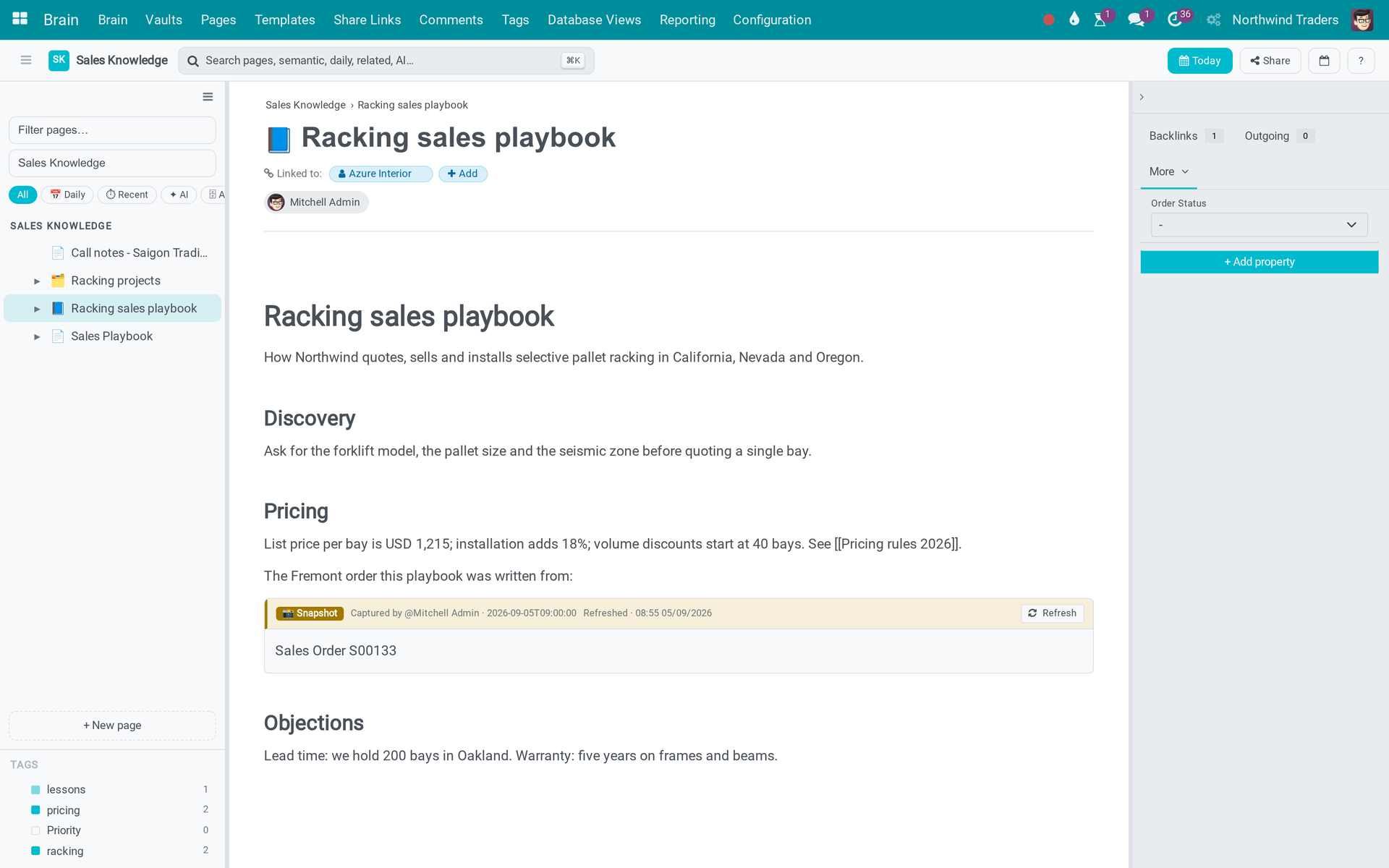
A page
Tags, wikilinks to the pricing page, backlinks on the right.
A lesson
Entry kind "lesson", linked to the sale order.

Database page
Rows with Bays, Stage, Install date and Customer properties.

Post-mortem
In the Warehouse Knowledge vault.

Daily note
Created by the daily cron in the Daily Notes vault.

Shared page
The forklift checklist as the crew sees it.

Comments
A pending comment from the share link and an approved one.

Vaults
Personal, Daily Notes and one per app.

Pages
Type, kind, vault, owner.

Share links
Comment mode, expiry, visits.

Templates
Playbook, SOP, meeting notes.

On a partner
The "Brain Pages" counter.

Settings
Real-time collaboration switch.

What You Get
Vaults with member roles
Pages, sub-pages, daily notes
[[Wikilinks]] and backlinks
Record links from any app
Database pages with properties and views
Live record snapshots, flagged when stale
Share links with moderated comments
Entry kinds: lesson, post-mortem, reference
What This App Does Not Do
Read this before you buy. Everything below is something the app deliberately leaves to another app or to you.
Its own models and its own app.
Install a Viindoo AI bridge for that.
Conflicts are detected by version token and shown in a dialog.
Each app bridge adds them to its own records.
Press Refresh to redraw the body from the live record.
Whether or not the reader may open those records. Clicking through still enforces the real permission, but grant page access with that in mind.
You are asked to confirm, the link's creator is notified, and the reason is recorded - but it cannot be undone.
Works Well With
Apps from the same stack, built to fit this one:
Who Should Use Viindoo Brain?
Sales manager
The racking playbook, pricing rules and the Fremont lesson, linked to the quote that went wrong.
Warehouse lead
The forklift checklist shared with the crew by link; their comments wait for approval.
Everyone
Open a partner or an order and see which pages mention it.
Frequently Asked Questions
What does Viindoo Brain do?
Vaults hold pages written in the Odoo editor; pages link to each other with [[wikilinks]] and to any record (a sale order, a ticket, a partner); database pages carry properties and views; a block can embed a live snapshot of records that is refreshed and flagged when stale; pages are shared by link with moderated comments, and every app record shows how many Brain pages mention it.
What does Viindoo Brain not do?
It is not Odoo Knowledge and does not import from it. Its own models and its own app. AI authoring fields exist but no AI writes pages. Install a Viindoo AI bridge for that. Real-time co-editing is a setting, not a bundled server. Conflicts are detected by version token and shown in a dialog. Only partners get the Brain buttons out of the box. Each app bridge adds them to its own records. A record snapshot block comes back with its banner only after a reload. Press Refresh to redraw the body from the live record.
Who is Viindoo Brain for?
Sales manager: The racking playbook, pricing rules and the Fremont lesson, linked to the quote that went wrong. Warehouse lead: The forklift checklist shared with the crew by link; their comments wait for approval. Everyone: Open a partner or an order and see which pages mention it.
Which Odoo version and editions does it support?
Odoo 17.0 - Odoo Community, Viindoo Cloud. Upgrades to a newer Odoo series are a separate purchase for that series.
What does it depend on?
It installs on top of: base, mail, portal, web, viin_web_editor. Odoo installs them with it.
How do I set it up?
Create a vault, invite members with a role, write pages; type [[ to link a page, use the record dialog to link a document, embed a snapshot from the picker.
What works well with it?
Brain - Sale (viin_brain_sale): Sales Knowledge vault and buttons on orders. Brain - CRM (viin_brain_crm): Leads and opportunities. Brain - Helpdesk (viin_brain_helpdesk): Tickets. Brain - Warehouse (viin_brain_stock): Transfers. Brain - Account Reports (viin_brain_account_reports): Embed a P&L as a snapshot block.
Can I try it before buying?
Yes - the Live Preview button at the top of this page opens the module's own screen on a working database.
How do I get support?
Write to apps.support@viindoo.com with your Odoo version and the technical name viin_brain; pre-sales questions go to sales@viindoo.com.
See Viindoo Brain in Action
A knowledge base that lives next to your records: vaults, pages, wikilinks, properties and live snapshots
Need help with Viindoo Brain?
For questions, implementation support, or consulting services, contact Viindoo.
Pre-Sales & Partnership
sales@viindoo.comWhen contacting us, please include:
- Odoo/Viindoo version (Odoo CE / Viindoo Editions).
- Number of users and business scope.
- Other modules currently in use.
Technical Support
apps.support@viindoo.comFor faster troubleshooting, please provide:
- Order number or app reference.
- Odoo/Viindoo version & edition.
- Steps to reproduce the issue.
- Screenshots/logs if available.
Upgrades to a newer Odoo series are a separate purchase for that series.
Technical Requirement
Changes log
1.0.1 - General linking, current labels, contained access
- [[ reaches any record you may read. Nothing has to be declared to Brain before a record can be linked.
- @@ mentions a record. A [[ link to a record and an @@ mention are stored the same way.
- A mention shows the record's current name, resolved at read time, so a rename updates every page - including on a public share link.
- Restricting a page, or turning it into a daily note, revokes its live share links - confirmed in advance, notified to the link's creator, and audited with a reason.
- The link and mention autocomplete works in every editor mount, not only inside the Brain app.
1.0.0 - Initial 17.0 release
- Aligned with the 17.0 models and views.
Viindoo Brain (viin_brain)
Installation
- Go to Apps.
- Search for viin_brain.
- Click Activate.
Note
Brain works on its own. The viin_brain_<app> bridge modules install themselves when the matching application is present, and each one seeds a starter vault for that team.
Configuration
Vaults
A vault is a container for pages, with its own membership.
- Navigate to Brain - Vaults.
- Create a vault, or open the one you were given.
- In the Members tab, add a user and give them a role:
- Viewer - read only.
- Commenter - read, and comment.
- Editor - read, write, create pages.
- Admin - everything, including pages another member restricted.
- Access Groups grants a whole user group access without naming people one by one. Default Role decides what those people get.
Note
Every internal user is given a personal vault automatically. It is theirs; nobody else is a member of it.
Who can do what
Two groups ship with the module:
- Editor (group_brain_editor) - may create and edit pages in vaults where they hold an editor or admin role.
- Brain Admin (group_brain_admin) - full control of every Brain vault in the companies they are allowed to see.
A plain internal user with no Brain group still works normally: with an editor or admin member row on a vault they create pages there, and they can always read and edit the pages they wrote themselves.
Templates are the exception - only a Brain Admin may create or change them.
Settings
Brain - Configuration - Settings carries the per-company options, including Real-time collaboration, which is off by default. With it off, Brain saves your work and warns you if someone else changed the page while you were typing. With it on, several people type in the same page at once.
Using Viindoo Brain
Opening the app
Brain - Brain, or go straight to /odoo/brain.
The screen has three panes: the vault sidebar on the left, the page you are editing in the middle, and the context panel on the right. Both side panes can be dragged wider or collapsed.
Writing a page
- Click + New page in the sidebar, and pick a template or start blank.
- Give the page a title.
- Type in the body. Three characters do the work:
- / opens the command menu: headings, lists, quote, code block, divider, and the Brain blocks below.
- [[ links to something.
- @@ mentions a contact.
Linking with [[
Typing [[ opens one popover with two sections:
- Pages - pages in the vault you are working in. If nothing matches, an inline Create "..." row makes the page and links it in one step.
- Documents - any record you have read access to. Choose the document type first, then the record. No module has to declare its models to Brain beforehand; if you may read it, you may link it.
Note
The Pages section needs a vault to search. Inside the Brain app you always have one. In an editor outside Brain - a mail composer, say - [[ still offers Documents, but Pages stays empty, because a page link is always scoped to a vault.
A linked record shows its current name. Rename the customer and every page that mentions them reads correctly the next time it is opened; nothing needs re-saving. A record you are not allowed to open still shows its real name, marked as inaccessible, rather than turning into a dead reference.
Embedding
From the / menu:
- Embed record / Embed recordset - a snapshot of one record, or of a list of them.
- Embed page - another Brain page, live or snapshotted.
- Database - a database page rendered inline.
A snapshot shows what its author could see when it was taken, and only people who can edit the page take or refresh one. A live page embed stores no copy: each reader sees the embedded page as they themselves may read it, or nothing. Copying a page, or creating one from a template, takes every snapshot again as the person doing it.
A snapshot goes stale on purpose after a configurable number of days, and says so, so nobody quotes last quarter's figure by accident.
Daily notes
Press g then d, or use the Today button, to open today's note.
Note
A daily note is private, absolutely. The rule that enforces it is global: neither a vault admin nor a Brain Admin can read someone else's daily note. This is deliberate and there is no override.
Tags, properties and database pages
- Tags group pages across the tree; the tag explorer sits at the bottom of the sidebar.
- Properties (Brain - Configuration - Properties) define typed fields for a vault - text, number, date, selection.
- A database page turns pages into rows and shows them as a table, board, calendar or gallery.
Brain on a business record
Open a sale order, an employee, a helpdesk ticket - any record covered by one of the bridge modules. Two buttons appear:
- Brain Pages - how many Brain pages mention this record; click to see them.
- Brain Note - opens a note already linked to the record, so it is connected from the first keystroke.
Finding things
Press Ctrl+K. The quick switcher searches pages, actions, dates, recently opened and related pages. Install a Brain AI bridge and it also searches by meaning rather than by word.
Keyboard shortcuts
Press ? for the full list. The ones worth learning first:
- Ctrl+K - quick switcher
- g d - today's daily note
- g t - timeline
- \ - toggle the sidebar
Sharing a page outside the system
- Open the page and click Share.
- Turn on Public link.
- Optionally set a password and an expiry date.
- Choose what visitors may do with comments: Disable comments, Allow + moderate, or Allow + auto-publish.
- Copy the link and send it.
Visitors need no login and can only read. Moderated comments wait in Brain - Comments, or in the moderation panel inside the app.
Revoking a link
Revoke link... in the same dialog kills it. A revoked link is dead for good - regenerating gives a new URL, it does not resurrect the old one.
Warning
Two ordinary edits also revoke every live link on a page, permanently:
- ticking Restricted on the page, and
- converting the page into a daily note.
Brain asks you to confirm first, tells the person who created the link, and records the reason on the link itself (Page restricted / Page became a daily note), so the revocation is never a mystery afterwards. But it cannot be undone: anyone still holding the URL gets a "no longer active" page, and you will have to issue a new link.
Things to know before you roll this out
Page read access implies seeing record names
Anyone who can read a page can see the names of the records that page mentions - whether or not they are allowed to open those records.
This is what makes a knowledge page readable instead of a wall of "no access" placeholders, and clicking through still enforces the real permission. But it does change what granting read on a page means: if a page mentions an acquisition target or a disciplinary case, its name is visible to every reader of that page.
Decide who may read a vault with that in mind, and use Restricted on the individual pages that must stay narrower.
Mentioned names are always current
Brain stores the identity of a mentioned record, never a copy of its name, and resolves the name every time the page is rendered. Renaming a record therefore updates every page that mentions it, everywhere, with nothing to re-save and no batch job to run.
The same holds on a public share link, where there is no logged-in user to resolve names client-side - the server fills them in.
Summary
viin_brain provides:
- Vaults with per-person roles, and a personal vault for everyone
- A page editor with / commands, [[ links and @@ mentions
- Links to any record the reader may read, with always-current names
- Daily notes that are private without exception
- Templates, tags, typed properties and database pages
- Revocable, auditable public sharing with moderated comments
- Brain buttons on business record forms, through the bridge modules
This software and associated files (the "Software") may only be used (executed, modified, executed after modifications) if you have purchased a valid license from the authors, typically via Odoo Apps, or if you have received a written agreement from the authors of the Software (see the COPYRIGHT file).
You may develop Odoo modules that use the Software as a library (typically by depending on it, importing it and using its resources), but without copying any source code or material from the Software. You may distribute those modules under the license of your choice, provided that this license is compatible with the terms of the Odoo Proprietary License (For example: LGPL, MIT, or proprietary licenses similar to this one).
It is forbidden to publish, distribute, sublicense, or sell copies of the Software or modified copies of the Software.
The above copyright notice and this permission notice must be included in all copies or substantial portions of the Software.
THE SOFTWARE IS PROVIDED "AS IS", WITHOUT WARRANTY OF ANY KIND, EXPRESS OR IMPLIED, INCLUDING BUT NOT LIMITED TO THE WARRANTIES OF MERCHANTABILITY, FITNESS FOR A PARTICULAR PURPOSE AND NONINFRINGEMENT. IN NO EVENT SHALL THE AUTHORS OR COPYRIGHT HOLDERS BE LIABLE FOR ANY CLAIM, DAMAGES OR OTHER LIABILITY, WHETHER IN AN ACTION OF CONTRACT, TORT OR OTHERWISE, ARISING FROM, OUT OF OR IN CONNECTION WITH THE SOFTWARE OR THE USE OR OTHER DEALINGS IN THE SOFTWARE.