
Viindoo AI - Voice Assistant
| Lines of Code | 3285 |
| Technical name | viin_ai_voice |
| License | OPL-1 |
| Website | https://viindoo.com/apps/app/17.0/viin_ai_voice |
| Read description for | |
| Required Apps | Discuss (mail) |
| Included Dependencies | Viindoo AI - Chat Assistant Viindoo AI Viindoo Base API Request Logger |
| Extensions | Viindoo AI Suite |

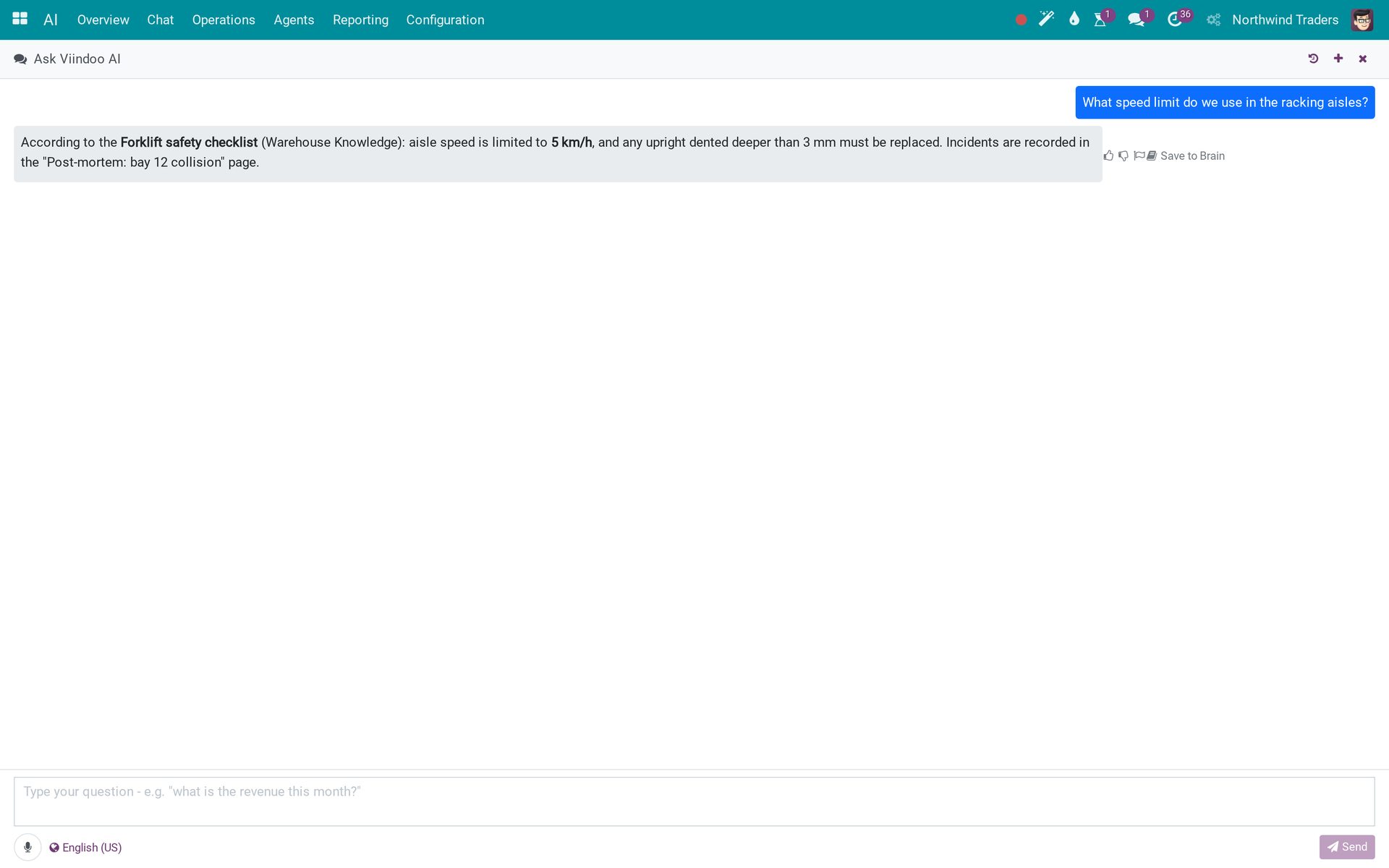
Speak to the assistant and hear the answer, in the chat panel you already use
A microphone button records the question, a transcription model turns it into text, the agent answers, a TTS model reads it back; the session remembers its language, and voice turns run as jobs that can be abandoned and are garbage-collected.
Viindoo AI - Voice Assistant (technical name viin_ai_voice) is an Odoo 17.0 app for Odoo Community and Viindoo Cloud, built for warehouse lead.

At a Glance
The facts of Viindoo AI - Voice Assistant, version 1.0.2, in one place. Published by Viindoo.
How It Works
Pick speech and TTS models on the provider; press the mic.
A voice session
Asked by voice, answered in the chat panel.
Language
Auto or a fixed language.

Mic
Mic and cancel.

Models
Transcription and TTS with prices.

What You Get
Mic in the chat panel
Transcription then agent then TTS
Language per session
Turn jobs with abandon and cleanup
Speaks a short summary once the answer is complete; Stop ends the voice and the answer together
What This App Does Not Do
Read this before you buy. Everything below is something the app deliberately leaves to another app or to you.
The lab provider keys are placeholders; every trace, brief and chat reply shown was recorded by hand to show the shape of the data.
Residency applies as for text.
Works Well With
Apps from the same stack, built to fit this one:
Who Should Use Viindoo AI - Voice Assistant?
Warehouse lead
Ask the assistant a question hands-free.
Frequently Asked Questions
What does Viindoo AI - Voice Assistant do?
A microphone button records the question, a transcription model turns it into text, the agent answers, a TTS model reads it back; the session remembers its language, and voice turns run as jobs that can be abandoned and are garbage-collected.
What does Viindoo AI - Voice Assistant not do?
Nothing answers without a vendor key. The lab provider keys are placeholders; every trace, brief and chat reply shown was recorded by hand to show the shape of the data. Audio is sent to the provider you chose. Residency applies as for text.
Who is Viindoo AI - Voice Assistant for?
Warehouse lead: Ask the assistant a question hands-free.
Which Odoo version and editions does it support?
Odoo 17.0 - Odoo Community, Viindoo Cloud. Upgrades to a newer Odoo series are a separate purchase for that series.
What does it depend on?
It installs on top of: viin_ai, viin_ai_chat, bus. Odoo installs them with it.
How do I set it up?
Pick speech and TTS models on the provider; press the mic.
What works well with it?
Viindoo AI - Chat Assistant (viin_ai_chat): Talk to the agent from any screen. Viindoo AI (viin_ai): Required - vendors, providers, agents, cost caps and the audit trail.
Can I try it before buying?
Yes - the Live Preview button at the top of this page opens the module's own screen on a working database.
How do I get support?
Write to apps.support@viindoo.com with your Odoo version and the technical name viin_ai_voice; pre-sales questions go to sales@viindoo.com.
See Viindoo AI - Voice Assistant in Action
Speak to the assistant and hear the answer, in the chat panel you already use
Need help with Viindoo AI - Voice Assistant?
For questions, implementation support, or consulting services, contact Viindoo.
Pre-Sales & Partnership
sales@viindoo.comWhen contacting us, please include:
- Odoo/Viindoo version (Odoo CE / Viindoo Editions).
- Number of users and business scope.
- Other modules currently in use.
Technical Support
apps.support@viindoo.comFor faster troubleshooting, please provide:
- Order number or app reference.
- Odoo/Viindoo version & edition.
- Steps to reproduce the issue.
- Screenshots/logs if available.
Upgrades to a newer Odoo series are a separate purchase for that series.
Technical Requirement
Changes log
1.0.2 - Latest on the 17.0 line
- The assistant speaks a short summary once the full answer is ready, never while it is still being written; Stop ends the voice and the answer together.
1.0.1 - Aligned with 17.0
- Aligned with the 17.0 models and views.
This software and associated files (the "Software") may only be used (executed, modified, executed after modifications) if you have purchased a valid license from the authors, typically via Odoo Apps, or if you have received a written agreement from the authors of the Software (see the COPYRIGHT file).
You may develop Odoo modules that use the Software as a library (typically by depending on it, importing it and using its resources), but without copying any source code or material from the Software. You may distribute those modules under the license of your choice, provided that this license is compatible with the terms of the Odoo Proprietary License (For example: LGPL, MIT, or proprietary licenses similar to this one).
It is forbidden to publish, distribute, sublicense, or sell copies of the Software or modified copies of the Software.
The above copyright notice and this permission notice must be included in all copies or substantial portions of the Software.
THE SOFTWARE IS PROVIDED "AS IS", WITHOUT WARRANTY OF ANY KIND, EXPRESS OR IMPLIED, INCLUDING BUT NOT LIMITED TO THE WARRANTIES OF MERCHANTABILITY, FITNESS FOR A PARTICULAR PURPOSE AND NONINFRINGEMENT. IN NO EVENT SHALL THE AUTHORS OR COPYRIGHT HOLDERS BE LIABLE FOR ANY CLAIM, DAMAGES OR OTHER LIABILITY, WHETHER IN AN ACTION OF CONTRACT, TORT OR OTHERWISE, ARISING FROM, OUT OF OR IN CONNECTION WITH THE SOFTWARE OR THE USE OR OTHER DEALINGS IN THE SOFTWARE.