Odoo Community
Odoo Enterprise
Viindoo Cloud
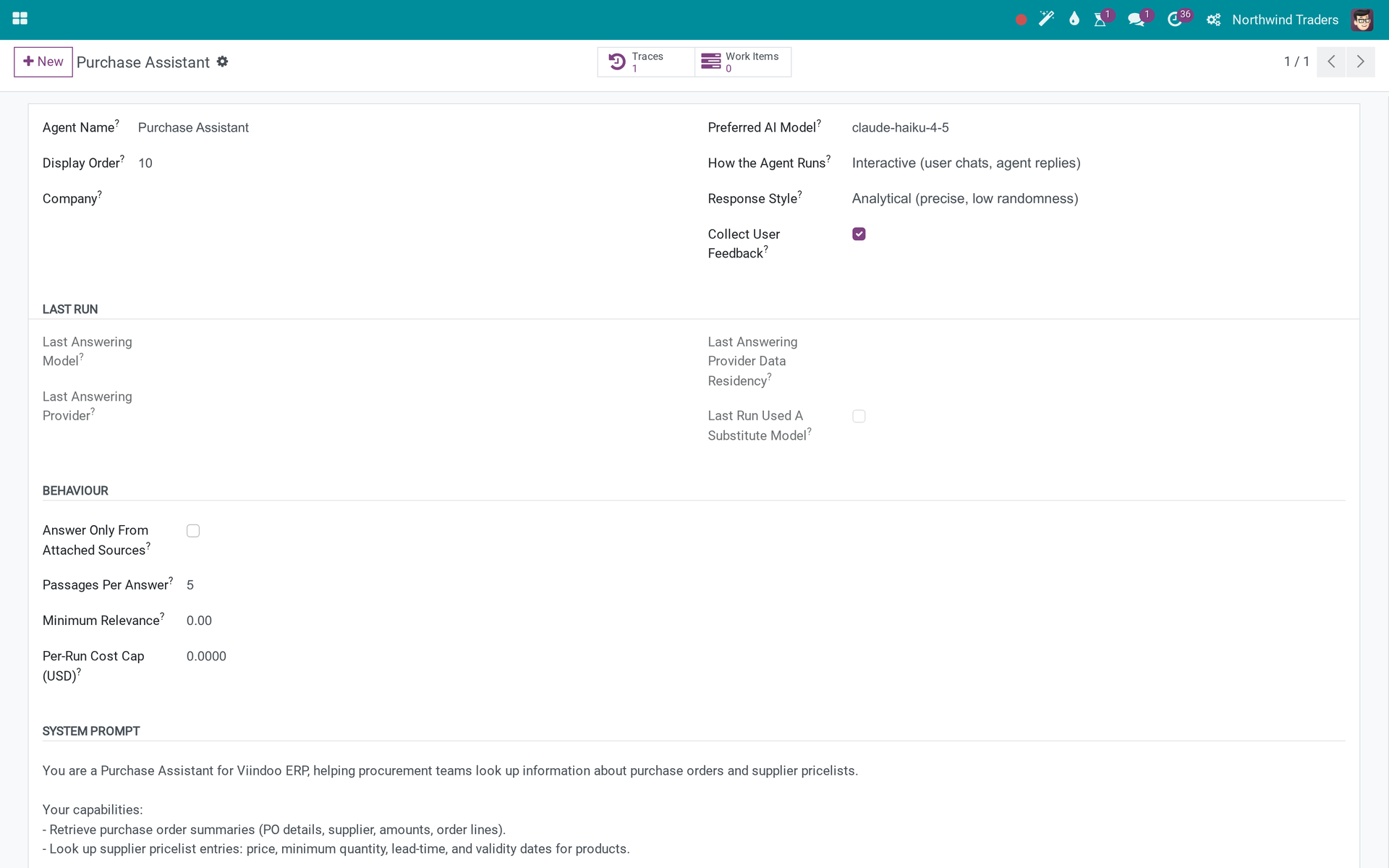
Purchase order summaries, supplier pricelists and a draft RFQ from the assistant
Two read tools (Get Purchase Order Summary, Get Supplier Pricelist) for the Purchase Assistant, a Create Purchase Order Draft tool for the Purchase Write Assistant that asks before writing, and SQL analytics templates.
Viindoo AI - Purchase Connector (technical name viin_ai_purchase) is an Odoo 17.0 app for Odoo Community and Odoo Enterprise and Viindoo Cloud, built for buyer.
At a Glance
The facts of Viindoo AI - Purchase Connector, version 1.0.1, in one place. Published by Viindoo.
Technical name
viin_ai_purchase
Odoo version
17.0 (Odoo Community, Odoo Enterprise, Viindoo Cloud)
Category
Inventory/Purchase
Depends on
viin_ai, purchase
Adds
no new menus or models - it extends existing screens, or ships data and rules
Not for
Nothing answers without a vendor key.
Key features
Order summary and pricelist, Draft RFQ with confirmation, SQL analytics
How It Works
Ask the Purchase Assistant; use the write agent to draft an RFQ.
What You Get
Order summary and pricelist
Draft RFQ with confirmation
What This App Does Not Do
Read this before you buy. Everything below is something the app deliberately leaves to another app or to you.
Nothing answers without a vendor key.
The lab provider keys are placeholders; every trace, brief and chat reply shown was recorded by hand to show the shape of the data.
RFQs are created as drafts.
Confirmation stays with the buyer.
Works Well With
Apps from the same stack, built to fit this one:
Viindoo AI
Required - vendors, providers, agents, cost caps and the audit trail.
viin_ai
Who Should Use Viindoo AI - Purchase Connector?
Buyer
P00043: 3 of 20 bundles received, beam price up 4%.
Frequently Asked Questions
What does Viindoo AI - Purchase Connector do?
Two read tools (Get Purchase Order Summary, Get Supplier Pricelist) for the Purchase Assistant, a Create Purchase Order Draft tool for the Purchase Write Assistant that asks before writing, and SQL analytics templates.
What does Viindoo AI - Purchase Connector not do?
Nothing answers without a vendor key. The lab provider keys are placeholders; every trace, brief and chat reply shown was recorded by hand to show the shape of the data. RFQs are created as drafts. Confirmation stays with the buyer.
Who is Viindoo AI - Purchase Connector for?
Buyer: P00043: 3 of 20 bundles received, beam price up 4%.
Which Odoo version and editions does it support?
Odoo 17.0 - Odoo Community, Odoo Enterprise, Viindoo Cloud. Upgrades to a newer Odoo series are a separate purchase for that series.
What does it depend on?
It installs on top of: viin_ai, purchase. Odoo installs them with it.
How do I set it up?
Ask the Purchase Assistant; use the write agent to draft an RFQ.
What works well with it?
Viindoo AI (viin_ai): Required - vendors, providers, agents, cost caps and the audit trail. Purchase (purchase): Required. Purchase Approval Advisory (viin_ai_approval_purchase): Risk on PO approvals.
Can I try it before buying?
Yes - the Live Preview button at the top of this page opens the module's own screen on a working database.
How do I get support?
Write to apps.support@viindoo.com with your Odoo version and the technical name viin_ai_purchase; pre-sales questions go to sales@viindoo.com.
Need help with Viindoo AI - Purchase Connector?
For questions, implementation support or a custom feature, contact Viindoo.
Upgrades to a newer Odoo series are a separate purchase for that series.
All Viindoo apps: apps.odoo.com/apps/modules/browse?author=Viindoo
About Viindoo. Viindoo builds and maintains more than 1,000 apps on the Odoo App Store for the Community and Enterprise editions and runs them on Viindoo Cloud. A purchase of Viindoo AI - Purchase Connector covers the 17.0 series: bug fixes on the module reach you through the store, questions go to apps.support@viindoo.com with the technical name viin_ai_purchase, and moving to a newer Odoo series is a separate purchase for that series. Source code is delivered with the module and stays yours to read and adapt.
Technical Requirement
Editions: Odoo Community, Odoo Enterprise, Viindoo Cloud
Changes log
1.0.1 - Latest on the 17.0 line
- Aligned with the 17.0 models and views.
This software and associated files (the "Software") may only be
used
(executed, modified, executed after modifications) if you have
purchased a
valid license from the authors, typically via Odoo Apps,
or if you
have
received a written agreement from the authors of the
Software (see the
COPYRIGHT file).
You may develop Odoo modules that use the Software as a library
(typically
by depending on it, importing it and using its
resources), but
without
copying any source code or material from the
Software. You may distribute
those modules under the license of your
choice, provided that this
license
is compatible with the terms of
the Odoo Proprietary License (For
example:
LGPL, MIT, or proprietary
licenses similar to this one).
It is forbidden to publish, distribute, sublicense, or sell
copies of the
Software or modified copies of the Software.
The above copyright notice and this permission notice must be
included in
all copies or substantial portions of the Software.
THE SOFTWARE IS PROVIDED "AS IS", WITHOUT WARRANTY OF ANY KIND,
EXPRESS OR
IMPLIED, INCLUDING BUT NOT LIMITED TO THE WARRANTIES OF
MERCHANTABILITY,
FITNESS FOR A PARTICULAR PURPOSE AND
NONINFRINGEMENT. IN NO EVENT
SHALL THE
AUTHORS OR COPYRIGHT HOLDERS
BE LIABLE FOR ANY CLAIM, DAMAGES OR OTHER
LIABILITY, WHETHER IN AN
ACTION OF CONTRACT, TORT OR OTHERWISE,
ARISING
FROM, OUT OF OR IN
CONNECTION WITH THE SOFTWARE OR THE USE OR OTHER
DEALINGS IN THE
SOFTWARE.