
Employee documents, filed in the document system
Documents attached to employees and departments, visible from the employee record and managed with the rules, workspaces and access of the Documents app.
Documents - HR (technical name viin_document_hr) is an Odoo 17.0 app for Odoo Community and Odoo Enterprise and Viindoo Cloud, built for hr officer, employee, compliance, manager.
At a Glance
The facts of Documents - HR, version 0.1.1, in one place. Published by Viindoo.
How It Works
Two screens.
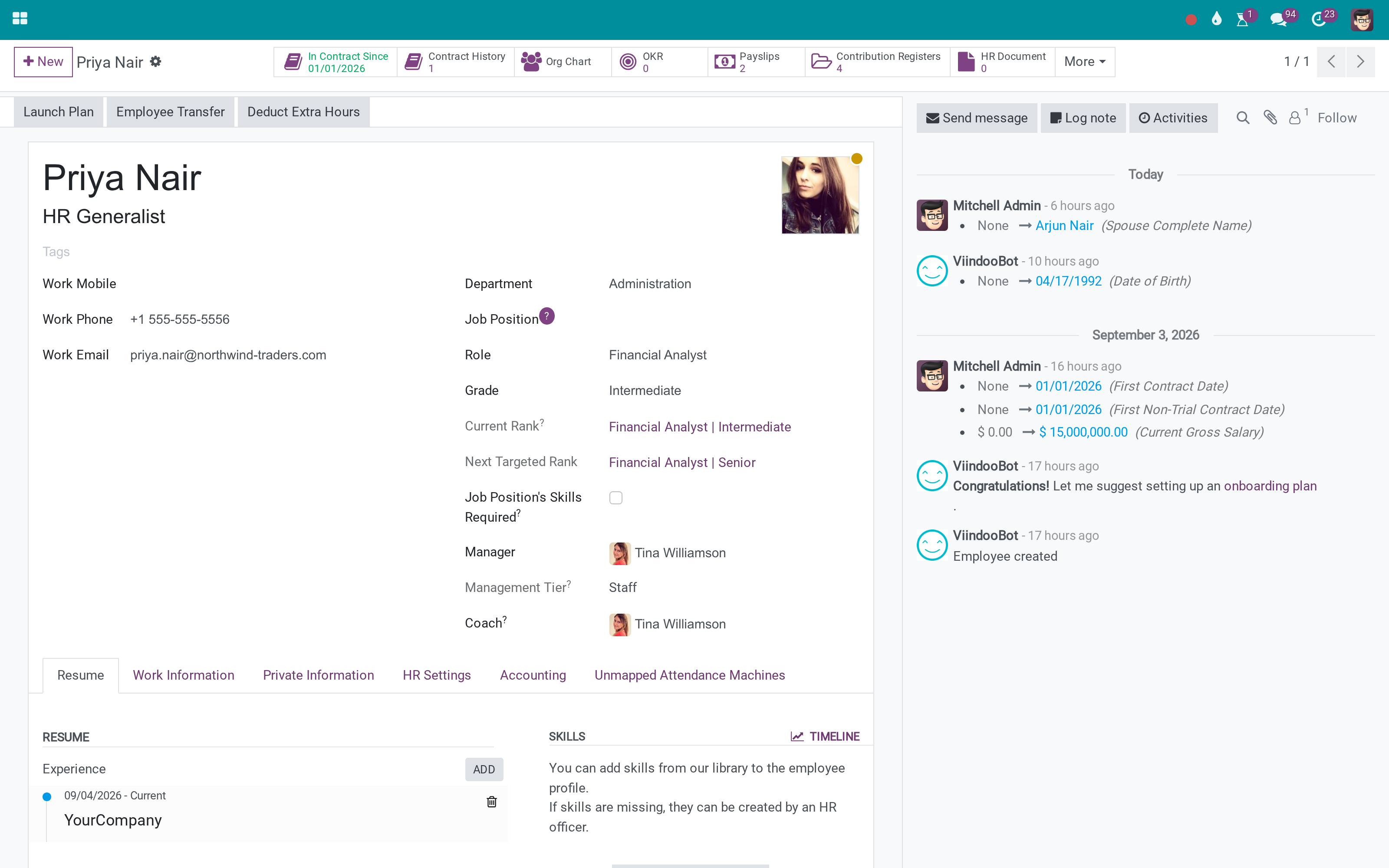
On the employee
The count and the list, on the record HR already opens.
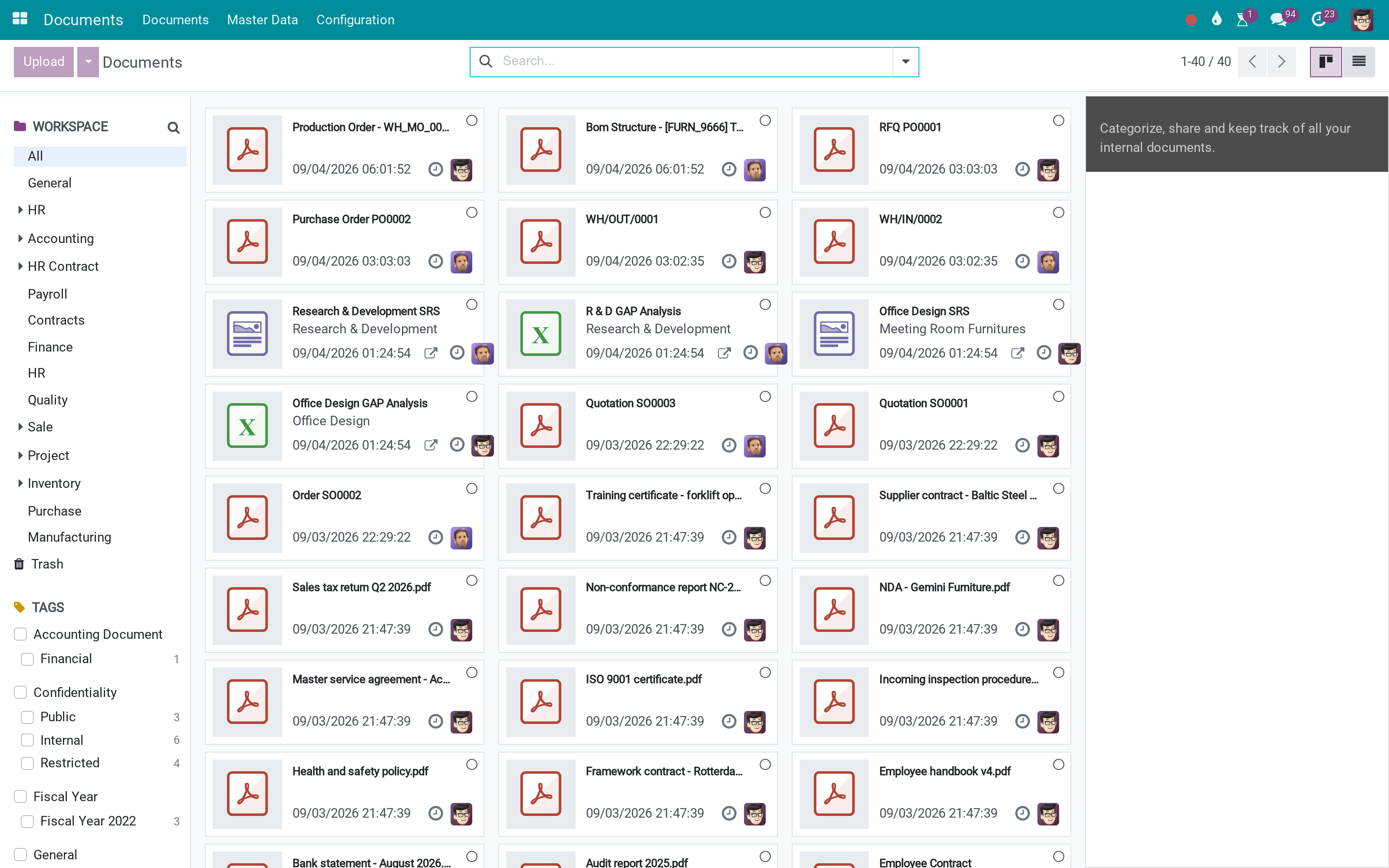
In the document system
The same files, with workspaces, tags and rules around them.
What You Get
Employee and department documents in the Documents app
A document count and list on the employee record
Workspaces, tags and rules from the document system
Access controlled separately from the employee record
Works with the wider Viindoo document layer
Existing attachments keep working
More Screens
Everything below was taken on a database seeded with real business data, on this series - not a mock-up and not a screenshot from an older version.
Documents
What This App Does Not Do
Read this before you buy. Everything below is something the app deliberately leaves to another app or to you.
Documents with a validity date are Employee Documents, a different module.
They keep working; filing them is a deliberate move.
Which is the point - separate from the employee record.
That is the half it bridges to.
Works Well With
Apps from the same stack, built to fit this one:
Who Should Use Documents - HR?
HR officer
Files a contract where it can be found again.
Employee
Sees their own documents where they expect them.
Compliance
Restricts sensitive files without restricting the record.
Manager
Finds a certificate without asking HR.
Frequently Asked Questions
What does Documents - HR do?
Documents attached to employees and departments, visible from the employee record and managed with the rules, workspaces and access of the Documents app.
What does Documents - HR not do?
It does not track expiry. Documents with a validity date are Employee Documents, a different module. It does not migrate old attachments. They keep working; filing them is a deliberate move. Access is the document system's. Which is the point - separate from the employee record. It needs the Documents app. That is the half it bridges to.
Who is Documents - HR for?
HR officer: Files a contract where it can be found again. Employee: Sees their own documents where they expect them. Compliance: Restricts sensitive files without restricting the record. Manager: Finds a certificate without asking HR.
Which Odoo version and editions does it support?
Odoo 17.0 - Odoo Community, Odoo Enterprise, Viindoo Cloud. Upgrades to a newer Odoo series are a separate purchase for that series.
What does it depend on?
It installs on top of: viin_document, hr. Odoo installs them with it.
How do I set it up?
Two screens.
What works well with it?
Document Management (viin_document): The filing system itself. Employee Documents (to_employee_documents): Papers with issue and expiry dates. Payroll Documents (viin_document_hr_payroll): Payslips and payroll files.
Can I try it before buying?
Yes - the Live Preview button at the top of this page opens the module's own screen on a working database.
How do I get support?
Write to apps.support@viindoo.com with your Odoo version and the technical name viin_document_hr; pre-sales questions go to sales@viindoo.com.
See Documents - HR in Action
Employee documents, filed in the document system
Need help with Documents - HR?
For questions, implementation support, or consulting services, contact Viindoo.
Pre-Sales & Partnership
sales@viindoo.comWhen contacting us, please include:
- Odoo/Viindoo version (Odoo CE / Viindoo Editions).
- Number of users and business scope.
- Other modules currently in use.
Technical Support
apps.support@viindoo.comFor faster troubleshooting, please provide:
- Order number or app reference.
- Odoo/Viindoo version & edition.
- Steps to reproduce the issue.
- Screenshots/logs if available.
Upgrades to a newer Odoo series are a separate purchase for that series.
Technical Requirement
Changes log
0.1.1 - Latest on the 17.0 line
- Departments as well as employees carry their documents.