
Nhóm Vùng Miền

Group the states your business actually reports on
State groups - West, Midwest, Northeast, South, or whatever your regions are - on the state, and on every contact through it.
Country State Group (technical name viin_base_state_group) is an Odoo 17.0 app for Odoo Community and Odoo Enterprise and Viindoo Cloud, built for sales manager, logistics, support, analyst.

At a Glance
The facts of Country State Group, version 0.1, in one place. Published by Viindoo.
How It Works
Two steps.
Define the groups
Per country - the regions your business is actually organised by.
Assign the states
Each state belongs to at most one group, which keeps the reporting unambiguous.

And the contacts follow
The group comes from the address, so nobody maintains it per contact.

What You Get
State groups, defined per country
States assigned to a group
The group on the contact, stored, through the state
Groupable and filterable like any field
Restrict-on-delete, so a group in use cannot vanish
Translatable names, for multilingual databases
More Screens
Everything below was taken on a database seeded with real business data, on this series - not a mock-up and not a screenshot from an older version.
Contacts
What This App Does Not Do
Read this before you buy. Everything below is something the app deliberately leaves to another app or to you.
Overlapping regions would make grouping ambiguous; a second dimension is a second field.
Groups live inside a country, deliberately.
It supplies the dimension; assignment rules belong to the apps that use it.
Which is honest - the group is derived, not typed.
Works Well With
Apps from the same stack, built to fit this one:
Administrative Regions
Deeper administrative hierarchies where a country needs them.
Administrative Region ManagementCountry Recognition
Getting the address right in the first place.
National Identification Of Online Registered Accounts (Portal)Who Should Use Country State Group?
Sales manager
Reports by region without inventing a tag.
Logistics
Groups deliveries by the zones the fleet actually runs.
Support
Routes by region rather than by state list.
Analyst
Gets a stored dimension instead of a case statement.
Frequently Asked Questions
What does Country State Group do?
State groups - West, Midwest, Northeast, South, or whatever your regions are - on the state, and on every contact through it.
What does Country State Group not do?
One group per state. Overlapping regions would make grouping ambiguous; a second dimension is a second field. It does not group countries. Groups live inside a country, deliberately. It does not route anything. It supplies the dimension; assignment rules belong to the apps that use it. Contacts without a state have no group. Which is honest - the group is derived, not typed.
Who is Country State Group for?
Sales manager: Reports by region without inventing a tag. Logistics: Groups deliveries by the zones the fleet actually runs. Support: Routes by region rather than by state list. Analyst: Gets a stored dimension instead of a case statement.
Which Odoo version and editions does it support?
Odoo 17.0 - Odoo Community, Odoo Enterprise, Viindoo Cloud. Upgrades to a newer Odoo series are a separate purchase for that series.
What does it depend on?
It installs on top of: contacts. Odoo installs them with it.
How do I set it up?
Two steps.
What works well with it?
Administrative Regions (viin_administrative_region): Deeper administrative hierarchies where a country needs them. Sales Teams Advanced (to_sales_team_advanced): Sales regions on the documents themselves. Country Recognition (viin_partner_country_recognition): Getting the address right in the first place.
Can I try it before buying?
Yes - the Live Preview button at the top of this page opens the module's own screen on a working database.
How do I get support?
Write to apps.support@viindoo.com with your Odoo version and the technical name viin_base_state_group; pre-sales questions go to sales@viindoo.com.
See Country State Group in Action
Group the states your business actually reports on
Need help with Country State Group?
For questions, implementation support, or consulting services, contact Viindoo.
Pre-Sales & Partnership
sales@viindoo.comWhen contacting us, please include:
- Odoo/Viindoo version (Odoo CE / Viindoo Editions).
- Number of users and business scope.
- Other modules currently in use.
Technical Support
apps.support@viindoo.comFor faster troubleshooting, please provide:
- Order number or app reference.
- Odoo/Viindoo version & edition.
- Steps to reproduce the issue.
- Screenshots/logs if available.
Upgrades to a newer Odoo series are a separate purchase for that series.
Technical Requirement
Changes log
0.1 - Latest on the 17.0 line
- The state group on the contact is stored, so it can be grouped and filtered.
Cài đặt
- Truy cập Ứng dụng.
- Tìm từ khóa viin_base_state_group.
- Bấm chọn Cài đặt.
Hướng dẫn sử dụng
Video hướng dẫn: Nhóm Vùng Miền
Khái niệm
- Vùng/Miền: Hay còn gọi là Vùng quốc gia, là việc phân chia quốc gia thành các miền, các vùng theo các tiêu chí khác nhau của từng quốc gia như vị trí địa lý, đặc trưng ngôn ngữ,...
Sử dụng
1. Thiết lập các Vùng/Miền cho mỗi quốc gia
Truy cập Danh bạ ‣ Cấu hình ‣ Vùng/Miền, ấn Tạo:

Điền các thông tin trên giao diện bao gồm:
- Tên Vùng/Miền;
- Mã Vùng/Miền (nếu có);
- Thuộc: Vùng/Miền cấp cha;
- Quốc gia: Quốc gia của Vùng/Miền đang thiết lập;
- Bang/Tỉnh: Các tỉnh/thành phố thuộc Vùng/Miền đang thiết lập.
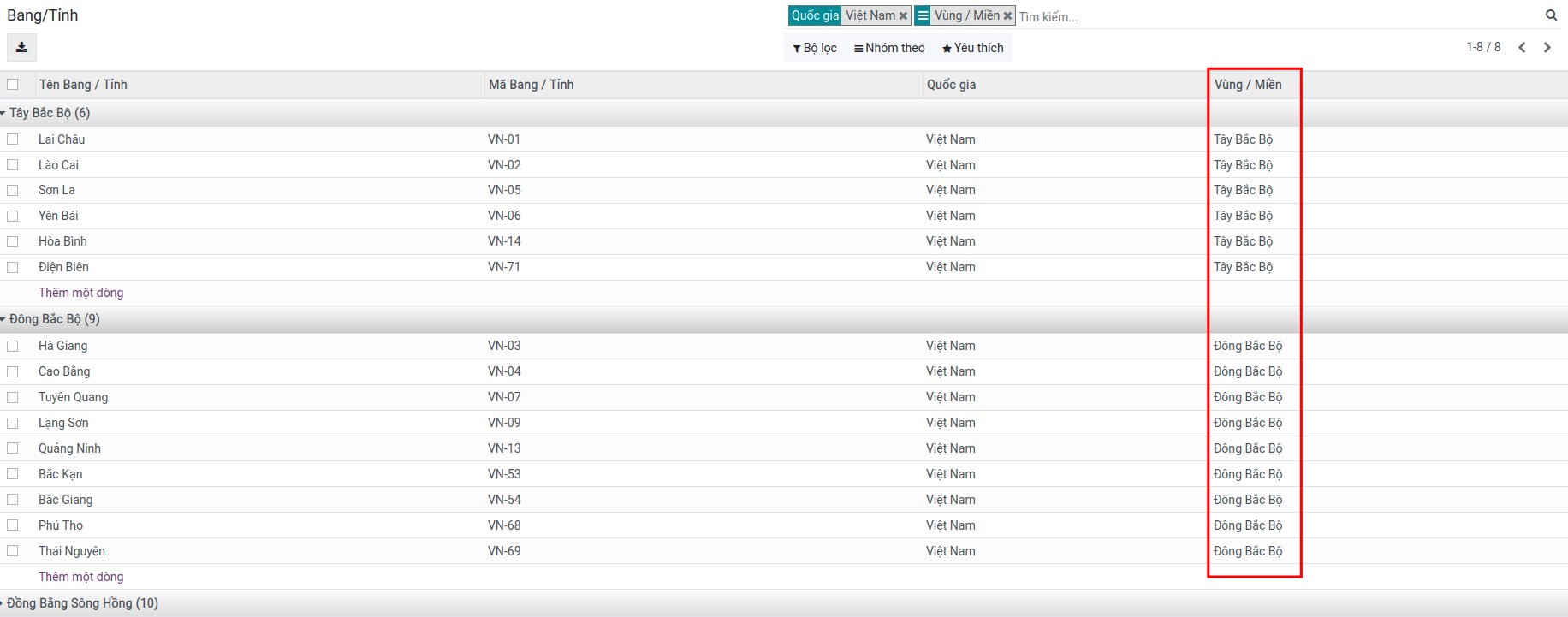
Sau khi thiết lập, bạn có thể truy cập vào Danh bạ ‣ Cấu hình ‣ Bang/Tỉnh để xem danh sách Bang/Tỉnh theo từng Vùng/Miền:
2. Tạo và quản lý danh sách khách hàng/nhà cung cấp (đối tác) theo Vùng/Miền
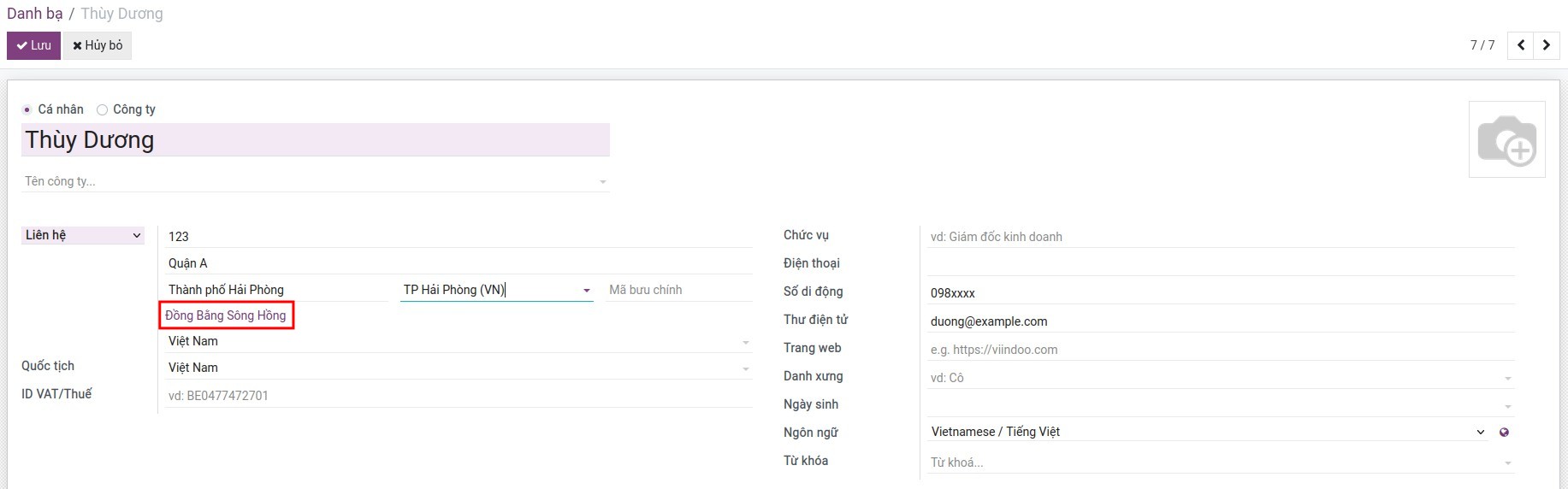
- Truy cập Danh bạ, ấn Tạo để tạo mới một liên hệ. Khi điền thông tin về Bang/Tỉnh của liên hệ thì hệ thống sẽ tự động lấy ra liên kết về Vùng/Miền dựa theo thiết lập ở bước 1.
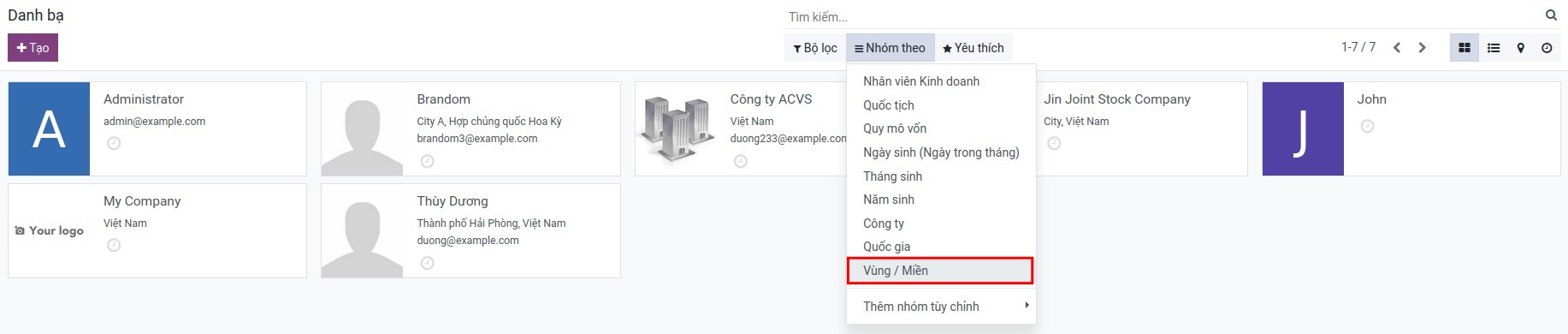
- Sử dụng công cụ lọc/nhóm để tìm kiếm và quản lý danh sách đối tác theo Vùng/Miền:
Phần mềm này và các tệp liên kết ("Phần mềm") được sử dụng (chạy, tuỳ biến, chạy sau khi được tuỳ biến) chỉ khi bạn mua được giấy phép có hiệu lực từ tác giả, điển hình như qua các Ứng dụng Odoo, hoặc trong trường hợp bạn nhận được thoả thuận bằng văn bản từ tác giả của Phần mềm (chi tiết tại tệp COPYRIGHT).
Bạn có thể phát triển các phân hệ Odoo có sử dụng Phần mềm như một Thư viện (thường là phụ thuộc vào, nhập vào và sử dụng nguồn của nó) nhưng không sao chéo bất kỳ mã nguồn hay tài liệu nào thuộc Phần mềm. Bạn có thể phân phối những phân hệ này theo giấy phép mà bạn lựa chọn, miễn sao nội dung giấy phép đó tương tích với điều khoản của Giấy phép Phần mềm Độc quyền Odoo (ví dụ: LGPL, MIT hay bất kỳ loại giấy phép phần mềm độc quyền nào tương tự vậy).
Nghiêm cấm phát hành, phân phối, cấp phép lại hoặc bán bản sao của Phần mềm hoặc bản sao Phần mềm đã được sửa đổi.
Thông báo bản quyền và chấp thuận nêu trên buộc phải được bao gồm trong tất cả các bản sao hoặc các phần quan trọng của Phần mềm.
PHẦN MỀM ĐƯỢC CUNG CẤP "NGUYÊN TRẠNG", KHÔNG BẢO ĐẢM DƯỚI BẤT KỲ HÌNH THỨC NÀO, ĐƯỢC THỂ HIỆN RÕ RÀNG HOẶC NGỤ Ý, KHÔNG GIỚI HẠN ĐẢM BẢO VỀ CÁC BẢO ĐẢM NGỤ Ý VỀ KHẢ NĂNG THƯƠNG MẠI, PHÙ HỢP VỚI MỤC ĐÍCH CỤ THỂ VÀ KHÔNG VI PHẠM. TRONG MỌI TRƯỜNG HỢP SẼ KHÔNG CÓ TÁC GIẢ HOẶC CHỦ SỞ HỮU BẢN QUYỀN NÀO CHỊU TRÁCH NHIỆM VỀ BẤT KỲ KHIẾU NẠI, THIỆT HẠI HOẶC TRÁCH NHIỆM PHÁP LÝ KHÁC NÀO TRONG PHẠM VI HỢP ĐỒNG, CÁC THIỆT HẠI HOẶC CÁCH KHÁC, PHÁT SINH TỪ, NGOÀI HOẶC CÓ LIÊN KẾT VỚI PHẦN MỀM HOẶC VIỆC SỬ DỤNG HOẶC KINH DOANH KHÁC TẠI PHẦN MỀM.