
Tỷ giá ngân hàng - Mua hàng về kho
| Số dòng Code | 556 |
| Tên kỹ thuật | to_bank_currency_rate_purchase_stock |
| Giấy phép | OPL-1 |
| Website | https://viindoo.com/apps/modules/17.0/to_bank_currency_rate_purchase_stock |
| Đọc mô tả cho | v 12.0 v 13.0 v 14.0 v 15.0 v 16.0 v 18.0 |
| Yêu cầu các App | Purchase (purchase) Invoicing (account) Discuss (mail) Inventory (stock) |
| Bao gồm Các phụ thuộc | Mô-đun Cơ Sở Quy Đổi Tỷ Giá Ngân Hàng Chính Xác |

Imported goods valued at the bank's buying rate
Receipts of foreign-currency purchases enter stock at the bank rate of the purchase, and the bill's price difference is computed against that same rate.
Bank Currency Rates - Purchase Stock (technical name to_bank_currency_rate_purchase_stock) is an Odoo 17.0 app for Odoo Community and Odoo Enterprise and Viindoo Cloud, built for cost accountant, buyer, controller, auditor.

At a Glance
The facts of Bank Currency Rates - Purchase Stock, version 0.1, in one place. Published by Viindoo.
How It Works
Order in a foreign currency, receive, bill - the rate is applied where it belongs.
The valuation
Twenty panels at €85 valued at $91.59 each - the bank's buying rate, not the plain rate.
The receipt
A standard receipt; the entry behind it is at the bank rate.

The order
Where the currency comes from.

What You Get
Incoming valuation layers converted at the bank buying rate
Purchase order lines and stock moves carry the bank rate context
Vendor price selection unchanged in behaviour, bank-rate aware
Price difference on the bill computed against the bank-rate cost
Falls back to the main bank, then the plain rate
Installed automatically with Purchase Stock and Bank Currency Rates
More Screens
Everything below was taken on a database seeded with real business data, on this series - not a mock-up and not a screenshot from an older version.
Purchase order in EUR
What This App Does Not Do
Read this before you buy. Everything below is something the app deliberately leaves to another app or to you.
Outgoing moves keep FIFO or average as configured.
Otherwise the plain rate applies, silently.
They use their own module.
Install it and the behaviour is there.
Works Well With
Apps from the same stack, built to fit this one:
Specific identification & purchase
Price difference per serial.
Stock Specific Identification & Purchase StockWho Should Use Bank Currency Rates - Purchase Stock?
Cost accountant
Sees landed value match the bank debit.
Buyer
Orders in the vendor currency without thinking about rates.
Controller
Gets a price difference that means something.
Auditor
Traces valuation to a bank rate.
Frequently Asked Questions
What does Bank Currency Rates - Purchase Stock do?
Receipts of foreign-currency purchases enter stock at the bank rate of the purchase, and the bill's price difference is computed against that same rate.
What does Bank Currency Rates - Purchase Stock not do?
Only incoming valuation is touched. Outgoing moves keep FIFO or average as configured. Needs a bank rate for the day. Otherwise the plain rate applies, silently. Landed costs are separate. They use their own module. Nothing to configure. Install it and the behaviour is there.
Who is Bank Currency Rates - Purchase Stock for?
Cost accountant: Sees landed value match the bank debit. Buyer: Orders in the vendor currency without thinking about rates. Controller: Gets a price difference that means something. Auditor: Traces valuation to a bank rate.
Which Odoo version and editions does it support?
Odoo 17.0 - Odoo Community, Odoo Enterprise, Viindoo Cloud. Upgrades to a newer Odoo series are a separate purchase for that series.
What does it depend on?
It installs on top of: to_bank_currency_rate, purchase_stock. Odoo installs them with it.
How do I set it up?
Order in a foreign currency, receive, bill - the rate is applied where it belongs.
What works well with it?
Advanced Bank Currency Rates (to_bank_currency_rate): The rate engine. Specific identification & purchase (viin_stock_specific_identification_purchase_stock): Price difference per serial.
Can I try it before buying?
Yes - the Live Preview button at the top of this page opens the module's own screen on a working database.
How do I get support?
Write to apps.support@viindoo.com with your Odoo version and the technical name to_bank_currency_rate_purchase_stock; pre-sales questions go to sales@viindoo.com.
See Bank Currency Rates - Purchase Stock in Action
Imported goods valued at the bank's buying rate
Need help with Bank Currency Rates - Purchase Stock?
For questions, implementation support, or consulting services, contact Viindoo.
Pre-Sales & Partnership
sales@viindoo.comWhen contacting us, please include:
- Odoo/Viindoo version (Odoo CE / Viindoo Editions).
- Number of users and business scope.
- Other modules currently in use.
Technical Support
apps.support@viindoo.comFor faster troubleshooting, please provide:
- Order number or app reference.
- Odoo/Viindoo version & edition.
- Steps to reproduce the issue.
- Screenshots/logs if available.
Upgrades to a newer Odoo series are a separate purchase for that series.
Technical Requirement
Changes log
0.1 - Latest on the 17.0 line
- Aligned with the 17.0 models and views.
Cài đặt
- Truy cập Ứng dụng.
- Tìm từ khóa to_bank_currency_rate_purchase_stock.
- Ấn Cài đặt.
Hướng dẫn sử dụng
Video hướng dẫn: Tỷ giá ngân hàng - Mua hàng về kho
Thiết lập tỷ giá cho ngoại tệ
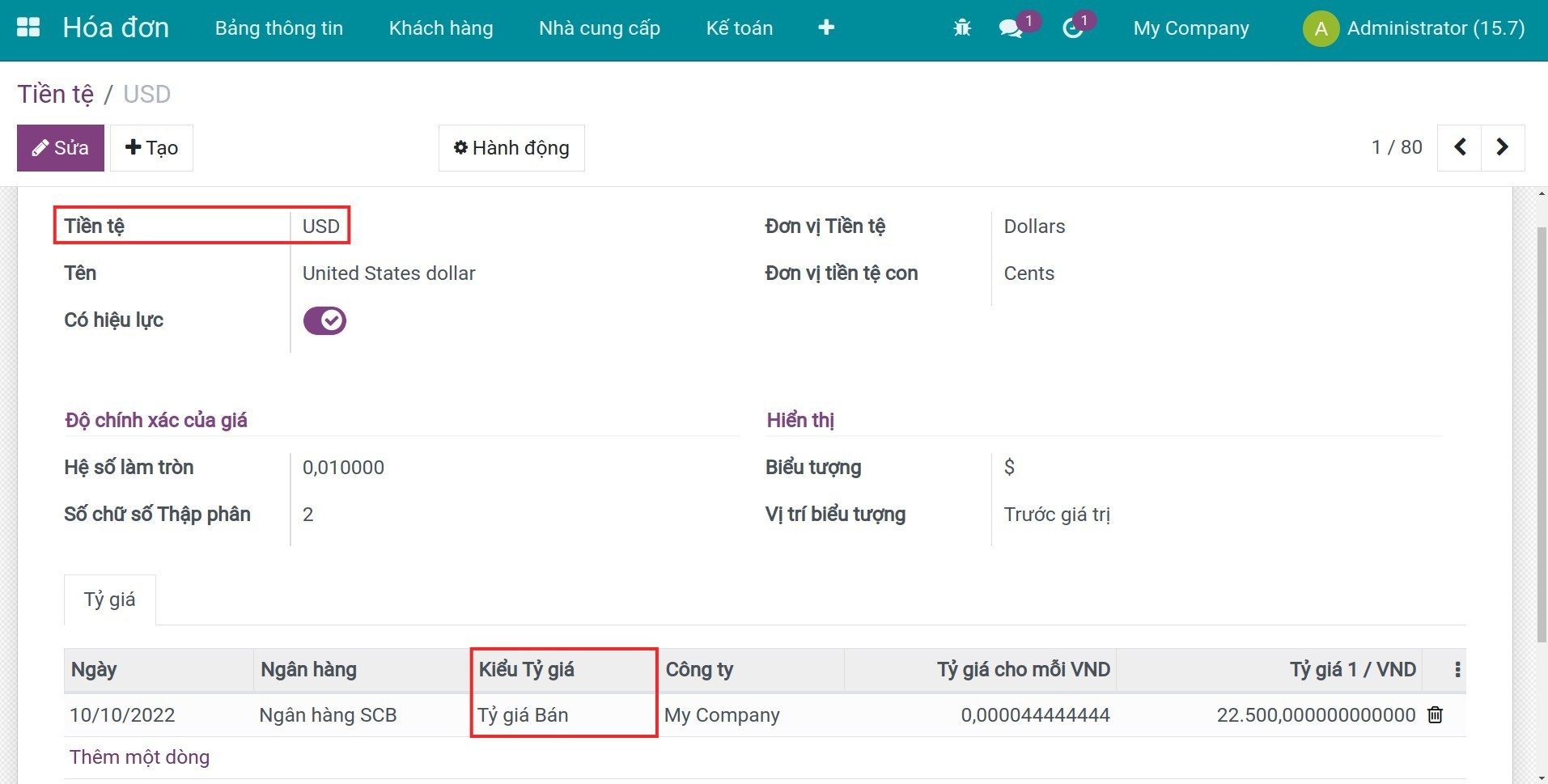
- Kích hoạt tính năng Đa tiền tệ.
- Nhập tỷ giá bán cho ngoại tệ bạn muốn sử dụng.
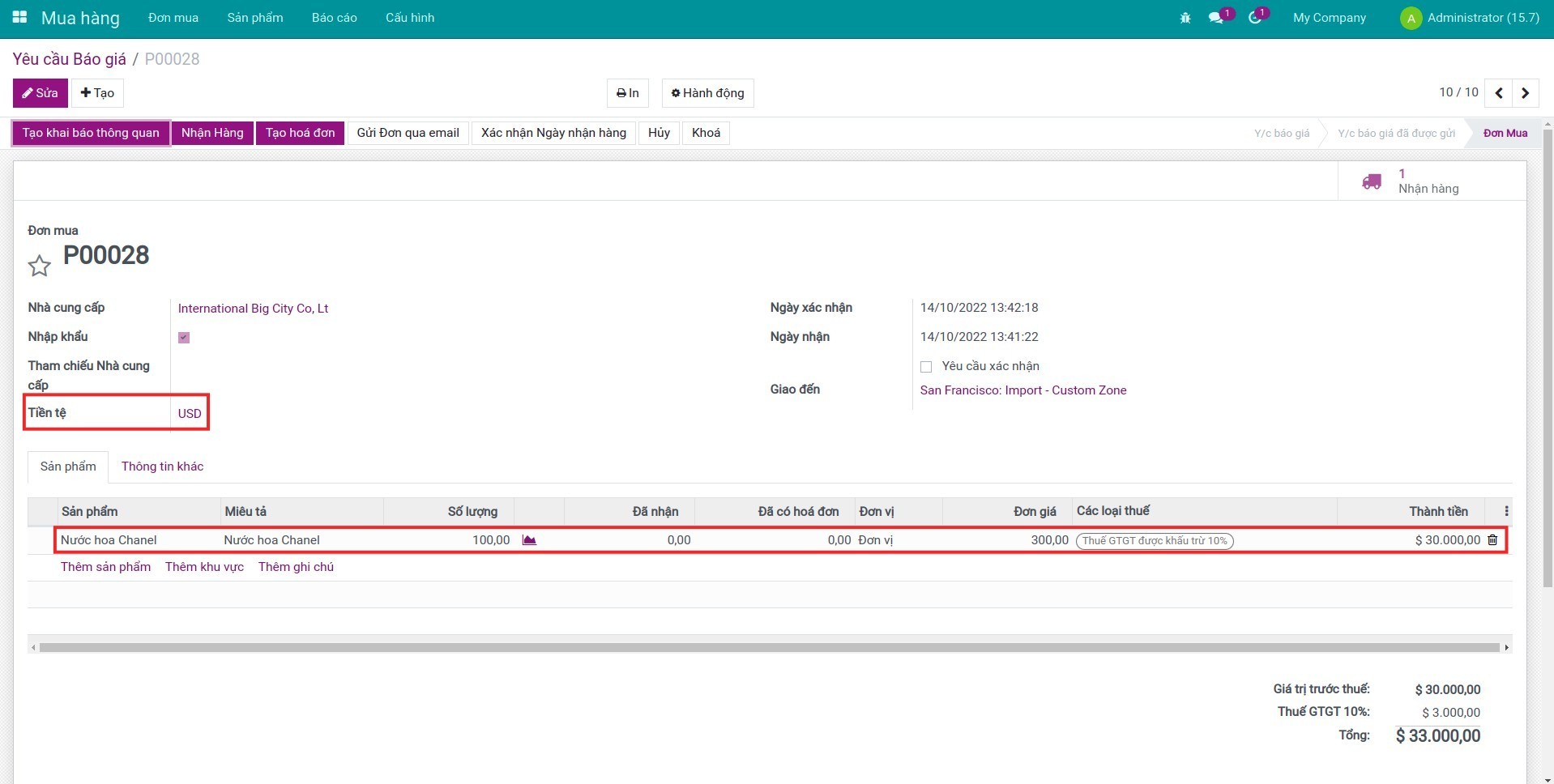
Nhận hàng và kiểm tra bút toán phát sinh
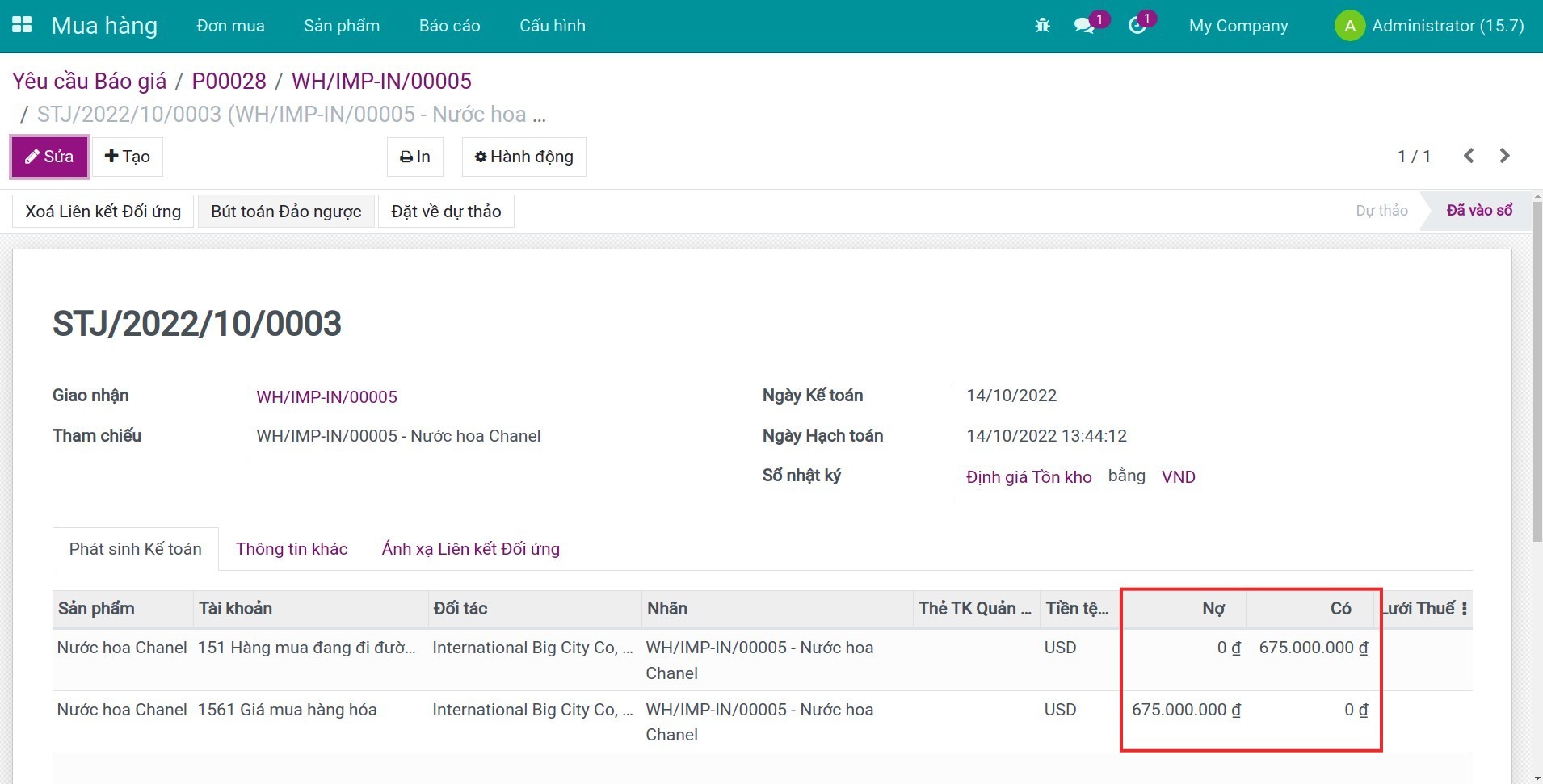
Nhận hàng cho đơn mua ở trên. Trên giao diện phiếu nhận hàng, bạn sẽ nhìn thấy nút thống kê bút toán phát sinh.
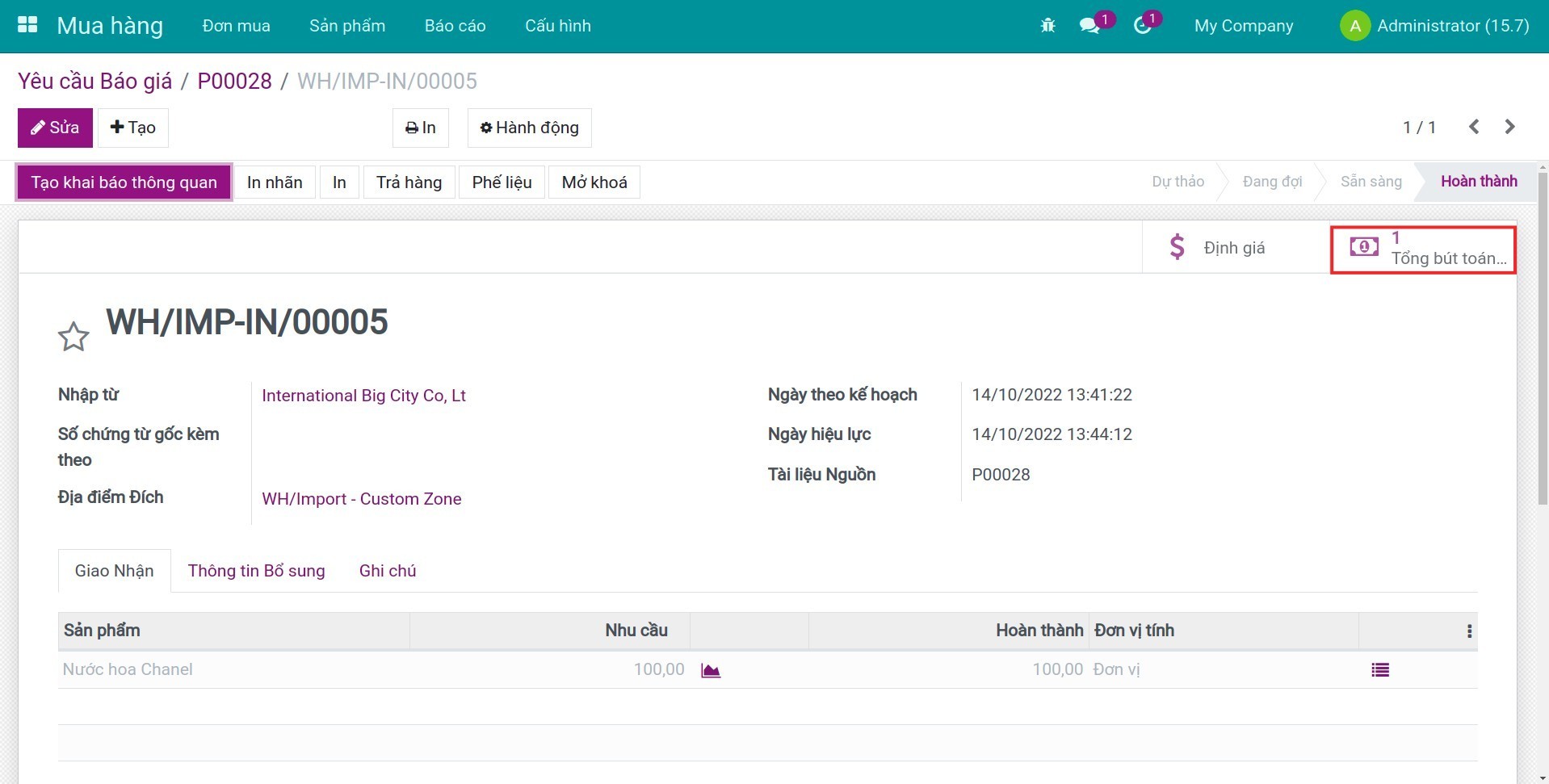
Bấm vào bút toán này, bạn sẽ thấy giá trị bút toán phát sinh được tự động quy đổi sang đơn vị tiền tệ hiện hành dựa theo tỷ giá đã thiết lập.
Phần mềm này và các tệp liên kết ("Phần mềm") được sử dụng (chạy, tuỳ biến, chạy sau khi được tuỳ biến) chỉ khi bạn mua được giấy phép có hiệu lực từ tác giả, điển hình như qua các Ứng dụng Odoo, hoặc trong trường hợp bạn nhận được thoả thuận bằng văn bản từ tác giả của Phần mềm (chi tiết tại tệp COPYRIGHT).
Bạn có thể phát triển các phân hệ Odoo có sử dụng Phần mềm như một Thư viện (thường là phụ thuộc vào, nhập vào và sử dụng nguồn của nó) nhưng không sao chéo bất kỳ mã nguồn hay tài liệu nào thuộc Phần mềm. Bạn có thể phân phối những phân hệ này theo giấy phép mà bạn lựa chọn, miễn sao nội dung giấy phép đó tương tích với điều khoản của Giấy phép Phần mềm Độc quyền Odoo (ví dụ: LGPL, MIT hay bất kỳ loại giấy phép phần mềm độc quyền nào tương tự vậy).
Nghiêm cấm phát hành, phân phối, cấp phép lại hoặc bán bản sao của Phần mềm hoặc bản sao Phần mềm đã được sửa đổi.
Thông báo bản quyền và chấp thuận nêu trên buộc phải được bao gồm trong tất cả các bản sao hoặc các phần quan trọng của Phần mềm.
PHẦN MỀM ĐƯỢC CUNG CẤP "NGUYÊN TRẠNG", KHÔNG BẢO ĐẢM DƯỚI BẤT KỲ HÌNH THỨC NÀO, ĐƯỢC THỂ HIỆN RÕ RÀNG HOẶC NGỤ Ý, KHÔNG GIỚI HẠN ĐẢM BẢO VỀ CÁC BẢO ĐẢM NGỤ Ý VỀ KHẢ NĂNG THƯƠNG MẠI, PHÙ HỢP VỚI MỤC ĐÍCH CỤ THỂ VÀ KHÔNG VI PHẠM. TRONG MỌI TRƯỜNG HỢP SẼ KHÔNG CÓ TÁC GIẢ HOẶC CHỦ SỞ HỮU BẢN QUYỀN NÀO CHỊU TRÁCH NHIỆM VỀ BẤT KỲ KHIẾU NẠI, THIỆT HẠI HOẶC TRÁCH NHIỆM PHÁP LÝ KHÁC NÀO TRONG PHẠM VI HỢP ĐỒNG, CÁC THIỆT HẠI HOẶC CÁCH KHÁC, PHÁT SINH TỪ, NGOÀI HOẶC CÓ LIÊN KẾT VỚI PHẦN MỀM HOẶC VIỆC SỬ DỤNG HOẶC KINH DOANH KHÁC TẠI PHẦN MỀM.