
Sales Teams Advanced
| Lines of Code | 1359 |
| Technical name | to_sales_team_advanced |
| License | OPL-1 |
| Website | https://viindoo.com/apps/modules/19.0/to_sales_team_advanced |
| Read description for | v 10.0 v 11.0 v 12.0 v 13.0 v 14.0 v 15.0 v 16.0 v 17.0 v 18.0 |
| Required Apps | Discuss (mail) |
| Extensions | Sales Target CRM - Sales Teams Advanced Sales - Sales Teams Advanced |

Sales regions, team leaders and regional managers - the two roles Odoo skips
Odoo gives sales two roles: user and administrator. This adds the two every sales organisation actually has - the team leader who sees their team, and the regional manager who sees a whole branch of the tree.
Sales Teams Advanced (technical name to_sales_team_advanced) is an Odoo 19.0 app for Odoo Community and Odoo Enterprise and Viindoo Cloud, built for team leader, regional manager, sales director, administrator.
At a Glance
The facts of Sales Teams Advanced, version 1.0.1, in one place. Published by Viindoo.
Key Features
In standard Odoo a salesperson sees their own records and an administrator sees everything. There is nothing in between, which is why every mid-sized sales organisation ends up with either too many administrators or a spreadsheet. This app adds the missing middle. Sales regions are a tree: a region has a manager, assistants, child regions and the teams that belong to it, and the members of every team roll up so a region shows its whole population. Two new access groups come with it - Sales Team Leader and Regional Manager - and the record rules that make them mean something: a leader sees their team's pipeline, a regional manager sees every team in their region and below. Leaders and managers can only be chosen from users who hold the matching role, so the hierarchy cannot be filled in with someone who has no access to it.
Regions as a tree
Parent and child regions, each with its own manager, so the hierarchy matches the org chart.
Teams, unchanged otherwise
The Odoo sales team you already use, with a region and a derived regional manager.
Roles per user
Who leads a team and who runs a region, visible in the user list.
How It Works
Three steps to a sales organisation with a shape.
Draw the regions
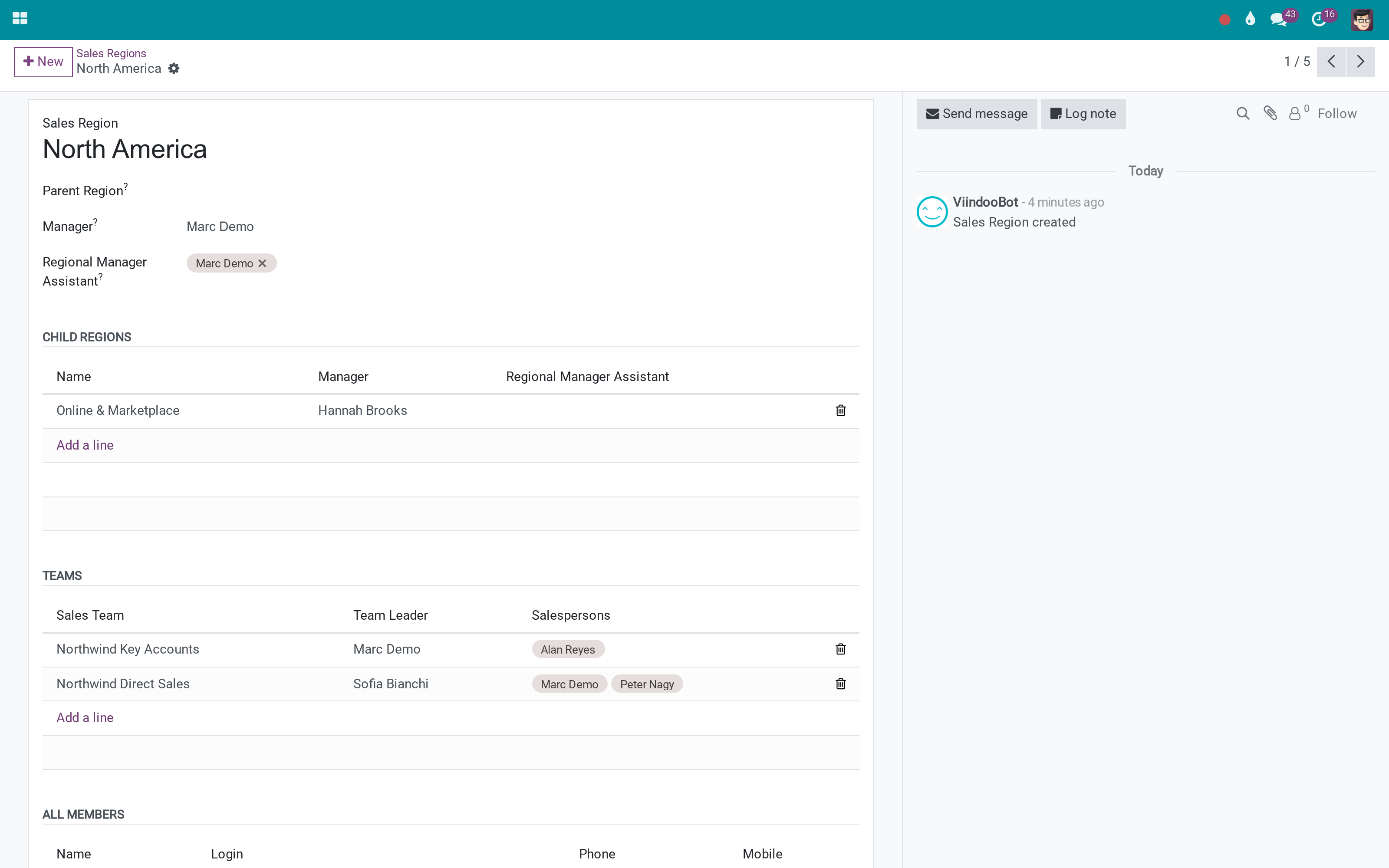
A region carries its manager and assistants, the teams inside it, and every salesperson those teams contain. Regions nest, so North America can sit above the channels that report into it.
Put the teams in their region
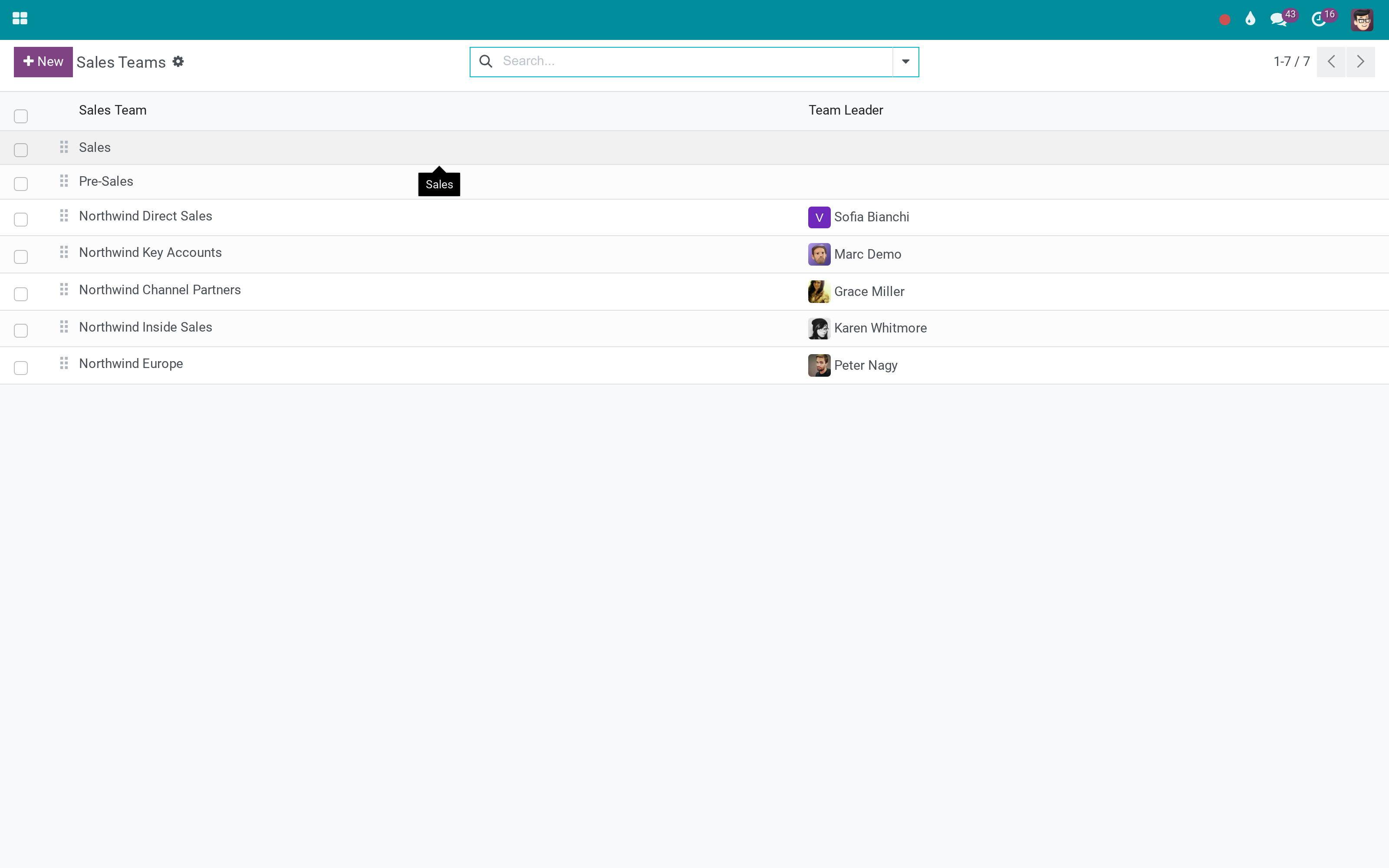
Each team points at one region. Its regional manager comes from the region, so the two never disagree - and the team leader is chosen from users who actually hold the leader role.
Grant the two roles that were missing
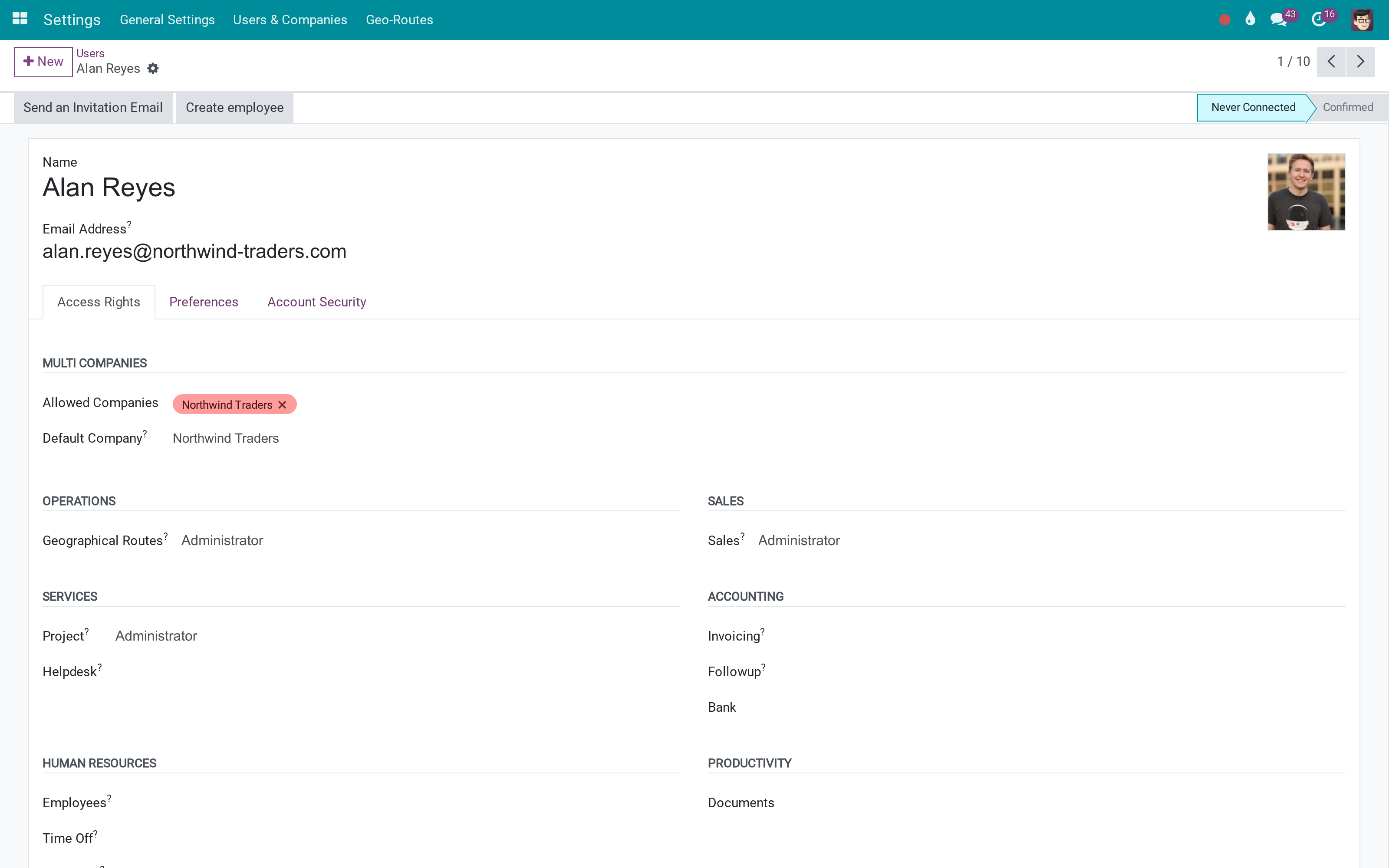
The access groups arrive with their record rules. A leader sees their team, a regional manager sees the branch - and nobody needs the administrator right to run their own patch.
What You Get
Sales regions with a parent, so a region can contain regions - and the managers of a parent region cover everything under it
Region manager plus assistants, both restricted to users who hold the regional role
Two new access groups: Sales Team Leader and Regional Manager, with the record rules that give them scope
Teams belong to a region, and their regional manager is derived from it rather than typed twice
A region lists every salesperson in every team under it, directly and recursively
Team leader can only be a user who holds the leader role - no accidental assignment
More Screens
Everything below was taken on a database seeded with real business data, on this series - not a mock-up and not a screenshot from an older version.
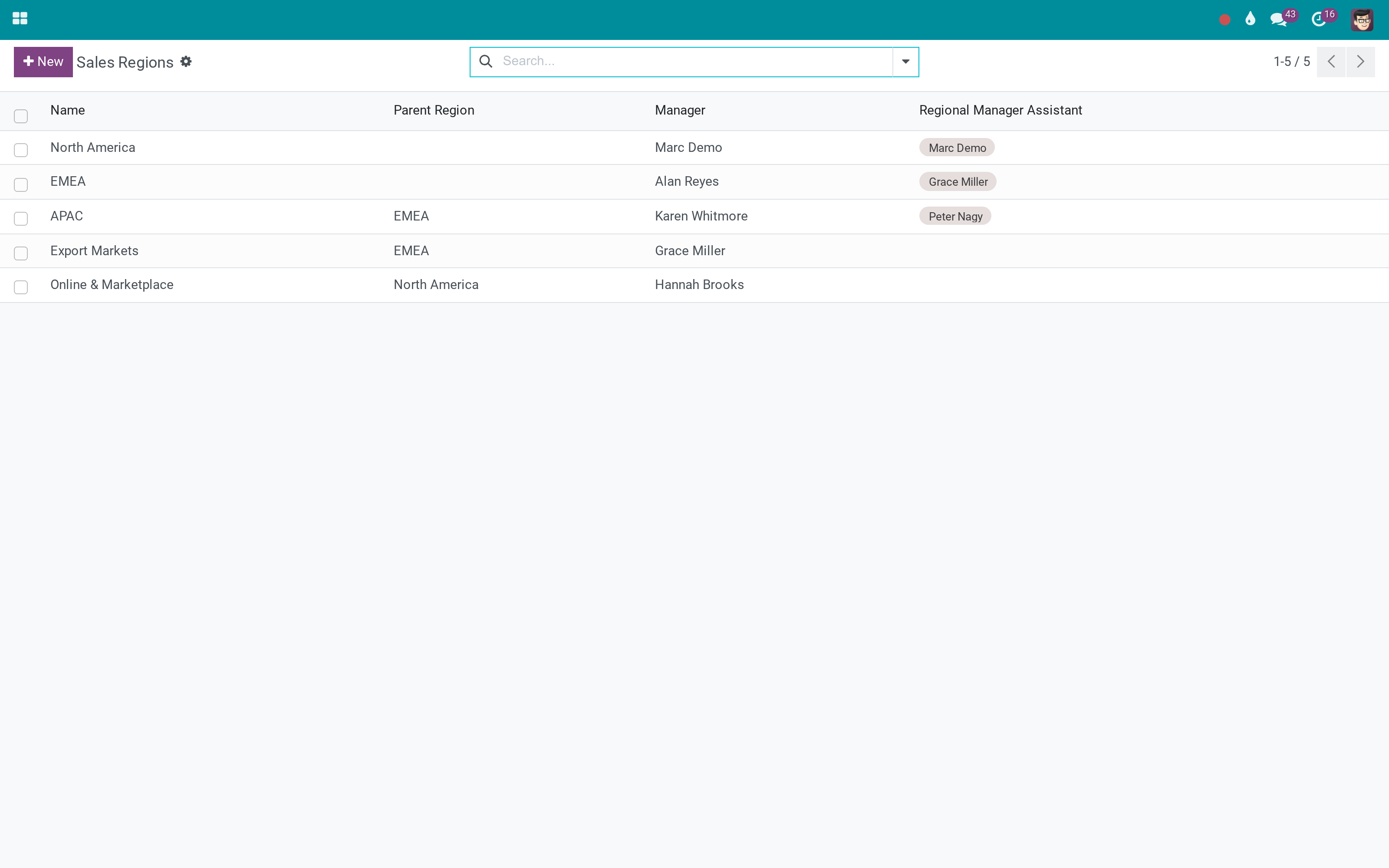
Sales regions
Teams and their regions
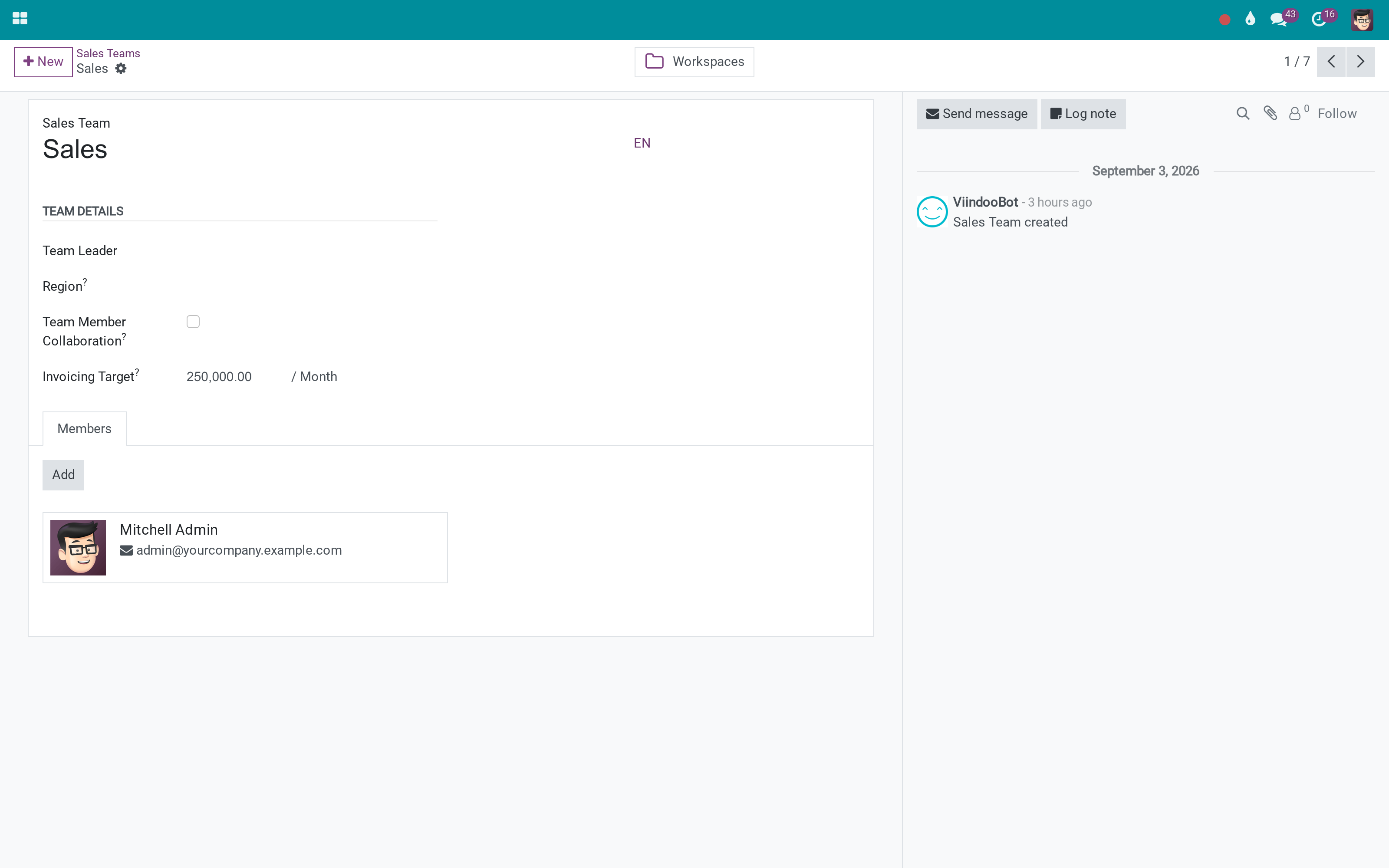
A sales team
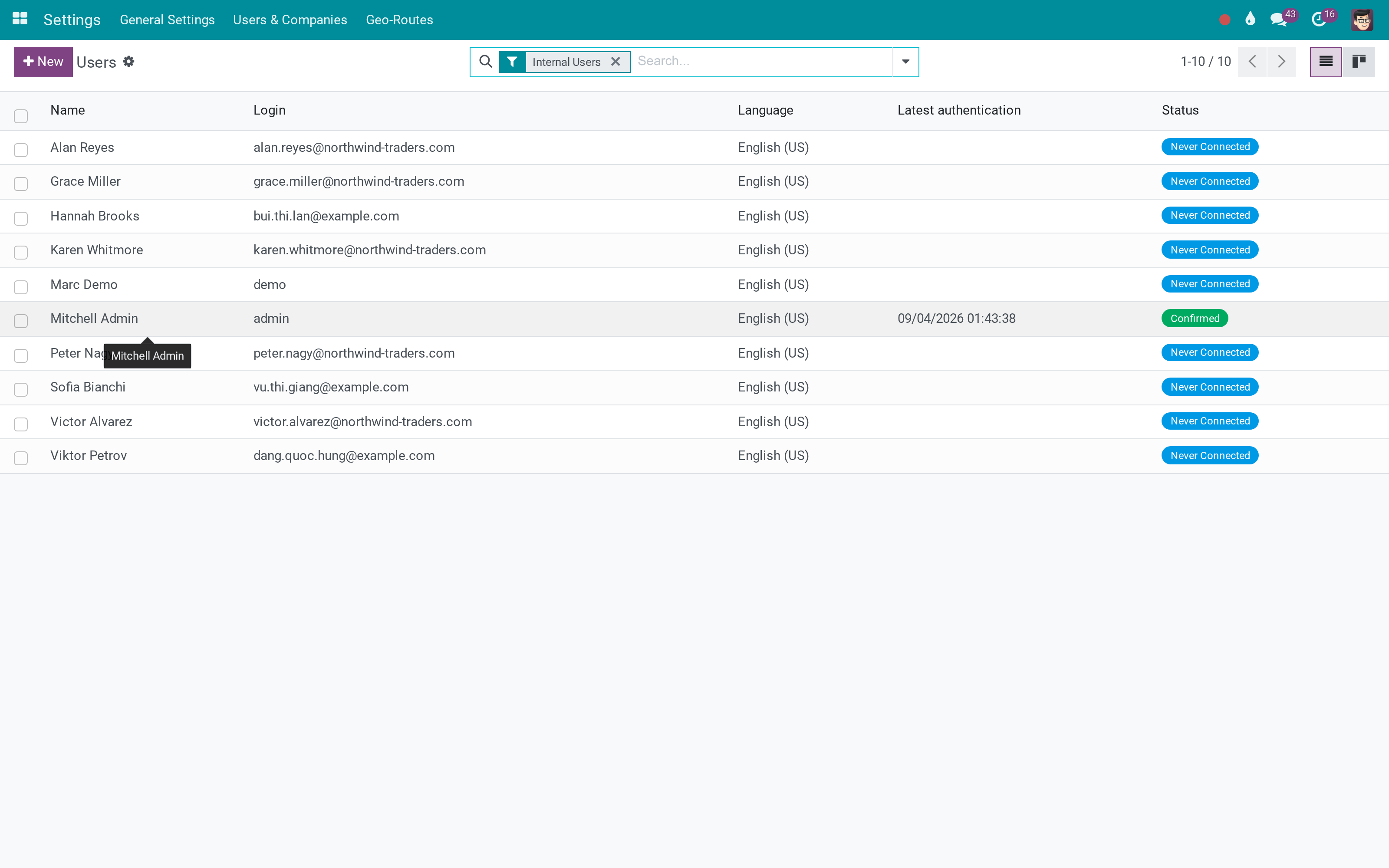
Users and their sales roles
What This App Does Not Do
Read this before you buy. Everything below is something the app deliberately leaves to another app or to you.
Quotas and target tracking are the Sales Target app; this defines who reports to whom.
No plans, no payouts - the hierarchy is here so a commission or target app has something to hang on.
Team leaders and regional managers get scope on the sales side; access to invoices, stock or HR follows those apps' own rules.
By design: the leader and manager fields only accept users who have the matching group, so the tree cannot promise access a user does not have.
Works Well With
Apps from the same stack, built to fit this one:
OmniApproval
Route discount and quotation approvals up the sales line.
OmniApproval™: One platform. Every approval.Who Should Use Sales Teams Advanced?
Team leader
Sees the team's pipeline and members without being made an administrator.
Regional manager
Sees every team in the region, and in the regions underneath it.
Sales director
Draws the organisation as a tree instead of maintaining a list of exceptions.
Administrator
Stops granting full sales rights to people who only need their own branch.
Frequently Asked Questions
What does Sales Teams Advanced do?
Odoo gives sales two roles: user and administrator. This adds the two every sales organisation actually has - the team leader who sees their team, and the regional manager who sees a whole branch of the tree.
What does Sales Teams Advanced not do?
It does not set sales targets. Quotas and target tracking are the Sales Target app; this defines who reports to whom. It is not a commission engine. No plans, no payouts - the hierarchy is here so a commission or target app has something to hang on. Rules cover sales records. Team leaders and regional managers get scope on the sales side; access to invoices, stock or HR follows those apps' own rules. A leader must hold the role. By design: the leader and manager fields only accept users who have the matching group, so the tree cannot promise access a user does not have.
Who is Sales Teams Advanced for?
Team leader: Sees the team's pipeline and members without being made an administrator. Regional manager: Sees every team in the region, and in the regions underneath it. Sales director: Draws the organisation as a tree instead of maintaining a list of exceptions. Administrator: Stops granting full sales rights to people who only need their own branch.
Which Odoo version and editions does it support?
Odoo 19.0 - Odoo Community, Odoo Enterprise, Viindoo Cloud. Upgrades to a newer Odoo series are a separate purchase for that series.
What does it depend on?
It installs on top of: sales_team. Odoo installs them with it.
How do I set it up?
Three steps to a sales organisation with a shape.
What works well with it?
Sales Target (to_sales_target): Targets per team and per region, once the regions exist. Advanced HR Management (viin_hr): The employee hierarchy alongside the sales hierarchy. OmniApproval (viin_approval): Route discount and quotation approvals up the sales line.
Can I try it before buying?
Yes - the Live Preview button at the top of this page opens the module's own screen on a working database.
How do I get support?
Write to apps.support@viindoo.com with your Odoo version and the technical name to_sales_team_advanced; pre-sales questions go to sales@viindoo.com.
See Sales Teams Advanced in Action
Live demo: v19demo-int.viindoo.com/web#action=to_sales_team_advanced.sales_team_region_config_action
Need help with Sales Teams Advanced?
For questions, implementation support or a custom feature, contact Viindoo.
Pre-Sales & Partnership
sales@viindoo.comUpgrades to a newer Odoo series are a separate purchase for that series.
All Viindoo apps: Viindoo Apps
Technical Requirement
Changes log
1.0.1 - Latest on the 17.0 line
- Regions nest: a parent region's manager covers every region and team underneath it.
- Team leader and region manager fields only accept users who hold the matching access group.
- A region lists the salespeople of all its teams, directly and recursively.
- Demo regions ship as North America, EMEA, APAC, Export Markets and Online & Marketplace.
Installation
- Navigate to Apps.
- Search with keyword to_sales_team_advanced.
- Press Install.
Instructions
Instruction video: Sales Teams Advanced
1. Add new access rights to the Sales app
Navigate to Settings ‣ Users & Companies ‣ Users, select a user account, and check the access rights of the Sales app:
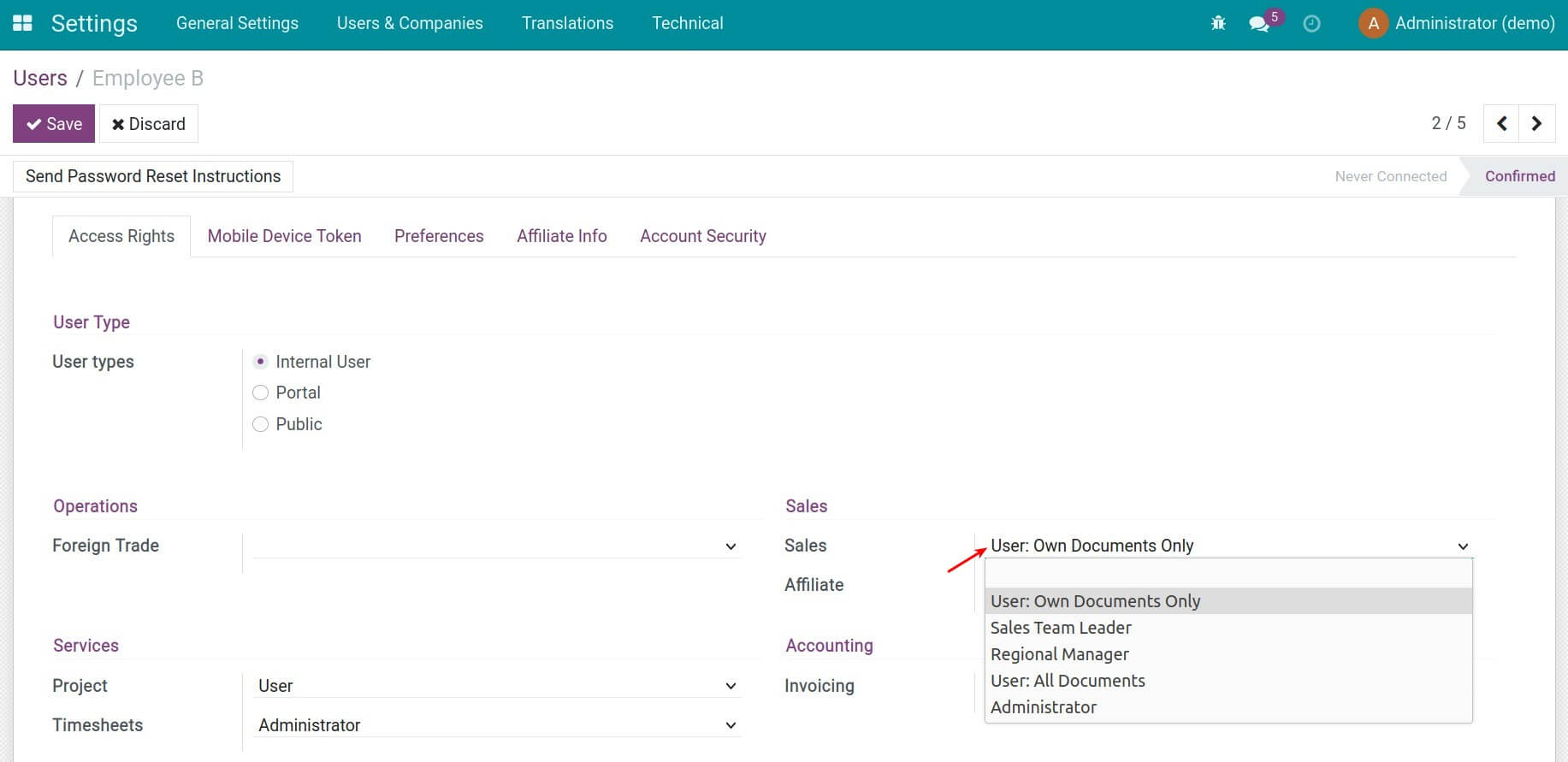
2. Categorize sales team by sales region
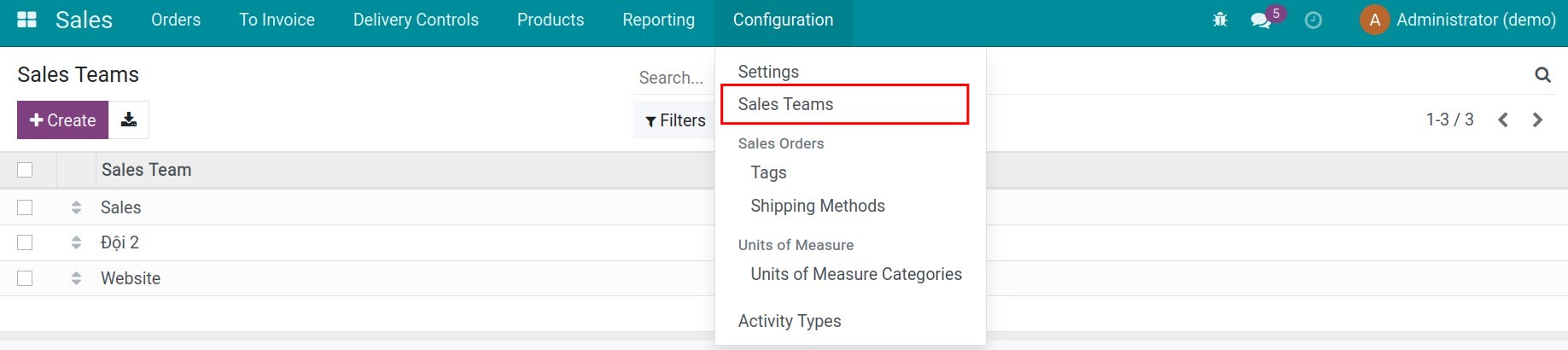
Navigate to Sales ‣ Configuration ‣ Sales Teams, select the team that needs to have the sales region configured, or create a new one:
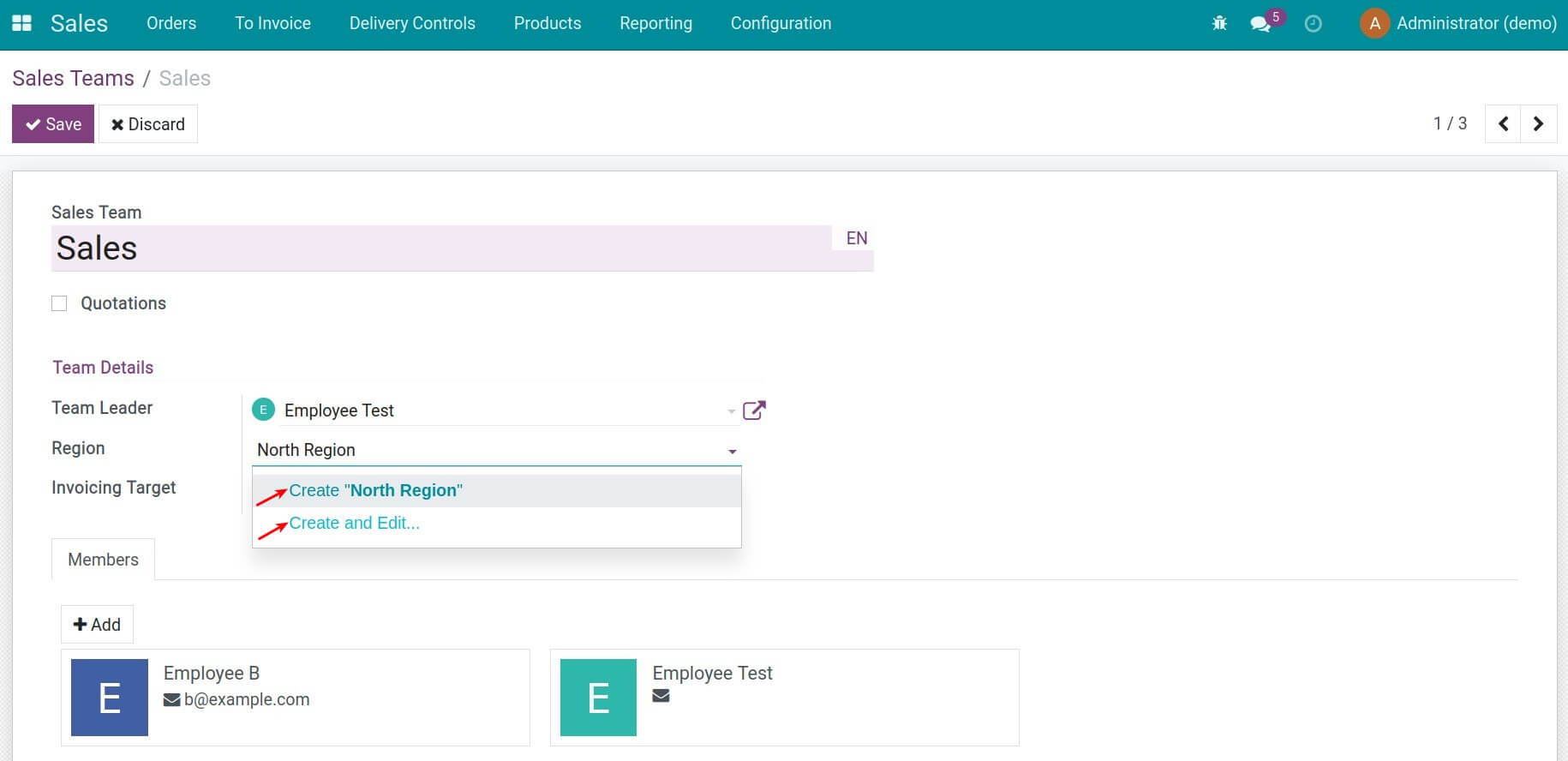
In the Region field, select the existing regions list or add the name of a region and press Create/Create and Edit:
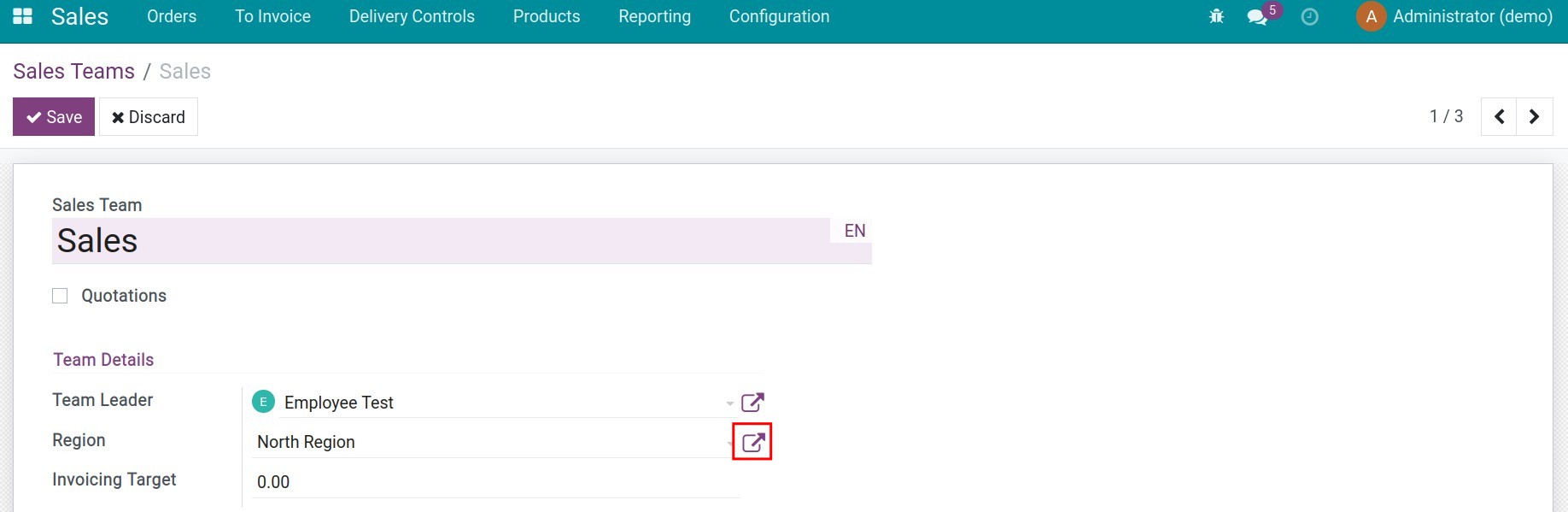
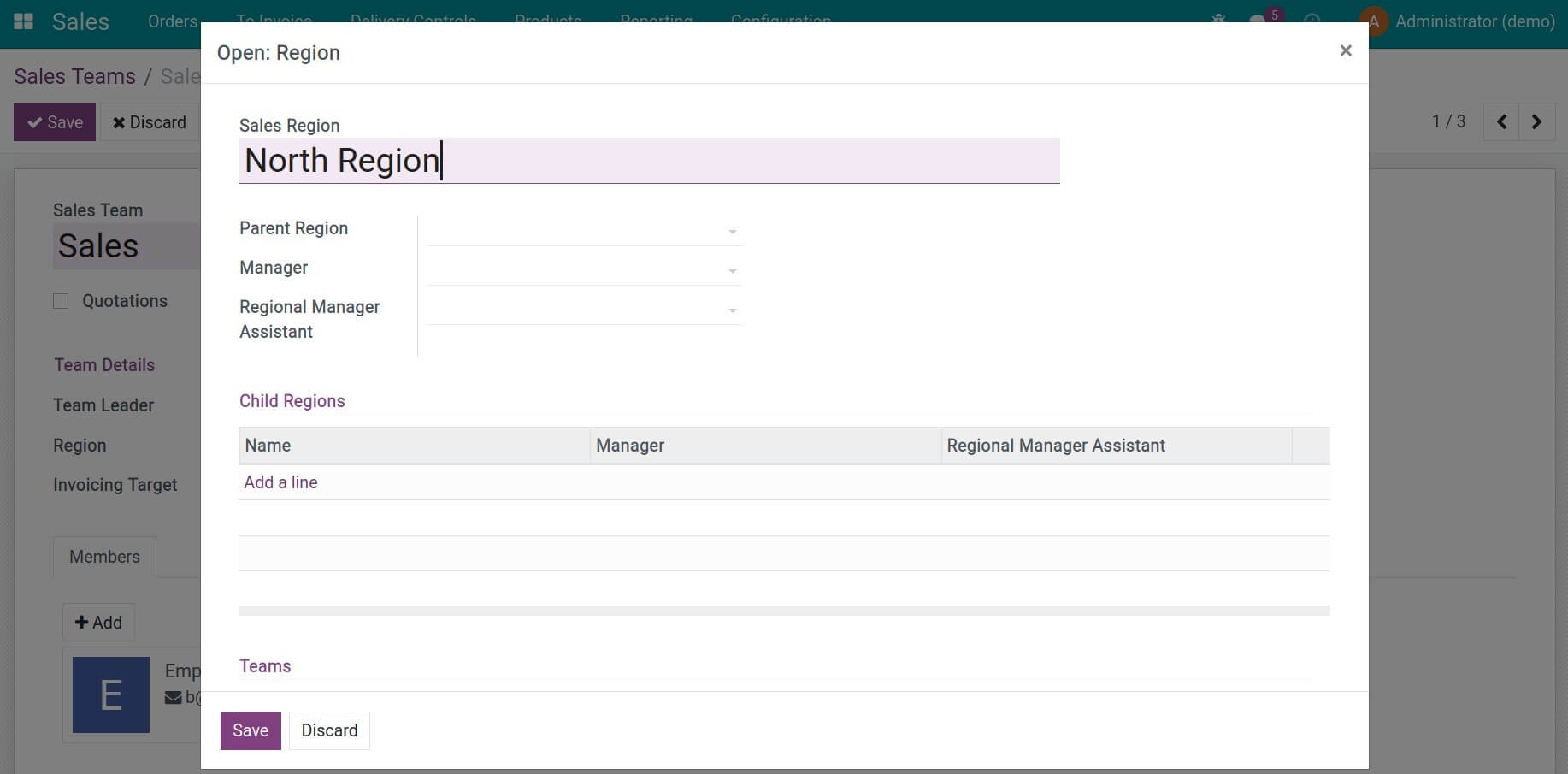
Click on the icon to open the sales region configuration and set up information:
Read more on how to establish sales regions.
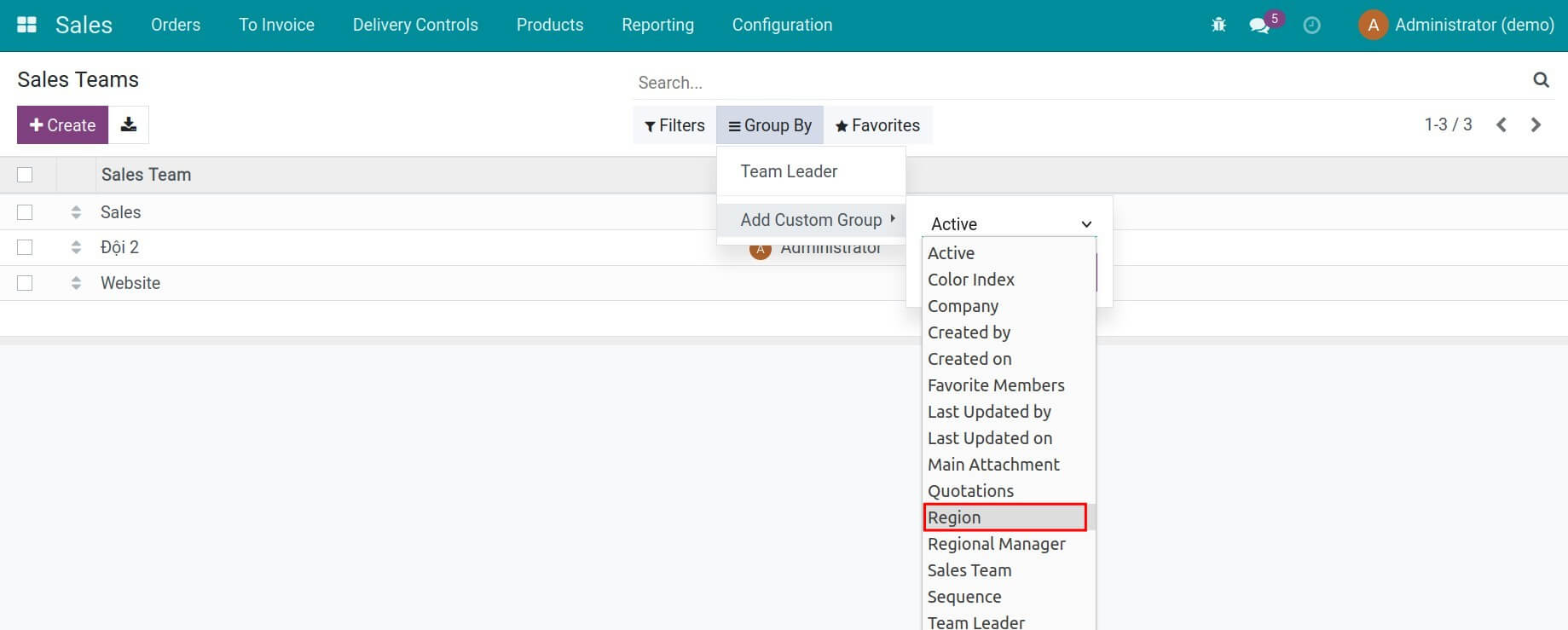
3. Filter/group, search for a sales team by sales region
This software and associated files (the "Software") may only be used (executed, modified, executed after modifications) if you have purchased a valid license from the authors, typically via Odoo Apps, or if you have received a written agreement from the authors of the Software (see the COPYRIGHT file).
You may develop Odoo modules that use the Software as a library (typically by depending on it, importing it and using its resources), but without copying any source code or material from the Software. You may distribute those modules under the license of your choice, provided that this license is compatible with the terms of the Odoo Proprietary License (For example: LGPL, MIT, or proprietary licenses similar to this one).
It is forbidden to publish, distribute, sublicense, or sell copies of the Software or modified copies of the Software.
The above copyright notice and this permission notice must be included in all copies or substantial portions of the Software.
THE SOFTWARE IS PROVIDED "AS IS", WITHOUT WARRANTY OF ANY KIND, EXPRESS OR IMPLIED, INCLUDING BUT NOT LIMITED TO THE WARRANTIES OF MERCHANTABILITY, FITNESS FOR A PARTICULAR PURPOSE AND NONINFRINGEMENT. IN NO EVENT SHALL THE AUTHORS OR COPYRIGHT HOLDERS BE LIABLE FOR ANY CLAIM, DAMAGES OR OTHER LIABILITY, WHETHER IN AN ACTION OF CONTRACT, TORT OR OTHERWISE, ARISING FROM, OUT OF OR IN CONNECTION WITH THE SOFTWARE OR THE USE OR OTHER DEALINGS IN THE SOFTWARE.