
Business Trips Approval
by Viindoo
| Lines of Code | 612 |
| Technical name | viin_business_trip_approval |
| License | OPL-1 |
| Website | https://viindoo.com/apps/modules/18.0/viin_business_trip_approval |
| Read description for | v 17.0 |
| Required Apps | Discuss (mail) Employees (hr) Contacts (contacts) |
| Included Dependencies | Business Trips Viindoo Unified Routing Framework Viindoo Base OmniApproval™: One platform. Every approval. Advanced HR Management API Request Logger Safe IR Metadata Proxies Country State Group |

Trip approval as configuration, not code
A seeded Business Trip approval type: submit a trip for approval in one click, approving the request confirms the trip, the trip itself is never blocked, and every rule lives on the type.
Business Trips Approval (technical name viin_business_trip_approval) is an Odoo 18.0 app for Odoo Community and Odoo Enterprise and Viindoo Cloud, built for employee, manager, administrator, finance.
At a Glance
The facts of Business Trips Approval, version 1.0, in one place. Published by Viindoo.
How It Works
Submit the trip; approve the request; the trip confirms.
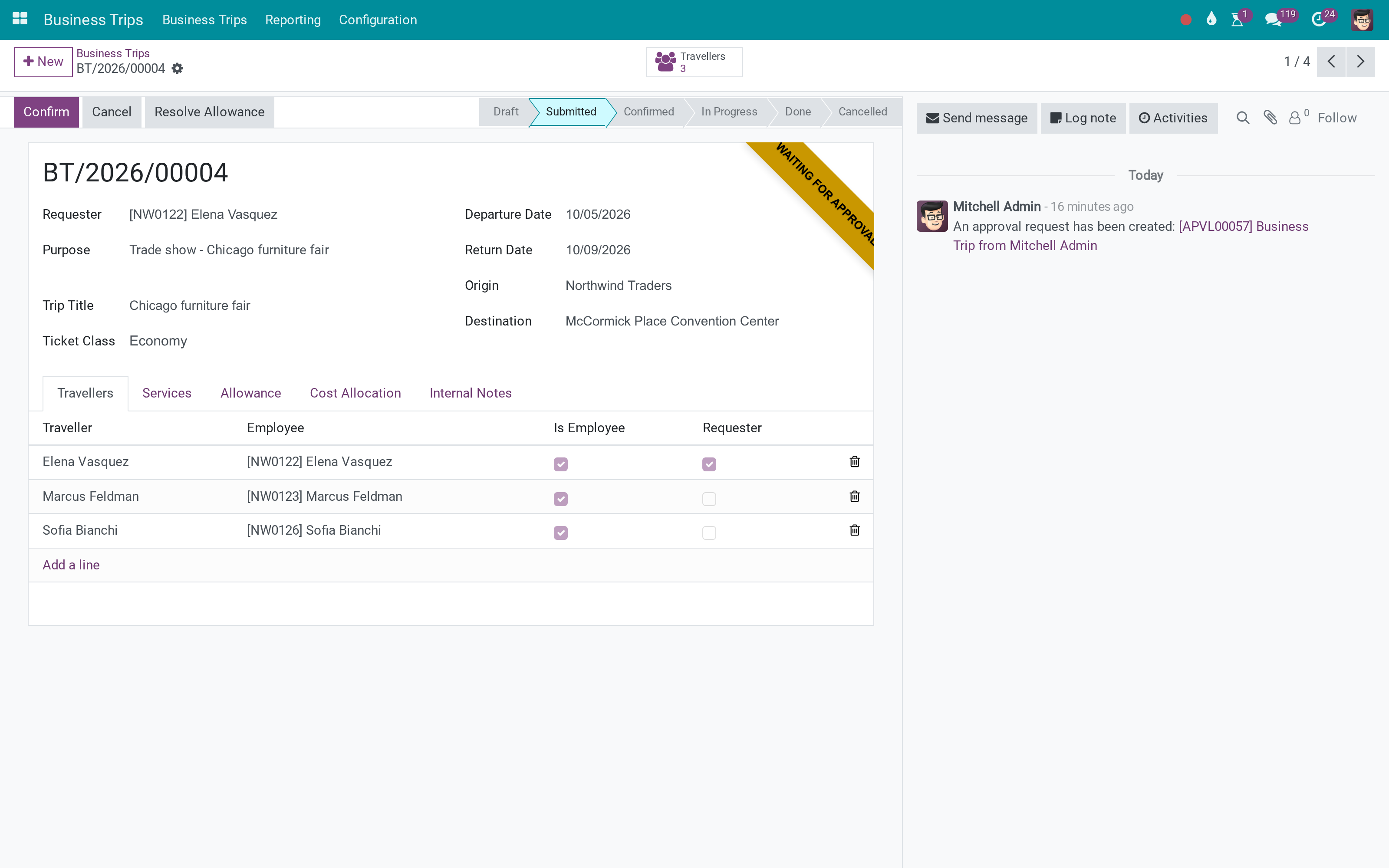
The trip
Approval Requests counted on the trip.
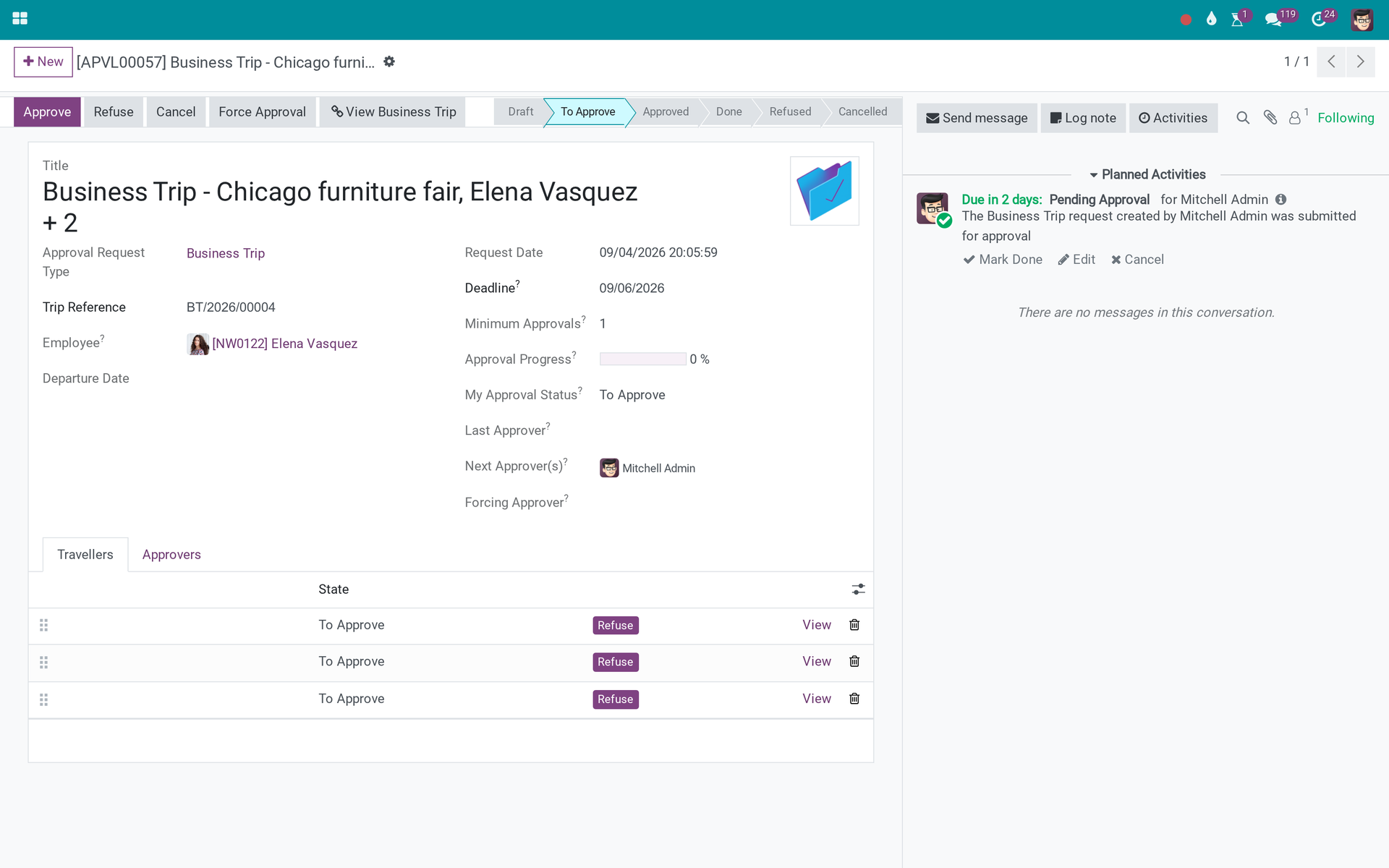
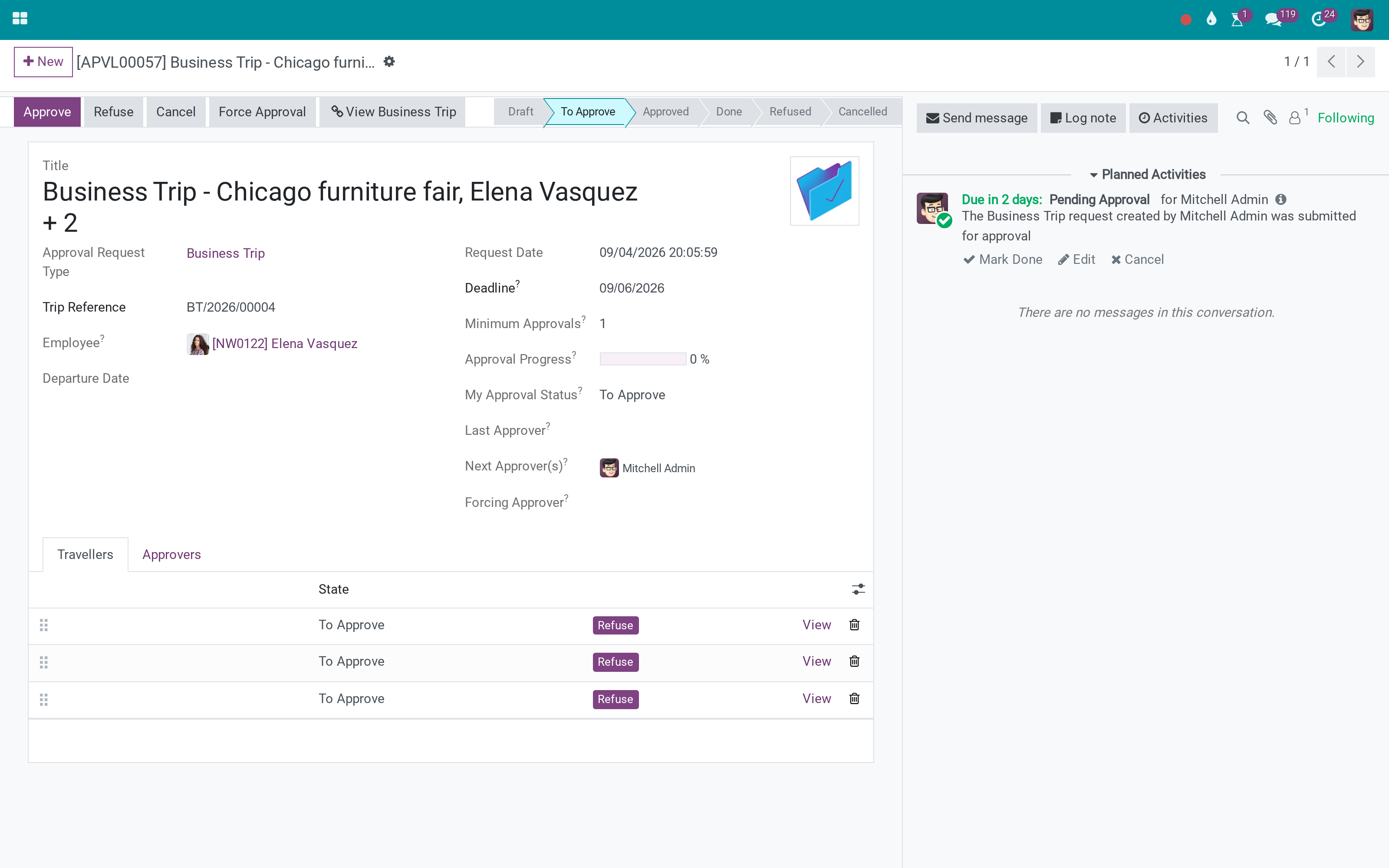
The request
Trip reference, requester and travellers on the request; approvers from the type.
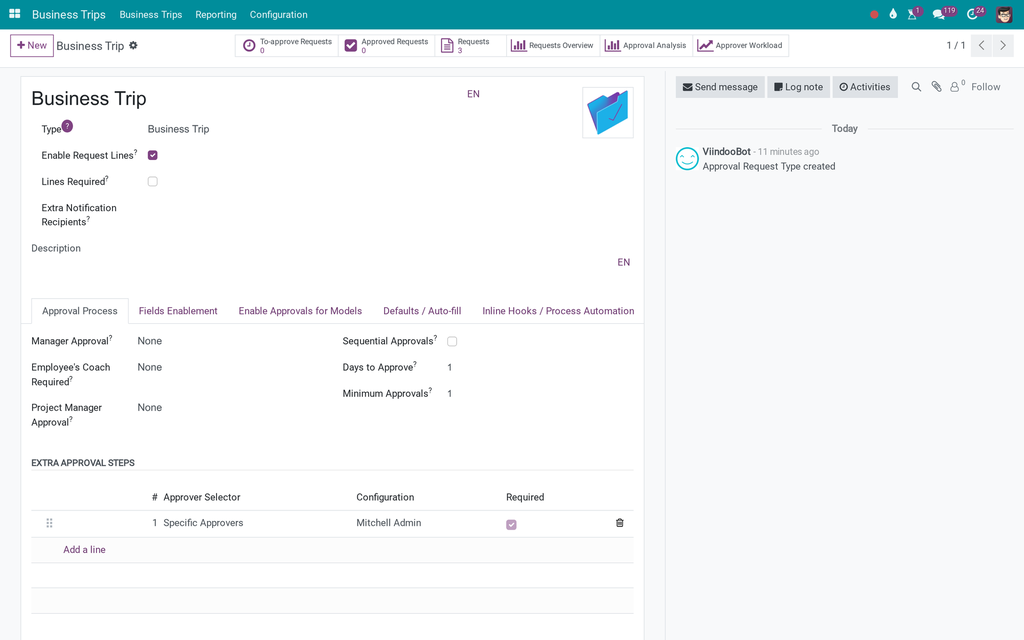
The type
Where the rules live.
What You Get
Seeded Business Trip approval type per company
Submit for approval from the trip; Approval Requests button and count
Approving the request confirms the trip; the trip is never blocked
Reset to draft when the request allows
Approvers, minimum approvals and required fields configured on the type
Installed automatically when both parents are present
More Screens
Everything below was taken on a database seeded with real business data, on this series - not a mock-up and not a screenshot from an older version.
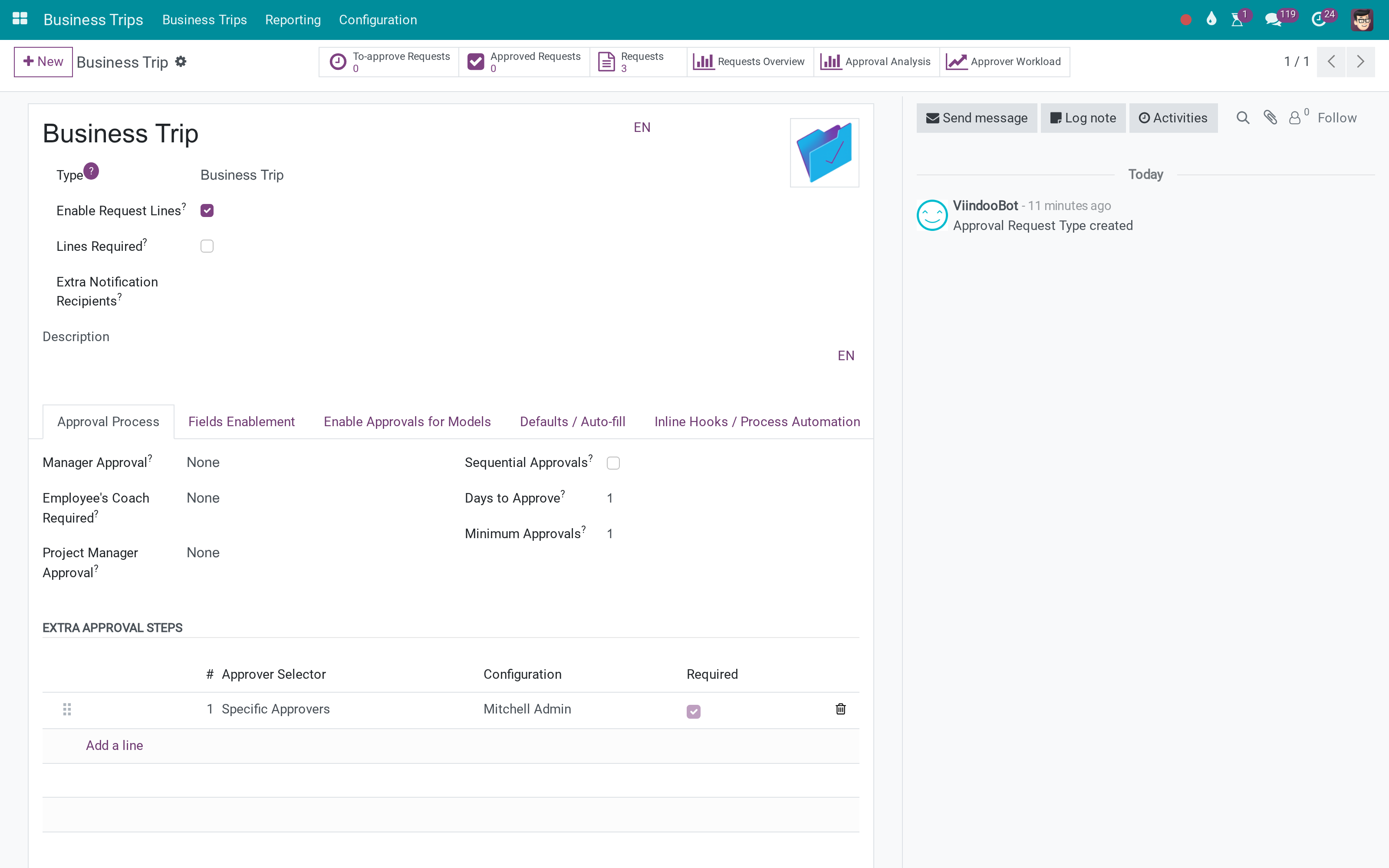
The Business Trip approval type
What This App Does Not Do
Read this before you buy. Everything below is something the app deliberately leaves to another app or to you.
Cancel it to resubmit.
Not from the trip.
Install it and the behaviour is there.
Depends on viin_approval.
Works Well With
Apps from the same stack, built to fit this one:
Who Should Use Business Trips Approval?
Employee
One click to submit.
Manager
Approves in the Approvals app.
Administrator
Changes the flow without a developer.
Finance
Approval confirms the trip; the trip is never blocked.
Frequently Asked Questions
What does Business Trips Approval do?
A seeded Business Trip approval type: submit a trip for approval in one click, approving the request confirms the trip, the trip itself is never blocked, and every rule lives on the type.
What does Business Trips Approval not do?
One open request per trip. Cancel it to resubmit. Approvers come from the type. Not from the trip. Nothing to configure. Install it and the behaviour is there. Needs OmniApproval. Depends on viin_approval.
Who is Business Trips Approval for?
Employee: One click to submit. Manager: Approves in the Approvals app. Administrator: Changes the flow without a developer. Finance: Approval confirms the trip; the trip is never blocked.
Which Odoo version and editions does it support?
Odoo 18.0 - Odoo Community, Odoo Enterprise, Viindoo Cloud. Upgrades to a newer Odoo series are a separate purchase for that series.
What does it depend on?
It installs on top of: viin_business_trip, viin_approval. Odoo installs them with it.
How do I set it up?
Submit the trip; approve the request; the trip confirms.
What works well with it?
Business Trips (viin_business_trip): The trip. OmniApproval (viin_approval): The engine. Flexible Approval Flow (viin_approval_flexible_flow): Add an approver mid-flight.
Can I try it before buying?
Yes - the Live Preview button at the top of this page opens the module's own screen on a working database.
How do I get support?
Write to apps.support@viindoo.com with your Odoo version and the technical name viin_business_trip_approval; pre-sales questions go to sales@viindoo.com.
See Business Trips Approval in Action
Live demo: v18demo-int.viindoo.com/web#action=viin_business_trip.business_trip_action
Need help with Business Trips Approval?
For questions, implementation support or a custom feature, contact Viindoo.
Pre-Sales & Partnership
sales@viindoo.comUpgrades to a newer Odoo series are a separate purchase for that series.
All Viindoo apps: Viindoo Apps
Technical Requirement
Changes log
1.0 - Latest on the 17.0 line
- Aligned with the 17.0 models and views.
Business Trips Approval
For travellers, trip officers, approvers and approval administrators.
Note
Extends OmniApproval™ - see its documentation for roles, approvers, snapshots and every other engine feature. This guide only describes what the Business Trip approval type adds.
Note
Extends Business Trips - see its documentation for trips, travellers, services and costs.
Overview
A business trip should be confirmed only after the right people have agreed to it. The module adds one approval type to every company, Business Trip, and links it to the trips:
- A traveller asks for approval from the trip. Each traveller of the trip appears as a line of the request, so the approver sees who travels without opening the trip.
- The request can be sent only for a trip that has a traveller and whose return date is not before its departure date.
- Approving the request confirms the trip.
| Role | What they do | Access right to assign |
|---|---|---|
| Traveller | Prepares the trip and asks for its approval. | Business Trips: User: Own Trips Only |
| Trip officer | Follows all trips and prepares trips for other employees. | Business Trips: Administrator |
| Approver | Decides on the requests that reach them. To complete an approval, the approver must also hold the Business Trips: Administrator right. | Team Approver or Officer (Approvals), and Business Trips: Administrator |
| Approval administrator | Adjusts the Business Trip type. | Administrator (Approvals) |
The Team Approver, Officer and Administrator rights of approvals are described in the Roles and Access Rights section of the OmniApproval™ guide.
Setup (for the Administrator)
- Go to Apps, search for Business Trips Approval and click Install. It is installed together with Business Trips and OmniApproval™ when both are present.
- Open Approval > Configuration > Approval Types. Each company now has an approval type named Business Trip, ready to use.
- Give each person the access rights of their role under Settings > Users & Companies > Users.
The type asks the employee's manager for the first approval step and names no approver. Who approves, and in how many steps, is yours to decide: add approvers to the type as described in the Approvers section of the OmniApproval™ guide. Give the Business Trips: Administrator right to each person who approves.
What the Business Trip type adds
- The type applies to trips that are in Draft or Submitted. One request is created for each trip.
- The request shows the Trip Reference and the Departure Date of the trip. Its Travellers tab lists the travellers of the trip, with their employee.
- Every trip is marked as requiring approval: until it is approved, the trip form shows a Missing Approval ribbon.
Using the approval
Asking for approval (Traveller)
- Open the trip under Business Trips > Business Trips > My Business Trips (or All Business Trips).
- Check that the trip has at least one traveller and that its return date is not before its departure date.
- Click Actions > Get Approved.
- Check the approval type and the trip shown in the Submit for Approval window.
- Click Create Approval Request.
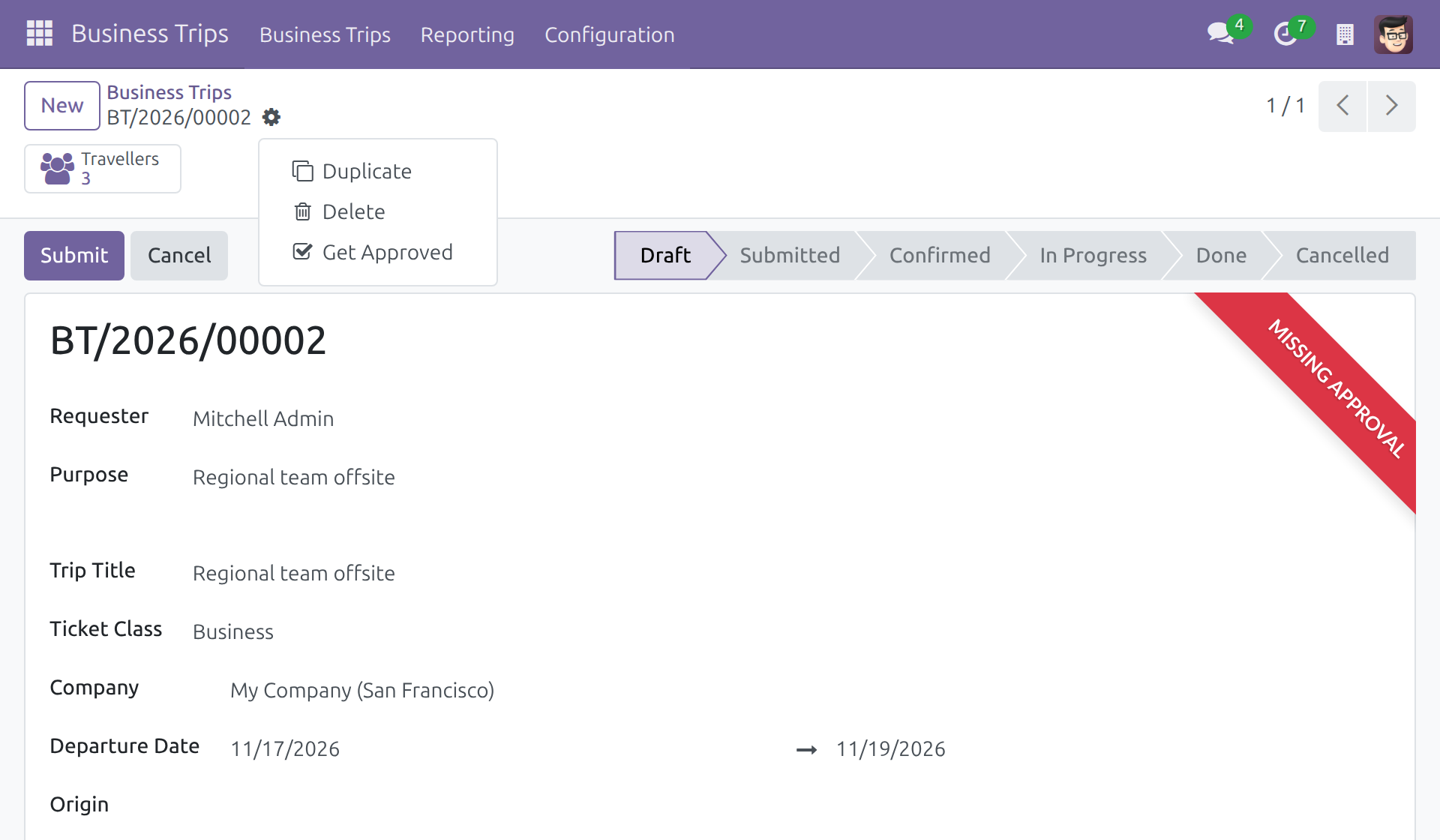
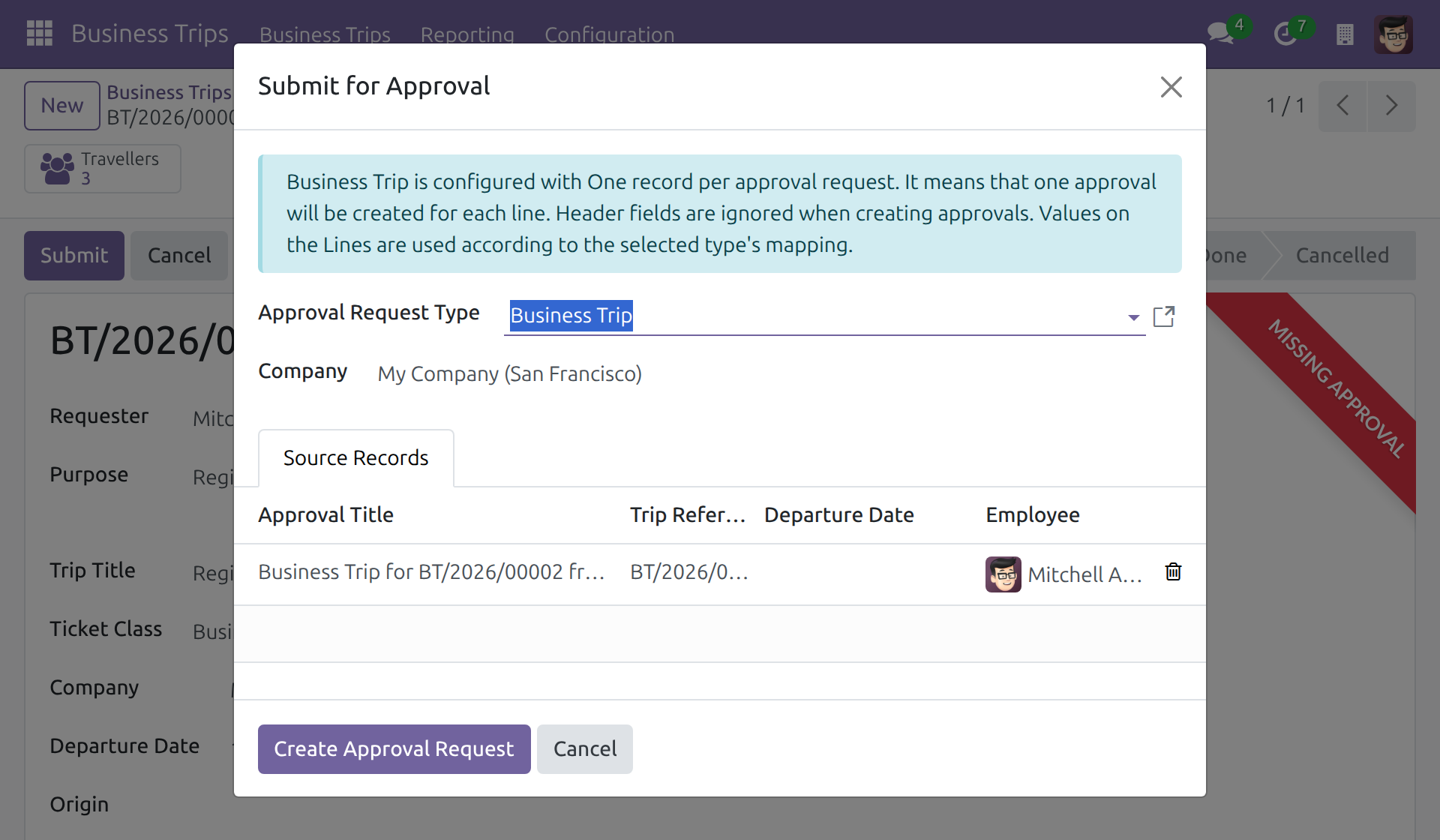
The request opens in Draft. Click Submit to send it to the approvers. Submitting is blocked with a message and the request stays in Draft when:
- the trip has no traveller: Trip ... must have at least one traveller before it can be submitted for approval.
- the return date is before the departure date: Trip ... has a return date before its departure date.
Correct the trip and submit the request again. Until the request is decided, the trip keeps its state.
Approving the request (Approver)
Open the request and click Approve. When the last required approval is given, the request is Approved and the trip becomes Confirmed, whether it was Draft or Submitted; the chatter of the trip records Trip approved and confirmed via approval. A trip with no traveller cannot be approved: the message Trip ... cannot be approved because it has no traveller. is shown.
The approver confirms the trip with their own rights. An approver who does not hold the Business Trips: Administrator right gets an access error on the trip when giving the last approval, and the trip stays as it is: give the right to the approvers of the type, as described in Setup. Refusing needs no trip right.
Refusing, cancelling and resetting
Refusing or cancelling a request, or resetting it to Draft, leaves the trip as it is: a trip that was Submitted stays Submitted, a Confirmed trip stays Confirmed. To stop a trip, use Cancel on the trip itself. The general behaviour of these actions is described in the Cancelling, Refusing and Resetting to Draft section of the OmniApproval™ guide.
No lock on the trip
Approval never blocks changes to the trip by itself, including its confirmation by hand. See the Business Documents section of the OmniApproval™ guide to add a block.
This software and associated files (the "Software") may only be used (executed, modified, executed after modifications) if you have purchased a valid license from the authors, typically via Odoo Apps, or if you have received a written agreement from the authors of the Software (see the COPYRIGHT file).
You may develop Odoo modules that use the Software as a library (typically by depending on it, importing it and using its resources), but without copying any source code or material from the Software. You may distribute those modules under the license of your choice, provided that this license is compatible with the terms of the Odoo Proprietary License (For example: LGPL, MIT, or proprietary licenses similar to this one).
It is forbidden to publish, distribute, sublicense, or sell copies of the Software or modified copies of the Software.
The above copyright notice and this permission notice must be included in all copies or substantial portions of the Software.
THE SOFTWARE IS PROVIDED "AS IS", WITHOUT WARRANTY OF ANY KIND, EXPRESS OR IMPLIED, INCLUDING BUT NOT LIMITED TO THE WARRANTIES OF MERCHANTABILITY, FITNESS FOR A PARTICULAR PURPOSE AND NONINFRINGEMENT. IN NO EVENT SHALL THE AUTHORS OR COPYRIGHT HOLDERS BE LIABLE FOR ANY CLAIM, DAMAGES OR OTHER LIABILITY, WHETHER IN AN ACTION OF CONTRACT, TORT OR OTHERWISE, ARISING FROM, OUT OF OR IN CONNECTION WITH THE SOFTWARE OR THE USE OR OTHER DEALINGS IN THE SOFTWARE.