
Facebook Social Marketing
by Viindoo
| Lines of Code | 2296 |
| Technical name | viin_social_facebook |
| License | OPL-1 |
| Website | https://viindoo.com/apps/modules/17.0/viin_social_facebook |
| Read description for | v 13.0 v 14.0 v 15.0 v 16.0 v 18.0 |
| Required Apps | Discuss (mail) |
| Included Dependencies | Viindoo Base Social Marketing |

Facebook pages in Social Marketing: post, schedule, comments, reviews, Messenger
Link a Facebook account with the app id and secret, pull the pages you manage with their counts, post articles with images or video (now or scheduled on Facebook's side), synchronise posts and engagement, receive comments and reactions through webhooks, answer Messenger conversations from Discuss, and read page reviews.
Facebook Social Marketing (technical name viin_social_facebook) is an Odoo 17.0 app for Odoo Community and Odoo Enterprise and Viindoo Cloud, built for marketer, support.

At a Glance
The facts of Facebook Social Marketing, version 0.2, in one place. Published by Viindoo.
How It Works
Enter the app credentials, link the account, synchronise pages; post.
Media
Link account.

Page
About, filters, counts.
Reviews
Synchronised reviews.

Preview
How the post will look.

Post
Engagement counts.

Settings
App ID and secret.

What You Get
OAuth link with app id and secret
Pages synchronised with counts and settings
Post text, images, video, scheduled
Facebook preview on the article
Comments and reactions as notices via webhook
Messenger conversations in Discuss
Page reviews
What This App Does Not Do
Read this before you buy. Everything below is something the app deliberately leaves to another app or to you.
Reviewed by Meta.
Configure the callback.
Counts and reviews were entered.
Works Well With
Apps from the same stack, built to fit this one:
Who Should Use Facebook Social Marketing?
Marketer
Preview before it goes out.
Support
A Messenger question answered from Discuss.
Frequently Asked Questions
What does Facebook Social Marketing do?
Link a Facebook account with the app id and secret, pull the pages you manage with their counts, post articles with images or video (now or scheduled on Facebook's side), synchronise posts and engagement, receive comments and reactions through webhooks, answer Messenger conversations from Discuss, and read page reviews.
What does Facebook Social Marketing not do?
Needs a Facebook app with the page permissions. Reviewed by Meta. Webhooks need a public HTTPS URL. Configure the callback. The lab data here is not synchronised from Facebook. Counts and reviews were entered.
Who is Facebook Social Marketing for?
Marketer: Preview before it goes out. Support: A Messenger question answered from Discuss.
Which Odoo version and editions does it support?
Odoo 17.0 - Odoo Community, Odoo Enterprise, Viindoo Cloud. Upgrades to a newer Odoo series are a separate purchase for that series.
What does it depend on?
It installs on top of: viin_social. Odoo installs them with it.
How do I set it up?
Enter the app credentials, link the account, synchronise pages; post.
What works well with it?
Social Marketing (viin_social): Required. Social Lead (viin_social_lead): Leads from Messenger.
Can I try it before buying?
Yes - the Live Preview button at the top of this page opens the module's own screen on a working database.
How do I get support?
Write to apps.support@viindoo.com with your Odoo version and the technical name viin_social_facebook; pre-sales questions go to sales@viindoo.com.
See Facebook Social Marketing in Action
Facebook pages in Social Marketing: post, schedule, comments, reviews, Messenger
Need help with Facebook Social Marketing?
For questions, implementation support, or consulting services, contact Viindoo.
Pre-Sales & Partnership
sales@viindoo.comWhen contacting us, please include:
- Odoo/Viindoo version (Odoo CE / Viindoo Editions).
- Number of users and business scope.
- Other modules currently in use.
Technical Support
apps.support@viindoo.comFor faster troubleshooting, please provide:
- Order number or app reference.
- Odoo/Viindoo version & edition.
- Steps to reproduce the issue.
- Screenshots/logs if available.
Upgrades to a newer Odoo series are a separate purchase for that series.
Technical Requirement
Changes log
0.2 - Latest on the 17.0 line
- Aligned with the 17.0 models and views.
Installation
- Navigate to Apps.
- Search with keyword viin_social_facebook.
- Press Install.
Instruction
Instruction video: Facebook Social Marketing
Concepts
- Social marketing: also known as social media marketing, is a form of advertising through the creation and sharing of content on the social networks.
- Social networks: a website or an online platform, with many features that help connect people.
- Article: content need to be posted.
- Post: content are posted on social networks.
Usages
1. Integrate the Social Marketing app with Facebook
- Step 1: connect API with Facebook.
You need to access Facebook Developer to connect API.
Refer to the article about Connect API with Facebook.
- Step 2: connect the Facebook pages with the Social Marketing app.
Once you've finished connecting to API, you can link the specific Facebook pages you need to manage.
Refer to the article about Integrate specific pages with the system.
2. Create articles on social media
- Step 1: create an article.
- Step 2: confirm articles.
- Step 3: post confirmed articles.
- Step 4: see the list of posts.
Refer to the article about Create articles on social media.
3. Manage posts on social media
To see interactions, users visit each post. In addition, there are several operations to manage posts such as: synchronizing posts, synchronizing pages, updating social posts, and deleting posts.
Refer to the article about Manage posts on social media.
4. Manage user interactions
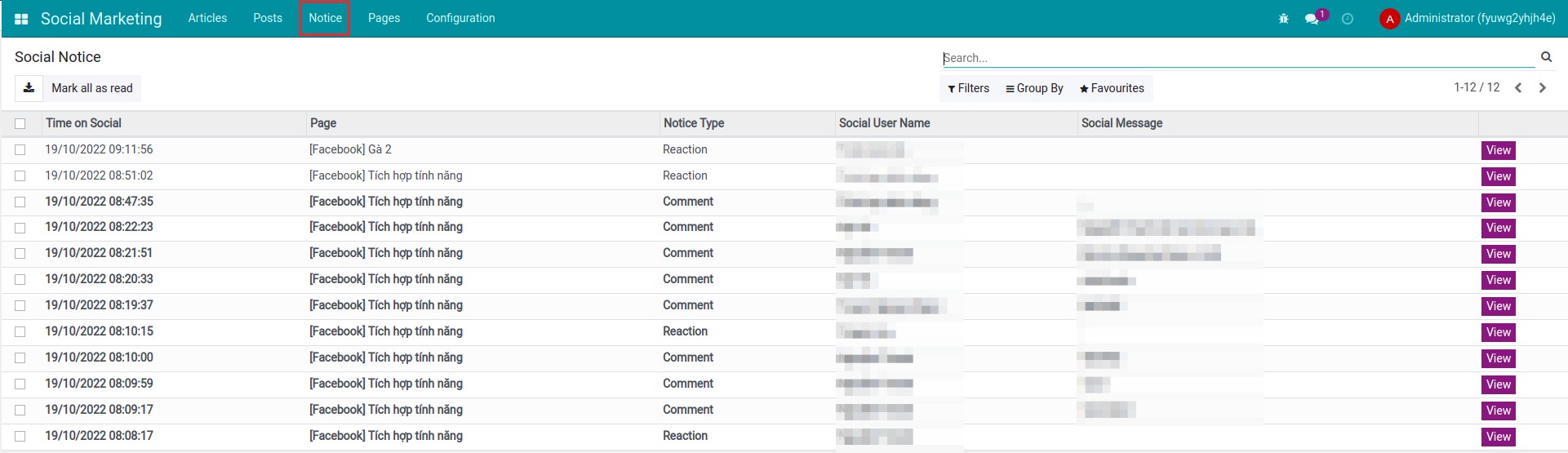
You can view all user interaction notifications in posts by navigating to Social Marketing ‣ Notice.
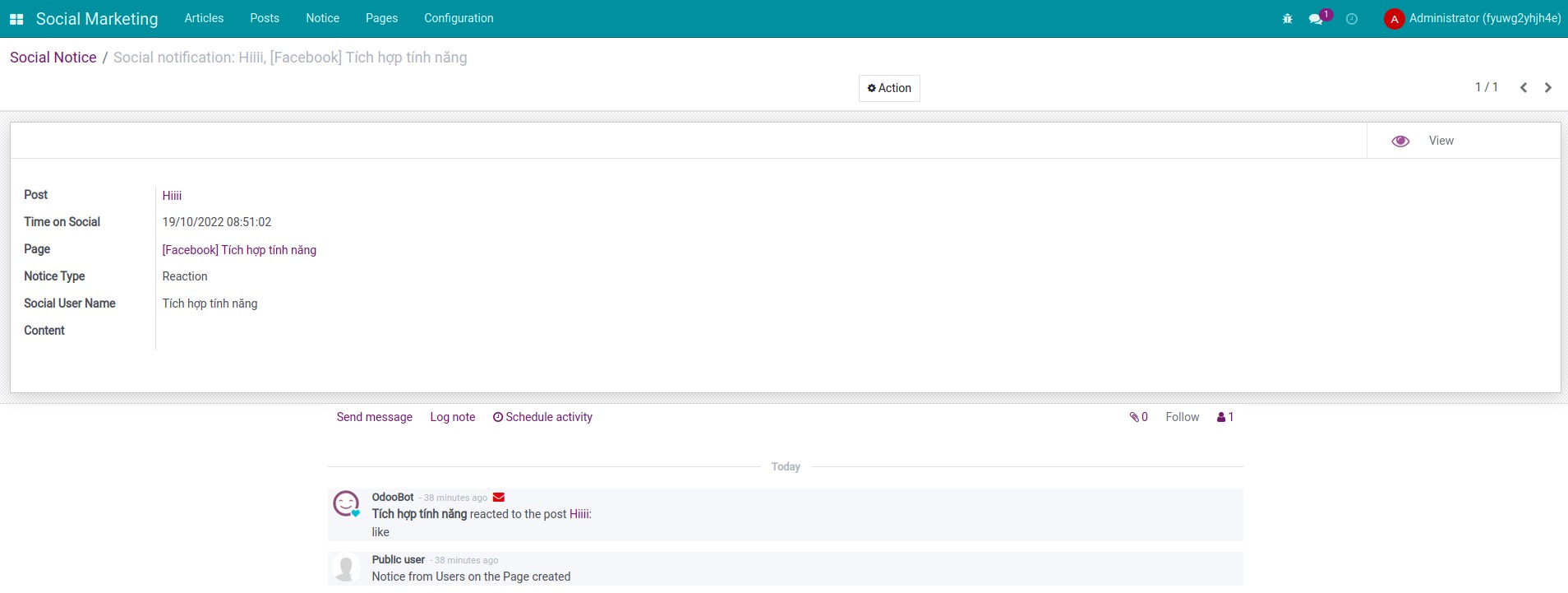
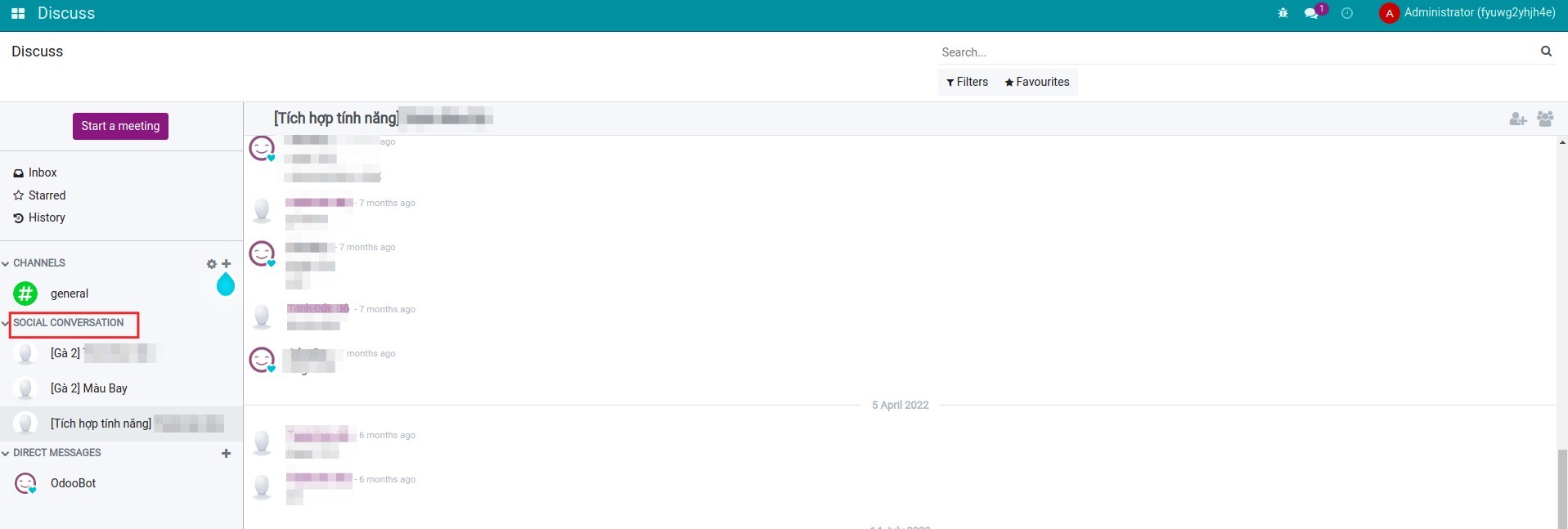
In addition, you can also manage messages from the Facebook page. Navigate to the page you manage, select Get message to update the messages sent by users from the Facebook page.
You navigate to the Discuss app to see messages from the Facebook page.
This software and associated files (the "Software") may only be used (executed, modified, executed after modifications) if you have purchased a valid license from the authors, typically via Odoo Apps, or if you have received a written agreement from the authors of the Software (see the COPYRIGHT file).
You may develop Odoo modules that use the Software as a library (typically by depending on it, importing it and using its resources), but without copying any source code or material from the Software. You may distribute those modules under the license of your choice, provided that this license is compatible with the terms of the Odoo Proprietary License (For example: LGPL, MIT, or proprietary licenses similar to this one).
It is forbidden to publish, distribute, sublicense, or sell copies of the Software or modified copies of the Software.
The above copyright notice and this permission notice must be included in all copies or substantial portions of the Software.
THE SOFTWARE IS PROVIDED "AS IS", WITHOUT WARRANTY OF ANY KIND, EXPRESS OR IMPLIED, INCLUDING BUT NOT LIMITED TO THE WARRANTIES OF MERCHANTABILITY, FITNESS FOR A PARTICULAR PURPOSE AND NONINFRINGEMENT. IN NO EVENT SHALL THE AUTHORS OR COPYRIGHT HOLDERS BE LIABLE FOR ANY CLAIM, DAMAGES OR OTHER LIABILITY, WHETHER IN AN ACTION OF CONTRACT, TORT OR OTHERWISE, ARISING FROM, OUT OF OR IN CONNECTION WITH THE SOFTWARE OR THE USE OR OTHER DEALINGS IN THE SOFTWARE.