
| Lines of Code | 962 |
| Technical name | viin_account_bank_statement_import |
| License | LGPL-3 |
| Website | https://viindoo.com/apps/modules/17.0/viin_account_bank_statement_import |
| Read description for | v 18.0 v 19.0 |
| Required Apps | Invoicing (account) Discuss (mail) |
| Included Dependencies | Account Reconciliation Widget |
| Extensions | Import RJE Bank Statement |

Import the bank statement Odoo Community stopped importing
A CSV or XLSX statement, mapped once per journal and imported into statement lines ready to reconcile.
Account Bank Statement Import (technical name viin_account_bank_statement_import) is an Odoo 17.0 app for Odoo Community and Odoo Enterprise and Viindoo Cloud, built for accountant, chief accountant, auditor.

At a Glance
The facts of Account Bank Statement Import, version 2.4.0, in one place. Published by Viindoo.
Key Features
Odoo removed statement import from Community in 14.0, which left every Community user typing the bank's own export back in by hand - a hundred lines a month, with the transcription errors that come with it. This app puts the wizard back, for the two formats every bank offers: CSV and XLSX. You upload the file on the journal, the columns are read into statement lines with their date, label, partner reference and amount, and the statement lands in the journal ready for reconciliation. Other formats - OFX, QIF, CAMT - are installable from the same screen when your bank uses them.
On the journal
Import lives on the bank journal, where an accountant already is.
How It Works
Three steps, once a month.
Upload the file
The bank's CSV or XLSX, on the journal it belongs to.
The statement appears
Lines with their dates, labels and amounts - and the opening and closing balances they add up to.

Alongside the ones you typed
An imported statement is an ordinary statement: same reconciliation, same reports.

Other formats when you need them
OFX, QIF and the rest are installable from here rather than hunted for.

What You Get
Import a bank statement from CSV or XLSX
Uploaded from the journal, so the statement lands in the right one
Lines created with date, label, reference and amount
The imported file kept as an attachment on the statement
Other formats installable from one screen when a bank needs them
Statements reconcile exactly as manually entered ones do
More Screens
Everything below was taken on a database seeded with real business data, on this series - not a mock-up and not a screenshot from an older version.
Statements
What This App Does Not Do
Read this before you buy. Everything below is something the app deliberately leaves to another app or to you.
This imports a file; a live feed is a bank connector.
OFX, QIF and CAMT are separate installable formats.
Lines arrive ready to reconcile; matching is the reconciliation screen's job.
A spreadsheet somebody rebuilt by hand imports whatever it says, mistakes included.
Works Well With
Apps from the same stack, built to fit this one:
Reconciliation Widget
Matching those lines against invoices and payments.
Account Reconciliation WidgetWho Should Use Account Bank Statement Import?
Accountant
Stops retyping the bank's export.
Chief accountant
Gets statements in on the day the bank publishes them.
Auditor
Finds the original file attached to the statement it produced.
Frequently Asked Questions
What does Account Bank Statement Import do?
A CSV or XLSX statement, mapped once per journal and imported into statement lines ready to reconcile.
What does Account Bank Statement Import not do?
It does not connect to your bank. This imports a file; a live feed is a bank connector. CSV and XLSX out of the box. OFX, QIF and CAMT are separate installable formats. It does not reconcile for you. Lines arrive ready to reconcile; matching is the reconciliation screen's job. The file must be the bank's own export. A spreadsheet somebody rebuilt by hand imports whatever it says, mistakes included.
Who is Account Bank Statement Import for?
Accountant: Stops retyping the bank's export. Chief accountant: Gets statements in on the day the bank publishes them. Auditor: Finds the original file attached to the statement it produced.
Which Odoo version and editions does it support?
Odoo 17.0 - Odoo Community, Odoo Enterprise, Viindoo Cloud. Upgrades to a newer Odoo series are a separate purchase for that series.
What does it depend on?
It installs on top of: viin_account_reconciliation. Odoo installs them with it.
How do I set it up?
Three steps, once a month.
What works well with it?
Reconciliation Widget (viin_account_reconciliation): Matching those lines against invoices and payments. Bank Connector (viin_bank_connector): When a live feed is what you actually want. Accounting Foundation (viin_account): The accounting layer underneath.
Can I try it before buying?
Yes - the Live Preview button at the top of this page opens the module's own screen on a working database.
How do I get support?
Write to apps.support@viindoo.com with your Odoo version and the technical name viin_account_bank_statement_import; pre-sales questions go to sales@viindoo.com.
See Account Bank Statement Import in Action
Import the bank statement Odoo Community stopped importing
Need help with Account Bank Statement Import?
For questions, implementation support, or consulting services, contact Viindoo.
Pre-Sales & Partnership
sales@viindoo.comWhen contacting us, please include:
- Odoo/Viindoo version (Odoo CE / Viindoo Editions).
- Number of users and business scope.
- Other modules currently in use.
Technical Support
apps.support@viindoo.comFor faster troubleshooting, please provide:
- Order number or app reference.
- Odoo/Viindoo version & edition.
- Steps to reproduce the issue.
- Screenshots/logs if available.
Upgrades to a newer Odoo series are a separate purchase for that series.
Technical Requirement
Changes log
2.4.0 - Latest on the 17.0 line
- CSV and XLSX parsing is handled through attachment readers, so the file stays on the statement.
Installation
- Navigate to Apps.
- Search with keyword viin_account_bank_statement_import.
- Press Install.
Instruction
Instruction video: Account Bank Statement Import
1. Download the import sample template and add bank statement information.
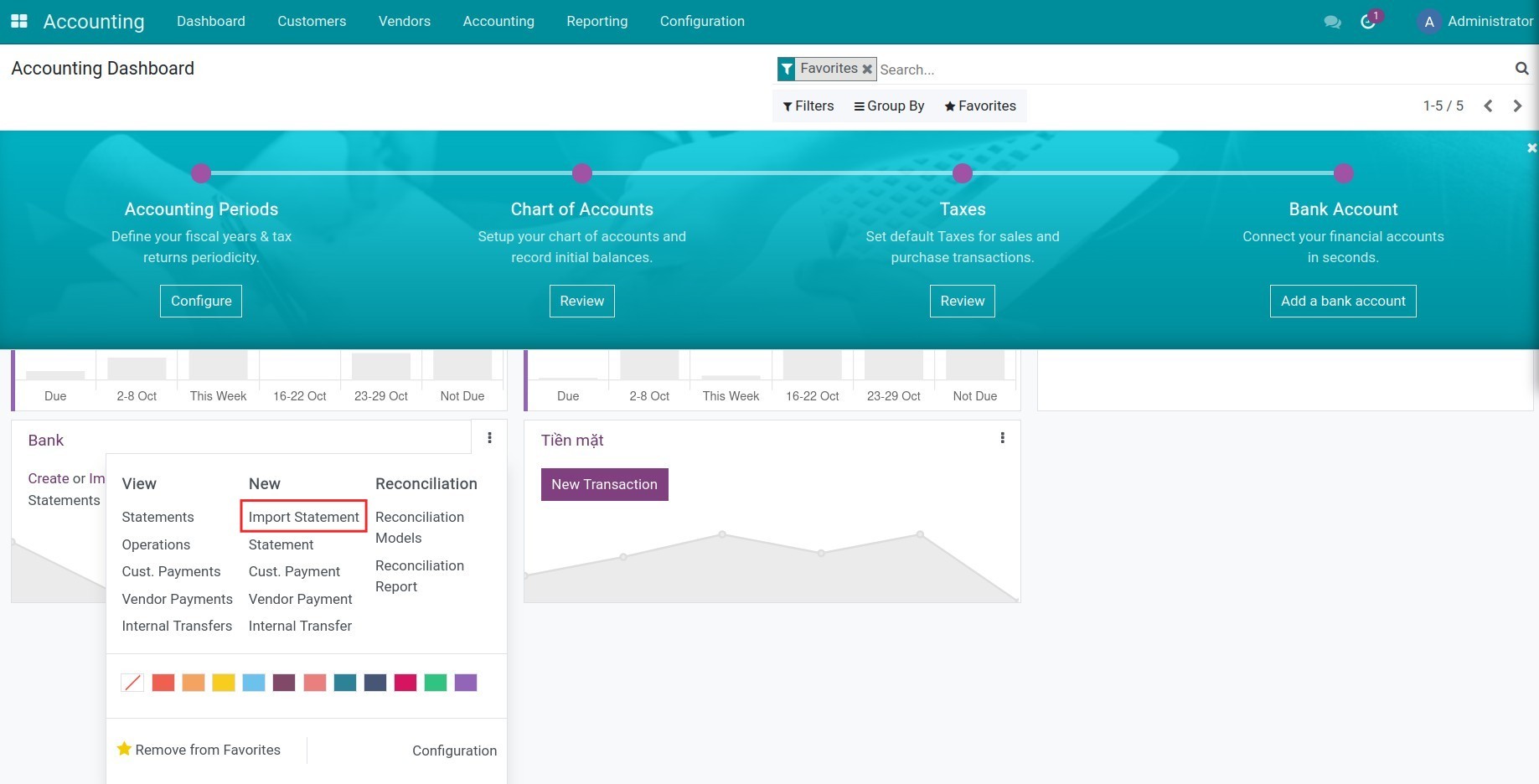
Navigate to Accounting > Dashboard, select a bank journal to import statement, press Import Statements and download the Import Sample CSV Template or Import Sample Excel Template.
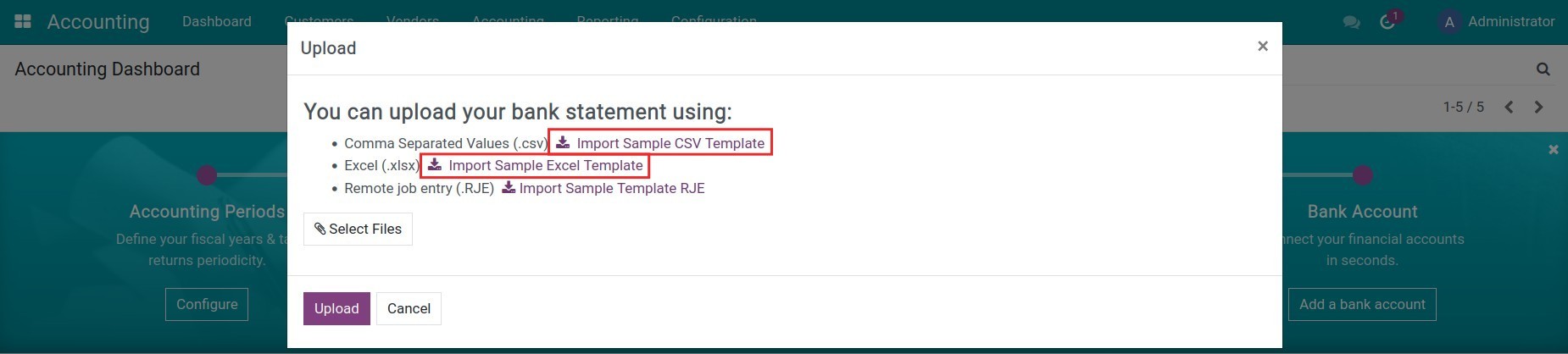
At this step, you need to add the data following the column order in the template. Be aware that you must keep and use the original date-time format pre-configured in the template.

2. Import bank statement to the system.
Once done adding data to the sample template, go to your system and press Select Files to upload this sample template to the system.
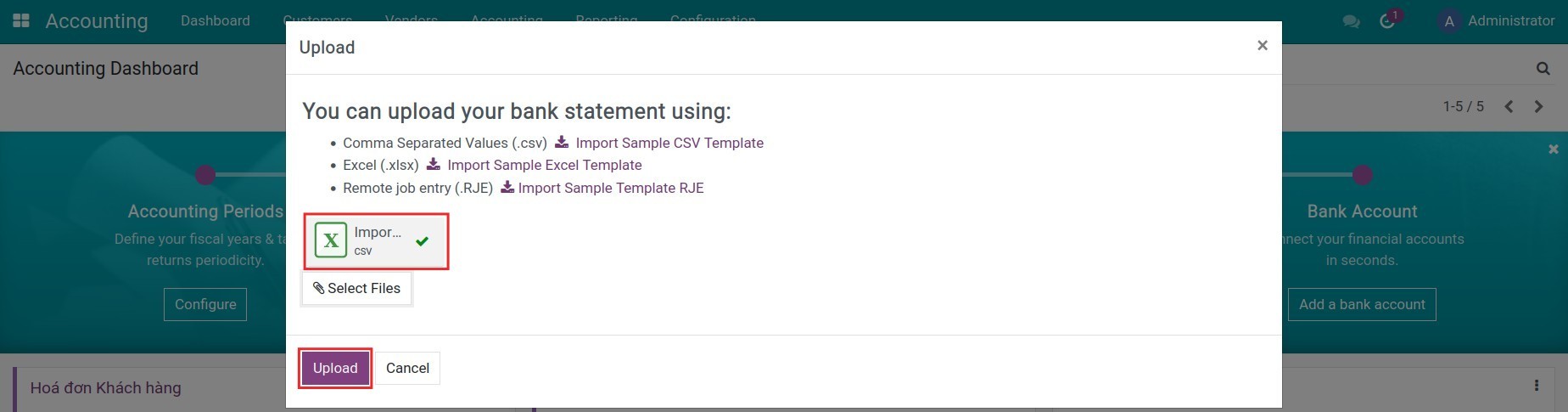
Press Upload to finish the importing process. On the bank statements view, review, and add any missing information to your statement, such as a description.
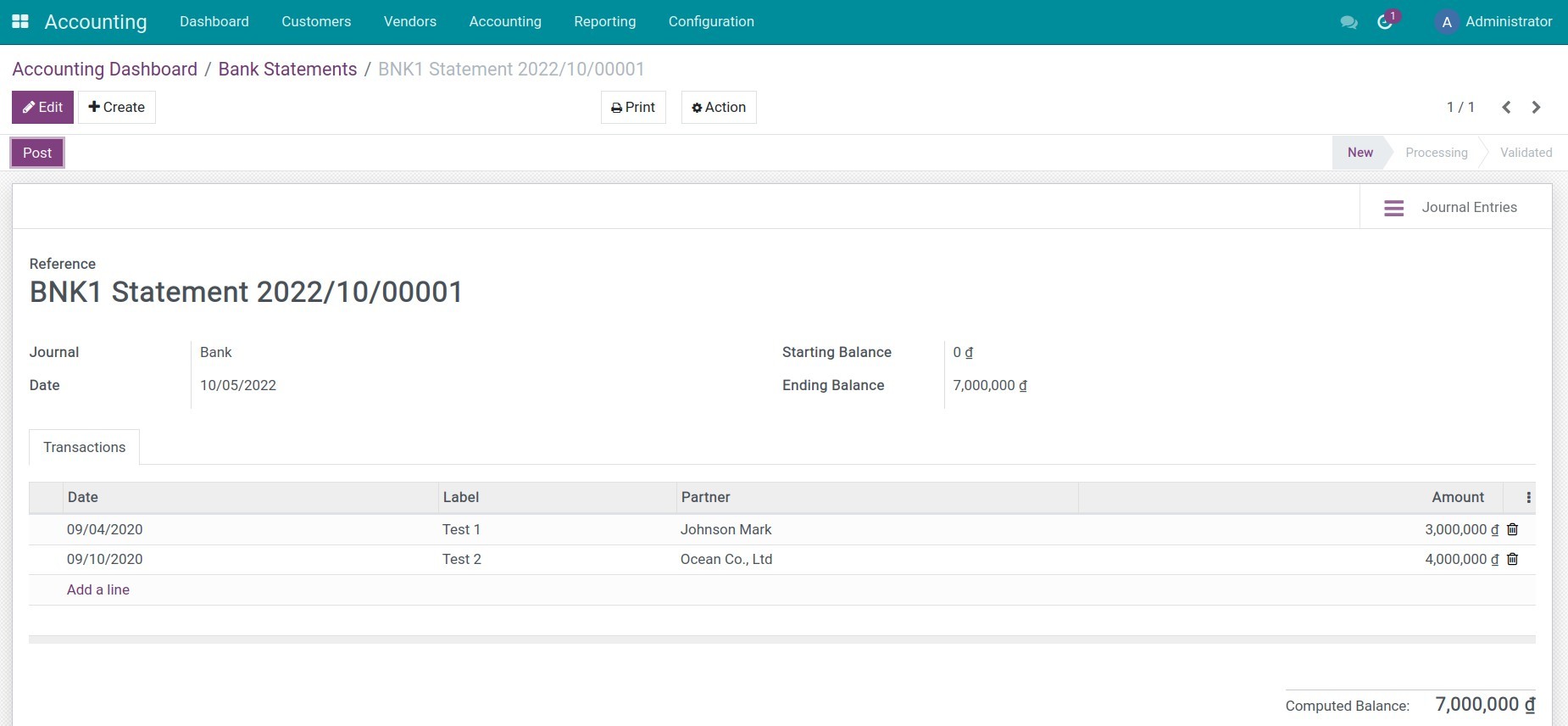
Now, you need to start the bank reconciliation process in the Accounting software.
This is an unofficial translation of the GNU Lesser General Public License into Vietnamese. It was not published by the Free Software Foundation,
and does not legally state the distribution terms for software that uses the GNU LGPL - only the original English text of the GNU LGPL does
that. However, we hope that this translation will help language speakers understand the GNU LGPL better.
GNU LESSER GENERAL PUBLIC LICENSE
Version 3, 29 June
2007
Copyright (C) 2007 Free Software Foundation, Inc. <https://fsf.org/>
Everyone is permitted to copy and distribute verbatim copies of this license document, but changing it is not allowed.
This version of the GNU Lesser General Public License incorporates the terms and conditions of version 3 of the GNU General Public License,
supplemented by the additional permissions listed below.
0. Additional Definitions.
As used herein,"this License" refers to version 3 of the GNU Lesser General Public License, and the "GNU GPL" refers to version 3 of
the GNU "General" Public License.
"The Library" refers to a covered work governed by this License, other than an Application or a Combined Work as defined below.
An "Application" is any work that makes use of an interface provided by the Library, but which is not otherwise based on the Library.
Defining a subclass of a class defined by the Library is deemed a mode of using an interface provided by the Library.
A "Combined Work" is a work produced by combining or linking an Application with the Library. The particular version of the Library
with which the Combined Work was made is also called the "Linked Version".
The "Minimal Corresponding Source" for a Combined Work means the Corresponding Source for the Combined Work, excluding any source code
for portions of the Combined Work that, considered in isolation, are based on the Application, and not on the Linked Version.
The "Corresponding Application Code" for a Combined Work means the object code and/or source code for the Application, including any data
and utility programs needed for reproducing the Combined Work from the Application, but excluding the System Libraries of the Combined Work.
1. Exception to Section 3 of the GNU GPL.
You may convey a covered work under sections 3 and 4 of this License without being bound by section 3 of the GNU GPL.
2. Conveying Modified Versions.
If you modify a copy of the Library, and, in your modifications, a facility refers to a function or data to be supplied by an Application that
uses the facility (other than as an argument passed when the facility is invoked), then you may convey a copy of the modified version:
a) under this License, provided that you make a good faith effort to ensure that, in the event an Application does not supply the function or data, the facility still
operates, and performs whatever part of its purpose remains meaningful, or
b) under the GNU GPL, with none of the additional permissions of this License applicable to that copy.
3. Object Code Incorporating Material from Library Header Files.
The object code form of an Application may incorporate material from a header file that is part of the Library. You may convey such
object code under terms of your choice, provided that, if the incorporated material is not limited to numerical parameters, data structure
layouts and accessors, or small macros, inline functions and templates (ten or fewer lines in length), you do both of the following:
a) Give prominent notice with each copy of the object code that the Library is used in it and that the Library and its use are covered by this License.
b) Accompany the object code with a copy of the GNU GPL and this license document.
4. Combined Works.
You may convey a Combined Work under terms of your choice that, taken together, effectively do not restrict modification of the portions of the
Library contained in the Combined Work and reverse engineering for debugging such modifications, if you also do each of the following:
a) Give prominent notice with each copy of the Combined Work that the Library is used in it and that the Library and its use are covered by this License.
b) Accompany the Combined Work with a copy of the GNU GPL and this license document.
c) For a Combined Work that displays copyright notices during execution, include the copyright notice for the Library among these notices,
as well as a reference directing the user to the copies of the GNU GPL and this license document.
d) Do one of the following:
0) Convey the Minimal Corresponding Source under the terms of this License, and the Corresponding Application Code in a form suitable for, and
under terms that permit, the user to recombine or relink the Application with a modified version of the Linked Version to produce a modified
Combined Work, in the manner specified by section 6 of the GNU GPL for conveying Corresponding Source.
1) Use a suitable shared library mechanism for linking with the Library. A suitable mechanism is one that (a) uses at run time a copy of the
Library already present on the user's computer system, and (b) will operate properly with a modified version of the Library
that is interface-compatible with the Linked Version.
e) Provide Installation Information, but only if you would otherwise be required to provide such information under section 6 of the
GNU GPL, and only to the extent that such information is necessary to install and execute a modified version of the Combined Work produced by
recombining or relinking the Application with a modified version of the Linked Version. (If you use option 4d0, the Installation Information
must accompany the Minimal Corresponding Source and Corresponding Application Code. If you use option 4d1, you must provide the Installation
Information in the manner specified by section 6 of the GNU GPL for conveying Corresponding Source.)
5. Combined Libraries.
You may place library facilities that are a work based on the Library side by side in a single library together with other library facilities that
are not Applications and are not covered by this License, and convey such a combined library under terms of your choice, if you do both of
the following:
a)Accompany the combined library with a copy of the same work based on the Library, uncombined with any other library facilities,
conveyed under the terms of this License.
b) Give prominent notice with the combined library that part of it is a work based on the Library, and explaining where to find the accompanying
uncombined form of the same work.
6. Revised Versions of the GNU Lesser General Public License.
The Free Software Foundation may publish revised and/or new versions of the GNU Lesser General Public License from time to time. Such new
versions will be similar in spirit to the present version, but may differ in detail to address new problems or concerns.
Each version is given a distinguishing version number. If the Library as you received it specifies that a certain numbered
version of the GNU Lesser General Public License "or any later version" applies to it, you have the option of following the terms and
conditions either of that published version or of any later version published by the Free Software Foundation. If the Library as you
received it does not specify a version number of the GNU Lesser General Public License, you may choose any version of the GNU Lesser
General Public License ever published by the Free Software Foundation.
If the Library as you received it specifies that a proxy can decide whether future versions of the GNU Lesser General Public License shall
apply, that proxy's public statement of acceptance of any version is permanent authorization for you to choose that version for the Library.