

Scrum Project - Helpdesk
by Viindoo
| Lines of Code | 188 |
| Technical name | viin_project_scrum_helpdesk |
| License | OPL-1 |
| Website | https://viindoo.com/apps/app/17.0/viin_project_scrum_helpdesk |
| Read description for | v 15.0 v 16.0 |
| Required Apps | Project (project) Discuss (mail) Employees (hr) |
| Included Dependencies | Helpdesk Viindoo Base Project Scrum Helpdesk Timesheet Integration Project Progress & Velocity Advanced HR Management Project Customization Project & HR Integration Helpdesk Project Integration |
Overview
In Agile project management, work is often divided into levels:
- Epic: Big idea to help achieve the project goal.
- User Story: Clear criteria to help achieve the Epic.
- Task: Specific work to complete the User Story.
Completing each Task will help complete the User Story, Epic, and finally the project.
During the implementation, partners (customers or project members) may need to send Helpdesk Tickets to the Scrum teams. On each Epic or User Story, the responsible person needs to have a general overview of the related tickets to ensure that all issues are resolved before determining that the User Story, Epic is actually completed or not.
Main features
- Create Helpdesk Ticket directly from Epic: Support creating Helpdesk Ticket directly on the Epic interface.
- Create Helpdesk Ticket directly from User Story: Allow creating a ticket from a User Story to track issues related to feature development.
- Display the number of tickets quickly:
- Add a Smart Button on the Epic and User Story interface to quickly view the number of related tickets.
- Click on this button to access the detailed list of tickets.
- Link ticket to Epic/User Story:
- The ticket can be linked to a specific Epic or User Story.
- When the information of Epic/User Story is changed, the system will automatically update the corresponding ticket.
- Automatically synchronize data:
- If a ticket is related to a task belonging to an Epic or User Story, the system will automatically retrieve the relevant information.
- When the Epic or User Story of a task is changed, the related tickets will be automatically updated.
Benefits
- Tightly link the software development process with customer support, helping the Scrum team track actual feedback.
- Optimize the request processing process, reduce manual data entry time.
- Enhance monitoring and management capabilities, helping the support team and development team work more effectively.
Who should use this module
- Scrum development team: Need to track feedback from users through the Helpdesk system.
- Customer support team: Need to link support requests to Epics and User Stories to provide quick feedback.
Editions Supported
- Community Edition
- Enterprise Edition
Installation
- Navigate to App.
- Search with keyword viin_project_scrum_helpdesk.
- Press Install.
How to use this module
Instruction video: Create helpdesk from Epic and User story
1. View support tickets related to an Epic and User Story
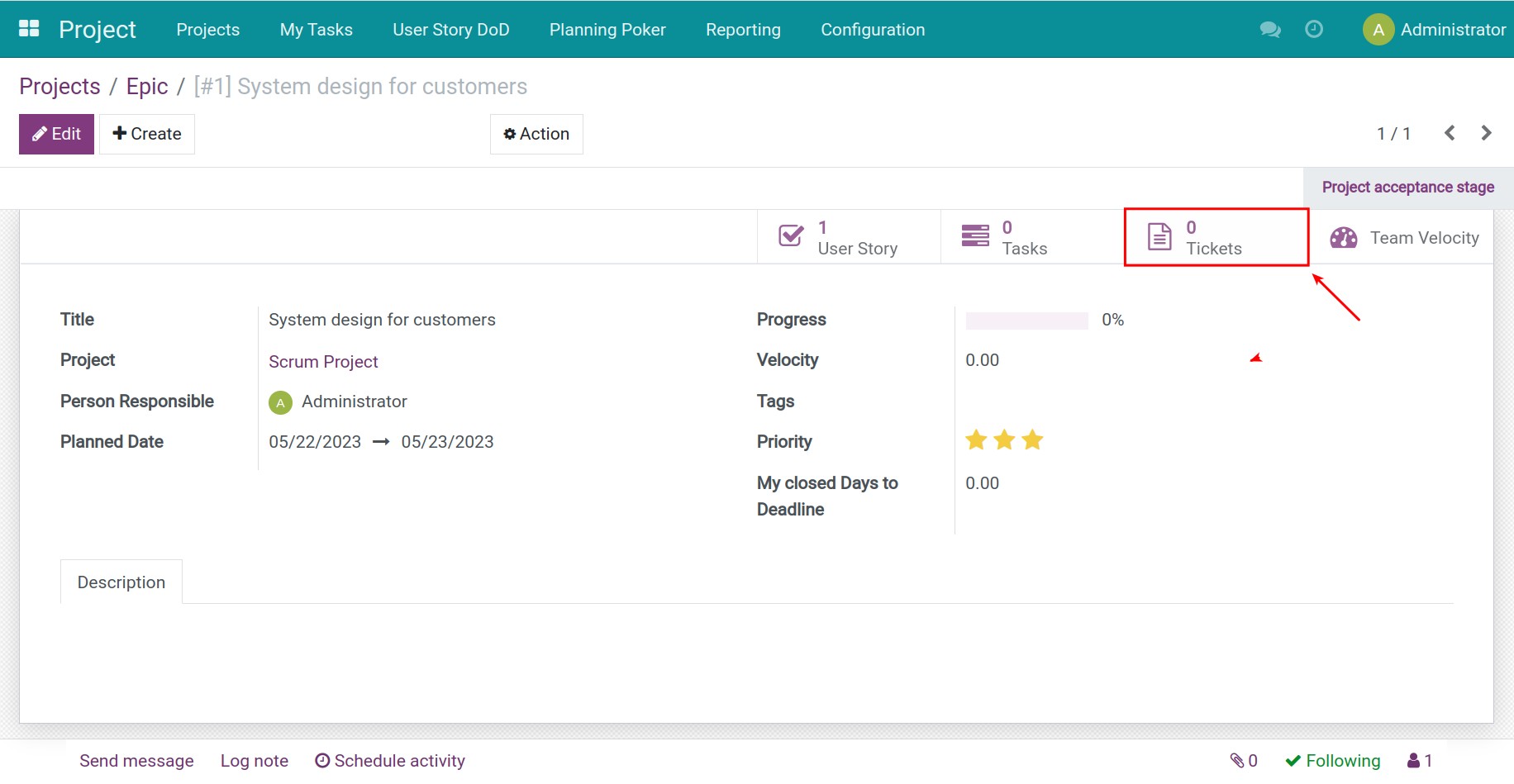
On an Epic or User Story, you can view the quantity of Helpdesk tickets related to said Epic or User Story. Click on Tickets to view details of your Helpdesk tickets or start to create a new one.
2. Create and control tickets on Helpdesk from Epic and User Story
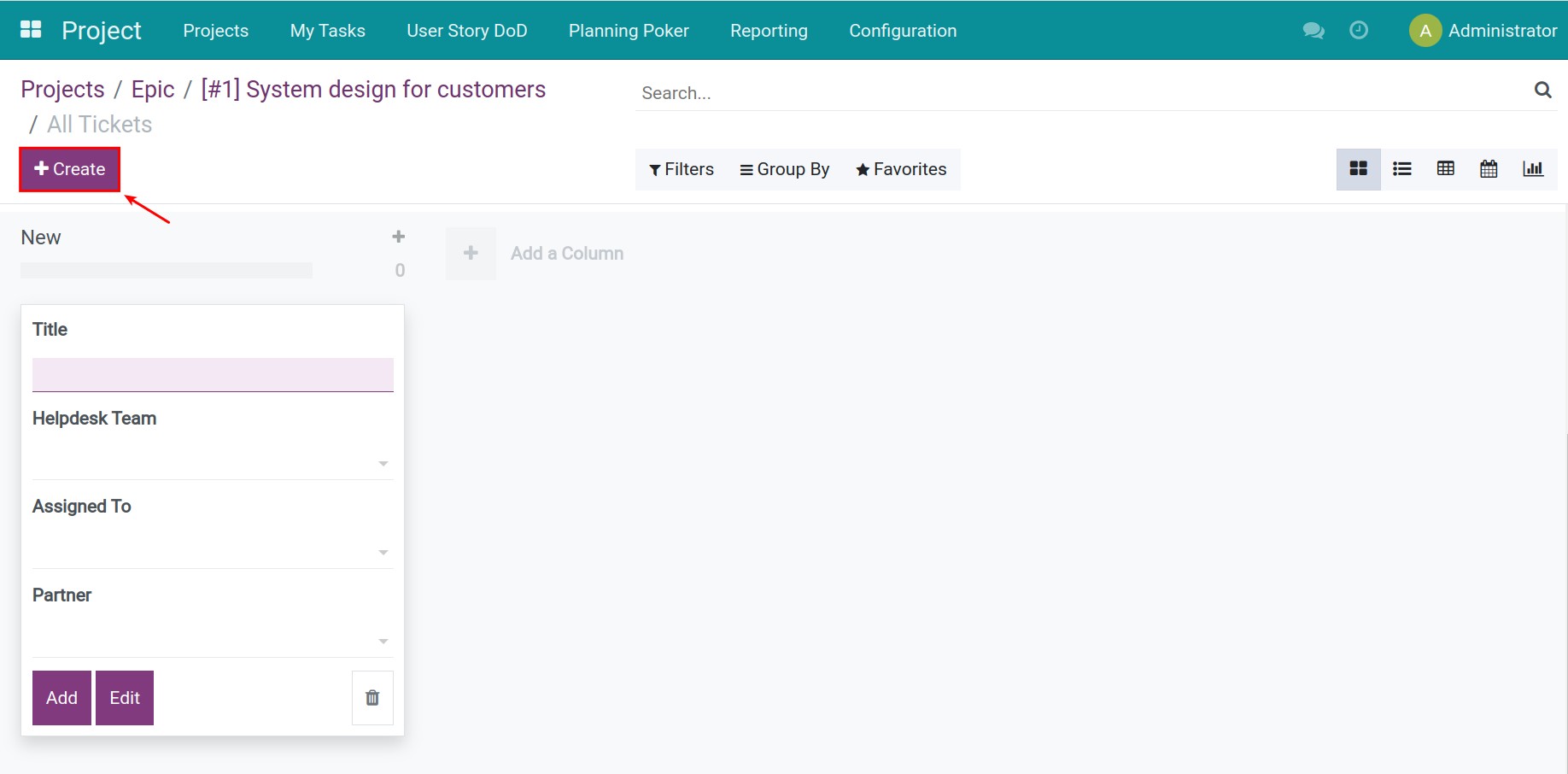
You will be redirected to the Helpdesk application. From here, click Create to make a new support request. You can refer to: How to create a ticket.
This software and associated files (the "Software") may only be used (executed, modified, executed after modifications) if you have purchased a valid license from the authors, typically via Odoo Apps, or if you have received a written agreement from the authors of the Software (see the COPYRIGHT file).
You may develop Odoo modules that use the Software as a library (typically by depending on it, importing it and using its resources), but without copying any source code or material from the Software. You may distribute those modules under the license of your choice, provided that this license is compatible with the terms of the Odoo Proprietary License (For example: LGPL, MIT, or proprietary licenses similar to this one).
It is forbidden to publish, distribute, sublicense, or sell copies of the Software or modified copies of the Software.
The above copyright notice and this permission notice must be included in all copies or substantial portions of the Software.
THE SOFTWARE IS PROVIDED "AS IS", WITHOUT WARRANTY OF ANY KIND, EXPRESS OR IMPLIED, INCLUDING BUT NOT LIMITED TO THE WARRANTIES OF MERCHANTABILITY, FITNESS FOR A PARTICULAR PURPOSE AND NONINFRINGEMENT. IN NO EVENT SHALL THE AUTHORS OR COPYRIGHT HOLDERS BE LIABLE FOR ANY CLAIM, DAMAGES OR OTHER LIABILITY, WHETHER IN AN ACTION OF CONTRACT, TORT OR OTHERWISE, ARISING FROM, OUT OF OR IN CONNECTION WITH THE SOFTWARE OR THE USE OR OTHER DEALINGS IN THE SOFTWARE.