
Tích hợp Hóa đơn Điện tử VNIs VN-Invoice
| Số dòng Code | 1511 |
| Tên kỹ thuật | l10n_vn_viin_accounting_vninvoice |
| Giấy phép | OPL-1 |
| Website | https://viindoo.com/apps/modules/19.0/l10n_vn_viin_accounting_vninvoice |
| Đọc mô tả cho | v 15.0 v 16.0 v 17.0 v 18.0 |
| Yêu cầu các App | Invoicing (account) Discuss (mail) |
| Bao gồm Các phụ thuộc | Tích hợp Hóa đơn Điện tử Việt Nam Mã đơn vị quan hệ ngân sách Thông tin Định danh Đối tác Mô-đun Cơ Sở Nền tảng Kế toán Ghi nhật ký API Request Số hóa đơn pháp lý |
| Các mở rộng | [TEST] Adapter Kiểm thử Nhà cung cấp Hóa đơn Điện tử Việt Nam |

E-Invoice - VNIs VN-Invoice Integrator
Integrates with VN-Invoice service to issue legal e-Invoice
At a Glance
The facts of E-Invoice - VNIs VN-Invoice Integrator, version 0.2, in one place. Published by Viindoo.
Key Features
VN-Invoice (VNIs), fully integrated with the unified E-Invoice interface:
One Unified E-Invoice Interface
VN-Invoice is configured, issued, tracked, adjusted, replaced and cancelled from the same E-Invoice menu, notebook tab and status filter as every other provider - no separate screen to learn.
Approve-and-Sign Lifecycle
A VN-Invoice-only capability: approve and digitally sign an issued invoice with one click, or let it sign itself automatically as soon as the invoice is paid.
E-Invoice Cancel-Guard
An issued e-invoice can no longer be plainly cancelled, however long ago it was issued - the system blocks the action and guides you to an adjustment or a replacement instead, keeping your books compliant.
Safe 3-Step / 1-Step Cancel
Cancelling a signed VN-Invoice runs a controlled 3-step process (error notification, sign, delete) with a mandatory reason; an unsigned invoice cancels in one step - both fully auditable.
Detailed Status Tracking
A precise VN-Invoice state and sign-state model (original, adjusted, replaced, cancelled, signed, sign error, ...) rolls up into the single, normalized E-Invoice Status filter shared across every provider.
Representation and Converted Files
Generate and store the PDF/XML representation and the converted version of every issued invoice, ready for one-click download and automatic attachment to the customer email.
Multi-Company Serials, Templates and Types
Define and manage invoice serial, template and invoice type per company and per journal, matching what you have registered with VN-Invoice and the government authority.
Customer Portal Access
Customers view, print and download the display (PDF) and XML versions of their VN-Invoice straight from the customer portal.
Sandbox Mode and Chronological Safeguards
Test safely in sandbox before going live, and let the system enforce chronological issuing order so no earlier invoice is ever skipped.
Benefits
Comply with Vietnam's e-invoice regulations end to end, including the cancel-guard that keeps a signed, issued invoice from being improperly cancelled.
Issue, sign, adjust, replace and cancel directly inside Odoo/Viindoo - no manual printing, storing or delivering of paper invoices.
The same E-Invoice tab and status filter used for every provider gives you a single, real-time view of every VN-Invoice, minimizing errors and confusion.
Effortlessly manage invoice series, templates and types across different companies and journals from one system.
Give customers instant, self-service access to their legal invoices in the format they need, through the customer portal.
Issue through VN-Invoice

Confirm issuing the e-invoice
Sign the VN-Invoice
Download the representation and converted files
Status updates as the invoice is paid
Send the e-invoice to the customer
Adjust, replace, or cancel safely
See E-Invoice - VNIs VN-Invoice Integrator in Action
See how this module solves real business problems in a working Viindoo environment.
Need help with E-Invoice - VNIs VN-Invoice Integrator?
For questions, implementation support, or consulting services, contact Viindoo.
Pre-Sales & Partnership
sales@viindoo.comWhen contacting us, please include:
- Odoo/Viindoo version (CE/EE).
- Number of users and business scope.
- Other modules currently in use.
Technical Support
apps.support@viindoo.comFor faster troubleshooting, please provide:
- Order number or app reference.
- Odoo/Viindoo version & edition.
- Steps to reproduce the issue.
- Screenshots/logs if available.
Technical Requirement
Changes log
We continuously improve this module. Recent updates from the official Viindoo repository:
- 2026-07-05 Improved Upgraded to Odoo 19.0: VN-Invoice now plugs into the unified E-Invoice menu, the merged E-Invoice tab and the single E-Invoice Status filter, and its sign lifecycle and 3-step cancel are gated by the cancel-guard.
- 2025-09-11 Added Identification, passport, budget code for Vietnam edi.
- 2025-08-15 Fixed Wrong taxable amount.
- 2025-07-22 Improved Correct vninvoice stuff.
- 2025-06-13 Fixed BuyerLegalName is require when have taxcode.
- 2025-06-09 Fixed Only get positive tax amount when needed, correct meinvoice data.
Works Great With These Modules
Extend E-Invoice - VNIs VN-Invoice Integrator with complementary Viindoo apps:
E-Invoice - Vietnam E-Invoicing Hub
The provider-agnostic backbone: the shared E-Invoice menu, notebook tab, status filter and Vietnam E-Invoicing settings section every provider - including VN-Invoice - plugs into.
Module l10n_vn_viin_ediVN-Invoice: Line Grouping Option for Flexible E-Invoice Issuing
Issue VN-Invoice e-invoices in detailed or line-grouped form to simplify invoicing for high-volume orders.
Module l10n_vn_viin_accounting_vninvoice_line_groupingShow EInvoice Information on POS Receipt
Disclose the tax-authority code, secret code and lookup URL on POS receipts for every e-invoice provider, VN-Invoice included.
Module l10n_vn_viin_edi_posVietnam E-invoice - Sale
Automatically add Vietnamese descriptions when creating invoices from sales orders for compliance and efficiency.
Module l10n_vn_viin_einvoice_saleWho Should Use This Module?
Built for teams that need this capability fully integrated into their Odoo/Viindoo stack.
Accounting Managers
Ensure compliance with state regulations, including the cancel-guard, while simplifying invoice management.
Multi-Company Businesses
Streamline invoicing across subsidiaries or branches from one unified E-Invoice interface.
Companies Using VN-Invoice Services
Leverage the VN-Invoice sign lifecycle and controlled cancel flow for efficient, compliant e-invoicing.
Cài đặt
- Truy cập Ứng dụng.
- Tìm từ khóa l10n_vn_viin_accounting_vninvoice.
- Ấn Cài đặt.
Hướng dẫn sử dụng
Note
Mở rộng l10n_vn_viin_edi - xem tài liệu của phân hệ đó.
Video hướng dẫn: VN-Invoice
Phân hệ này tích hợp nhà cung cấp VN-Invoice (VNIs) vào giao diện hóa đơn điện tử thống nhất: khi cài cùng phân hệ gốc (l10n_vn_viin_edi), mọi hóa đơn phát hành qua VN-Invoice đều được thiết lập, phát hành, theo dõi, điều chỉnh, thay thế và hủy từ cùng menu Hóa đơn điện tử, tab sổ tay và bộ lọc trạng thái mà mọi nhà cung cấp khác đang dùng - cùng với hai khả năng chỉ riêng VN-Invoice có: vòng đời phê duyệt và ký, và quy trình hủy 3 bước.
1. Thiết lập bản ghi dịch vụ VN-Invoice.
- Truy cập Kế toán ‣ Cấu hình ‣ Hóa đơn điện tử ‣ Dịch vụ hóa đơn điện tử rồi mở (hoặc tạo mới) bản ghi dịch vụ cho VN-Invoice.
- Điền các trường kết nối trên bản ghi đó: Chế độ (Kiểm thử hoặc Vận hành), và Tên đăng nhập/Mật khẩu dùng cho môi trường chính thức (hoặc Tên đăng nhập sandbox/ Mật khẩu sandbox khi dùng chế độ thử nghiệm). Ở tab Thiết lặp ngân hàng VN-Invoice, tùy chọn Hóa đơn điện tử - Tự động ký khi thanh toán được bật sẵn - giữ nguyên để hóa đơn tự động ký ngay khi được đối soát thanh toán.
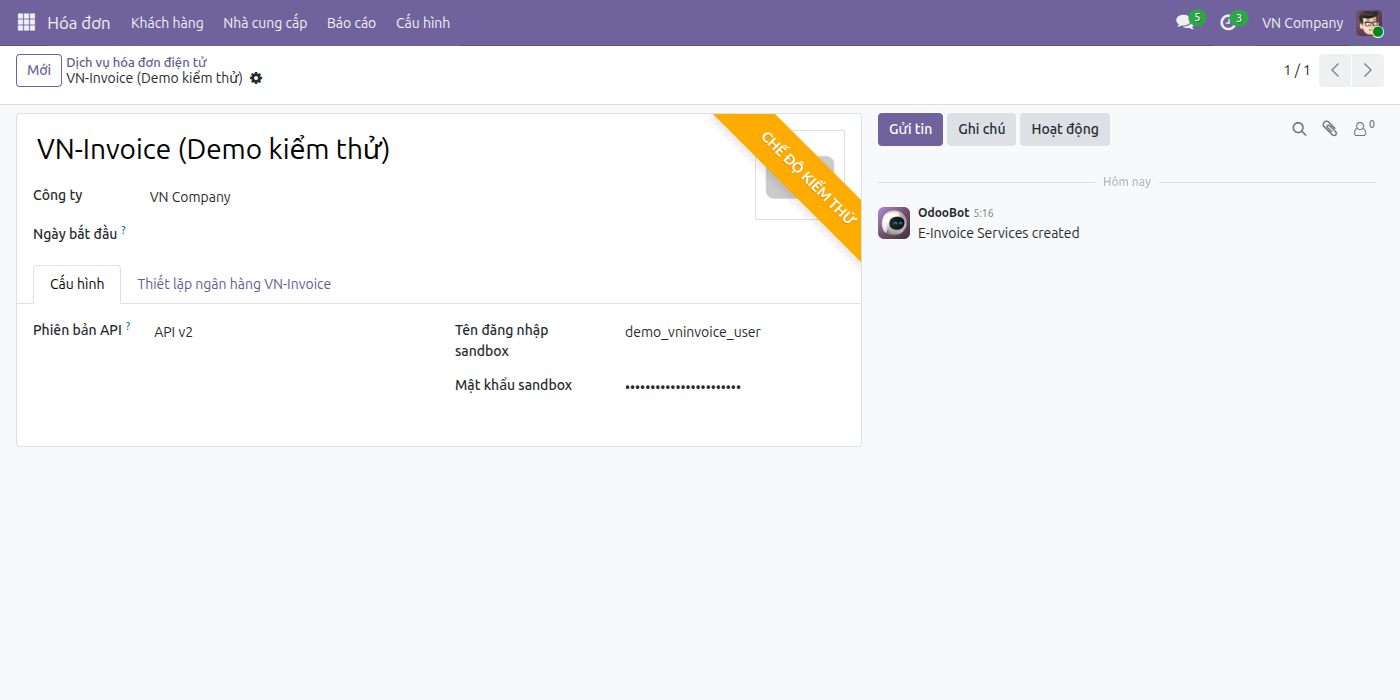
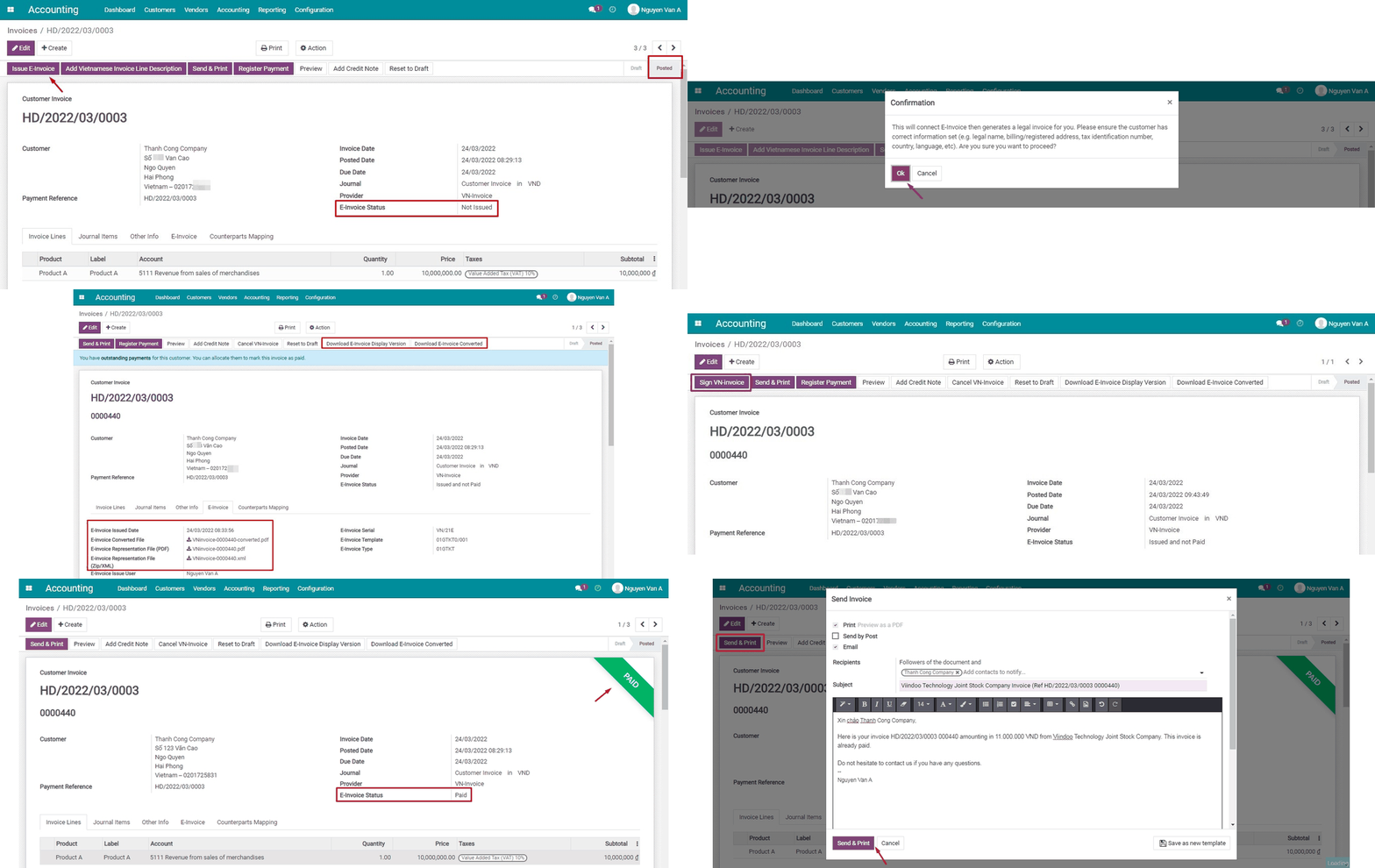
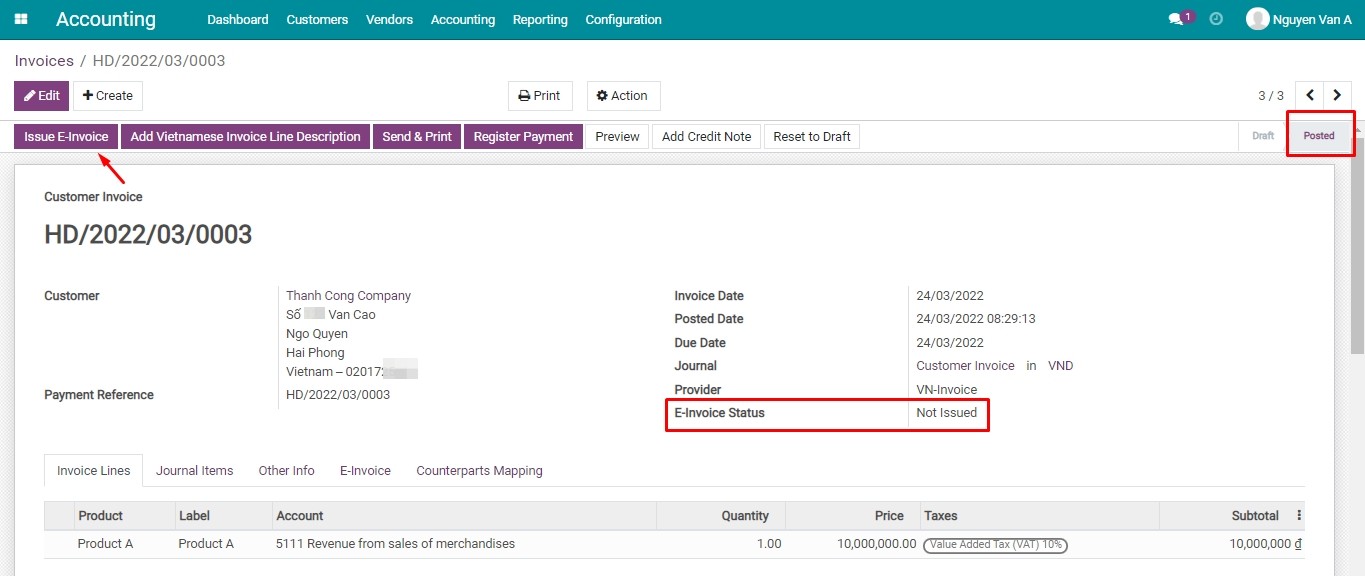
2. Phát hành hóa đơn điện tử qua VN-Invoice.
- Xác nhận hóa đơn khách hàng, sau đó ấn Gửi. Trong hộp thoại Gửi, giữ nguyên tùy chọn Phát hành hóa đơn điện tử Việt Nam đã được chọn sẵn - hóa đơn định tuyến qua VN-Invoice sẽ tự động chọn tùy chọn này - rồi ấn Gửi. Thao tác này vừa phát hành hóa đơn điện tử, vừa gửi email cho khách hàng trong cùng một bước nếu tùy chọn bằng email cũng được chọn.
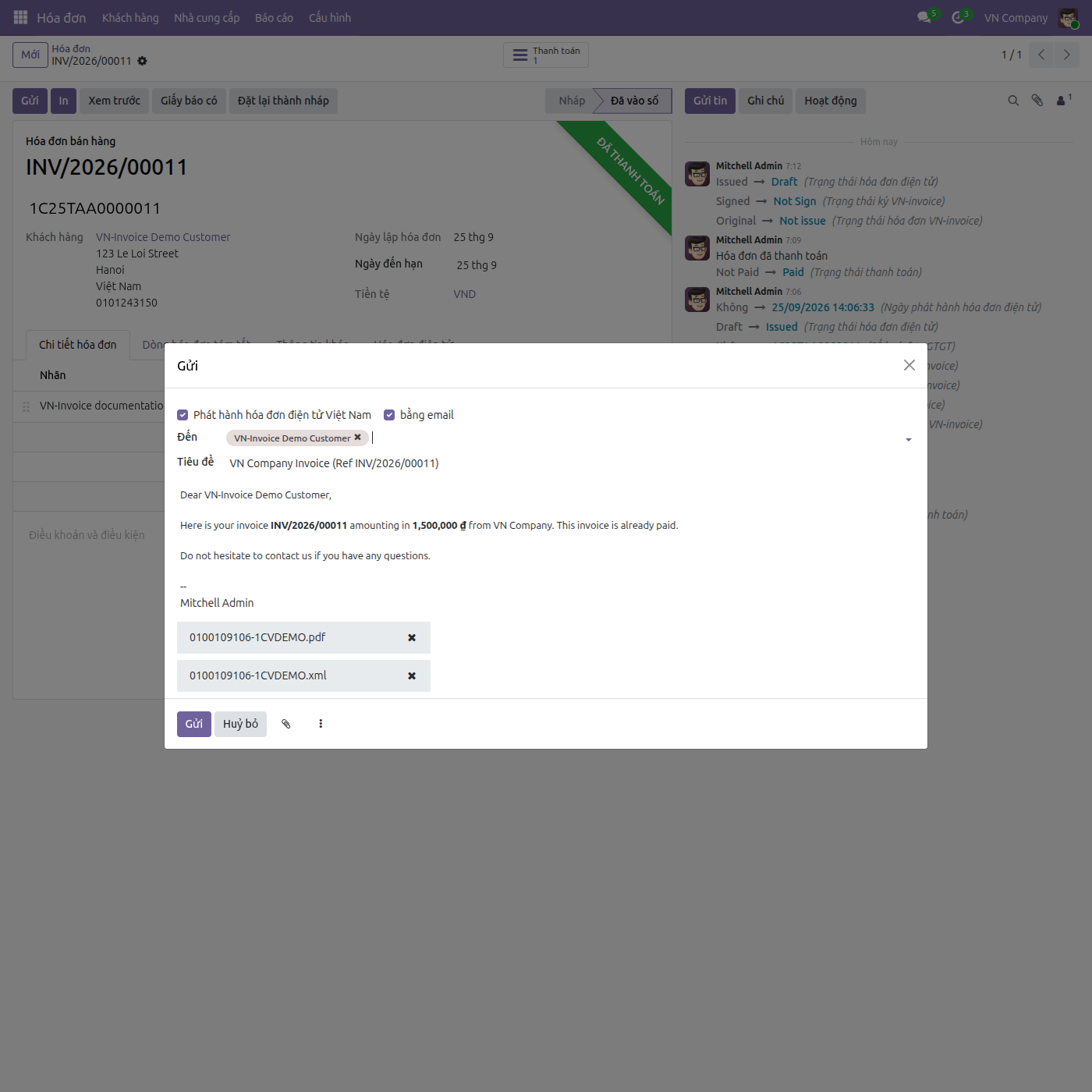
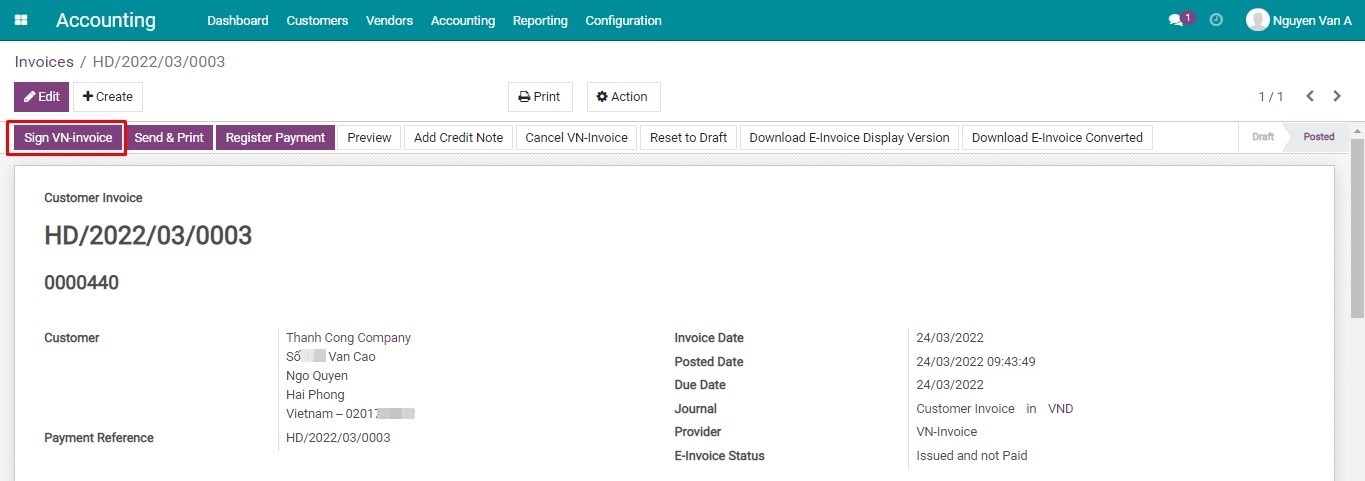
3. Ký hóa đơn VN-Invoice (vòng đời ký chỉ riêng VN-Invoice có).
- Sau khi phát hành, dùng nút Ký hóa đơn VN-invoice - đặt cạnh các thao tác hóa đơn điện tử khác trên hóa đơn - để phê duyệt và ký số hóa đơn. Trường Trạng thái ký VN-invoice (Chờ phê duyệt / Chưa ký / Chờ ký / Đang ký / Đã ký / Ký lỗi) theo dõi tiến trình ngay trên tab Hóa đơn điện tử; bản thể hiện và bản chuyển đổi chỉ có thể tải xuống khi hóa đơn đã ở trạng thái Đã ký.
- Nếu bật Hóa đơn điện tử - Tự động ký khi thanh toán trên dịch vụ hóa đơn điện tử, VN-Invoice sẽ tự động ký hóa đơn ngay khi hóa đơn được đối soát thanh toán - không cần thao tác thủ công.
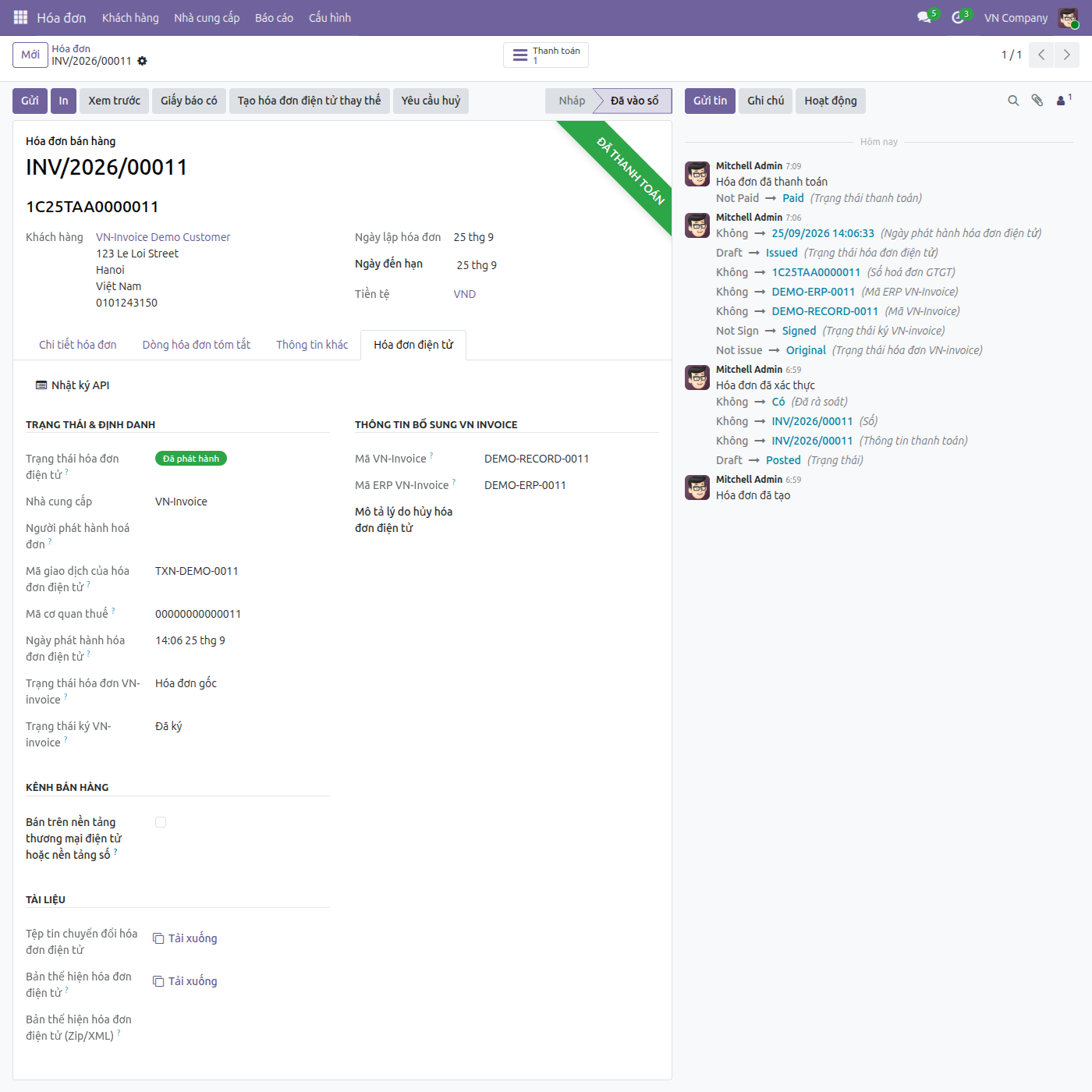
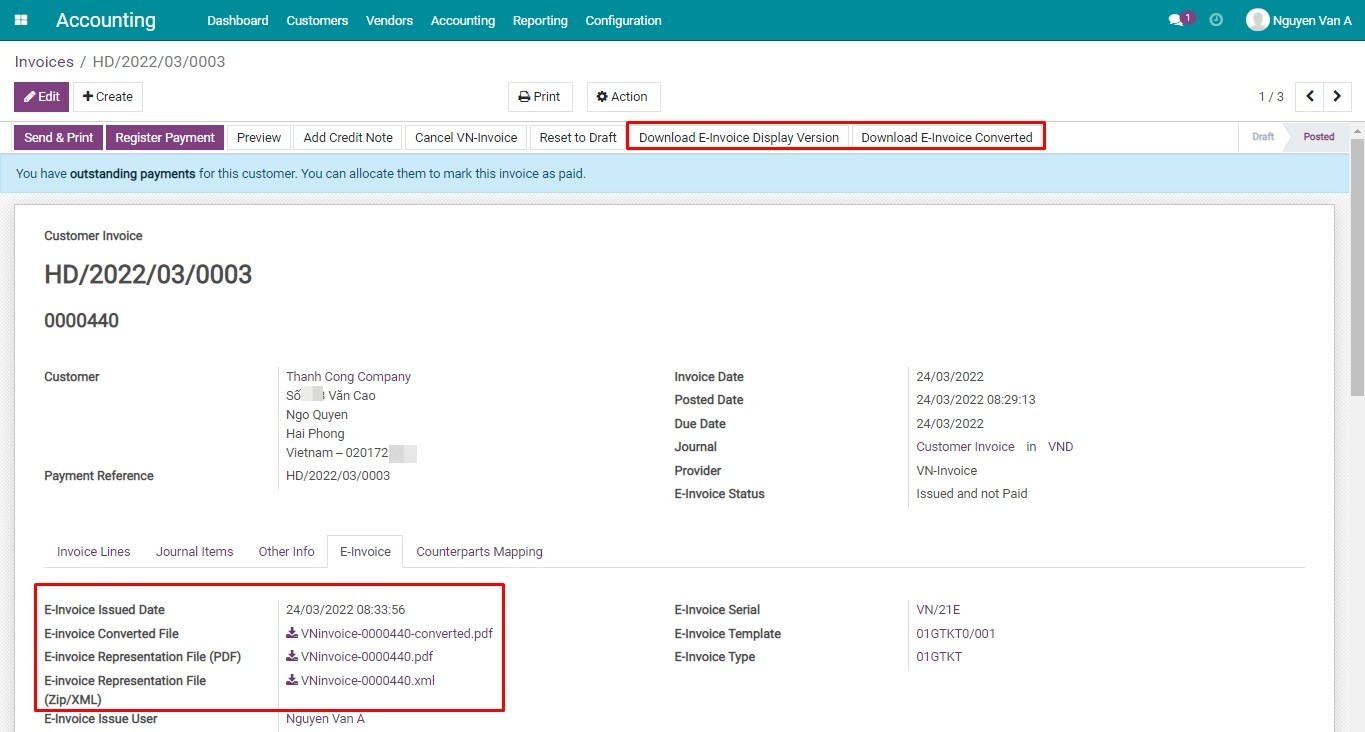
4. Tải về bản thể hiện và bản chuyển đổi.
- Từ phần Tài liệu trên tab Hóa đơn điện tử, tải về bản thể hiện PDF/XML và bản chuyển đổi sau khi hóa đơn đã được ký.
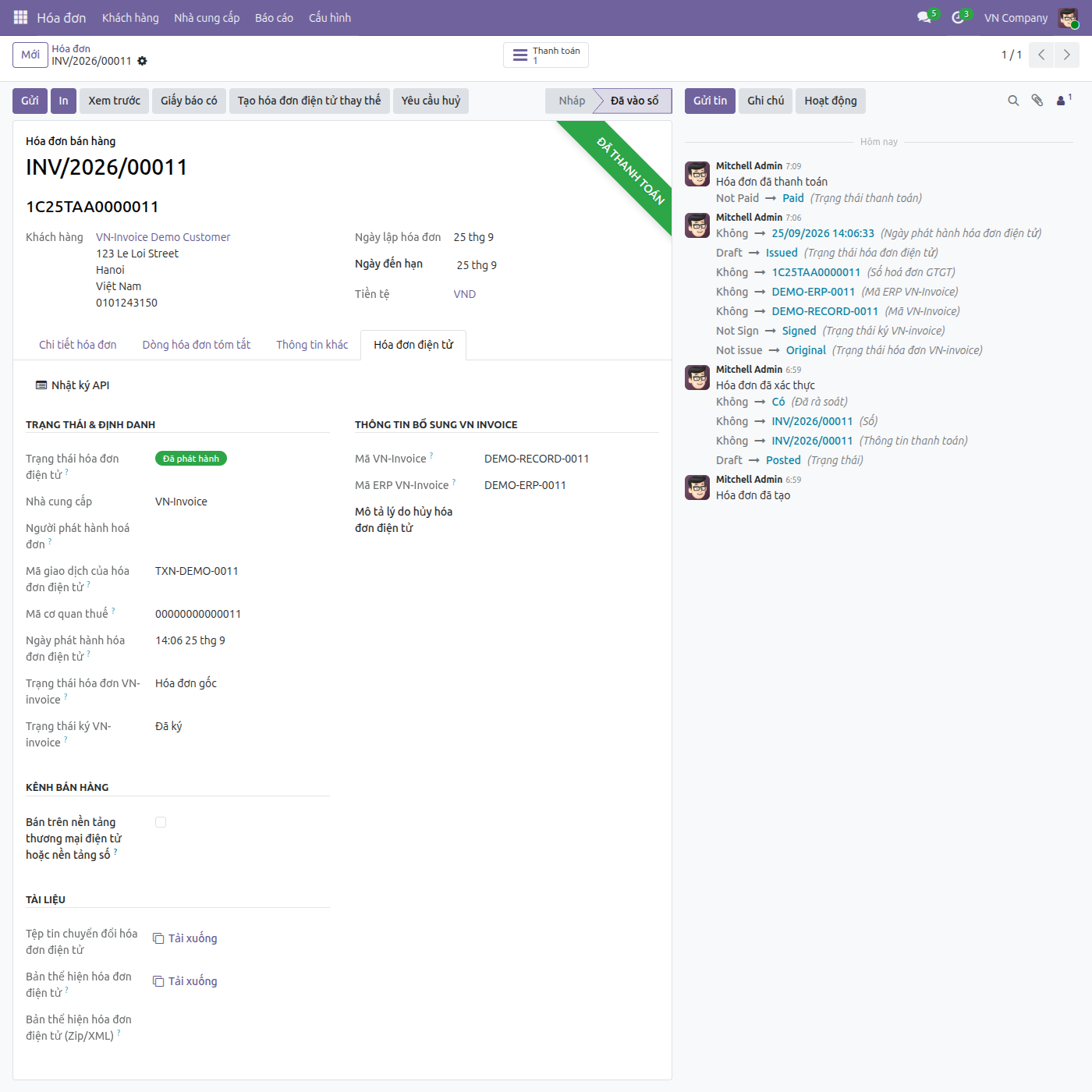
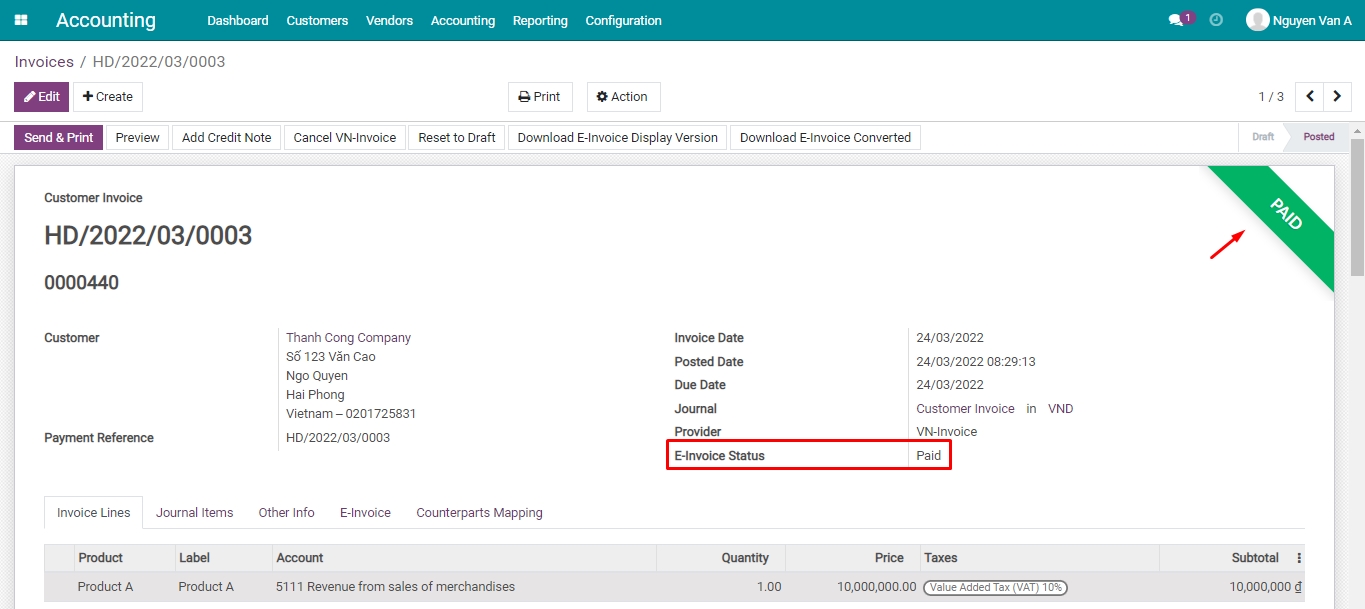
5. Theo dõi trạng thái khi hóa đơn được thanh toán.
- Sau khi hóa đơn khách hàng được đối soát công nợ, cả hóa đơn khách hàng lẫn Trạng thái hóa đơn điện tử duy nhất đều tự động cập nhật - Đã thanh toán trên hóa đơn, và trạng thái tương ứng trên hệ thống VNIs - hiển thị qua cùng bộ lọc và gom nhóm Trạng thái hóa đơn điện tử dùng chung cho mọi nhà cung cấp.
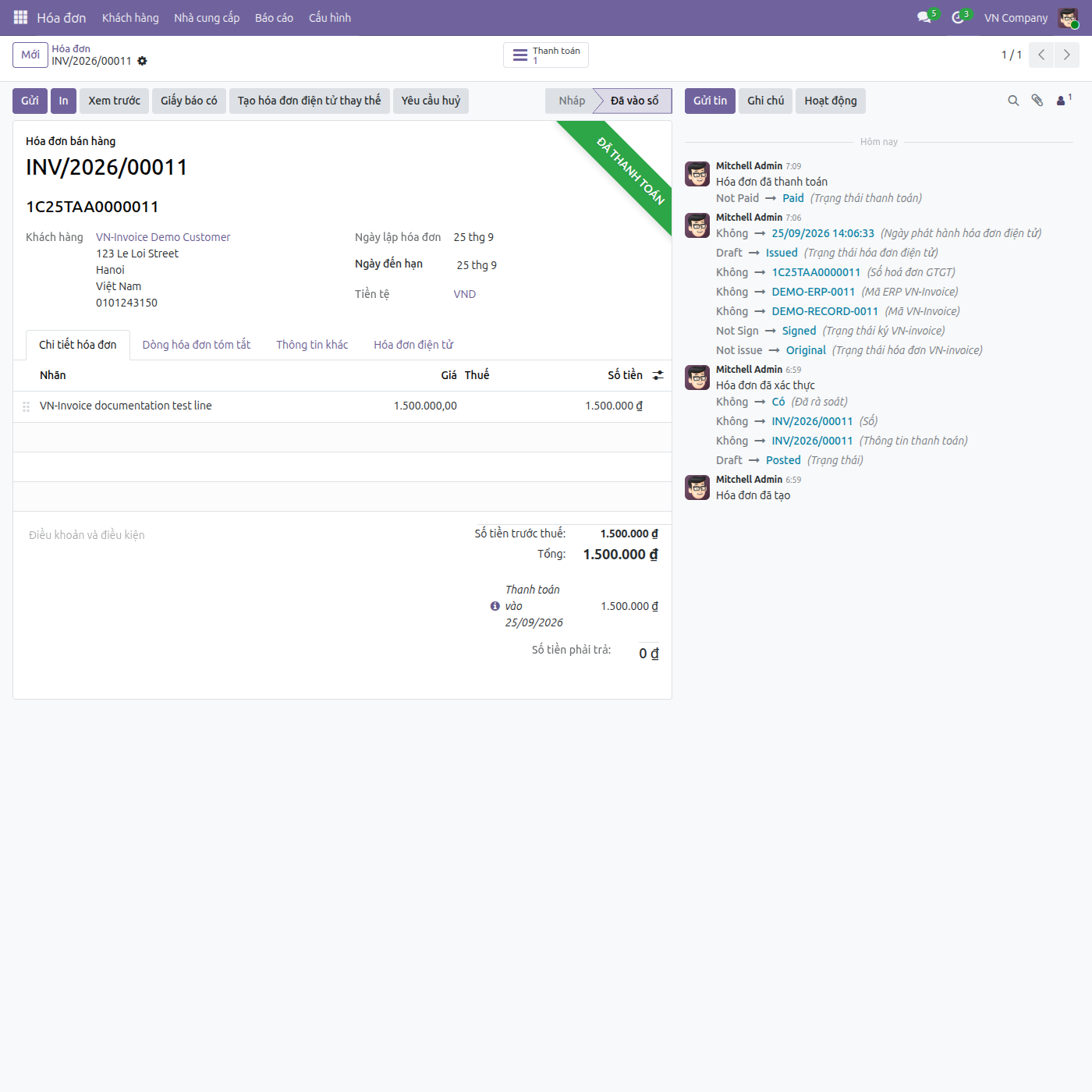
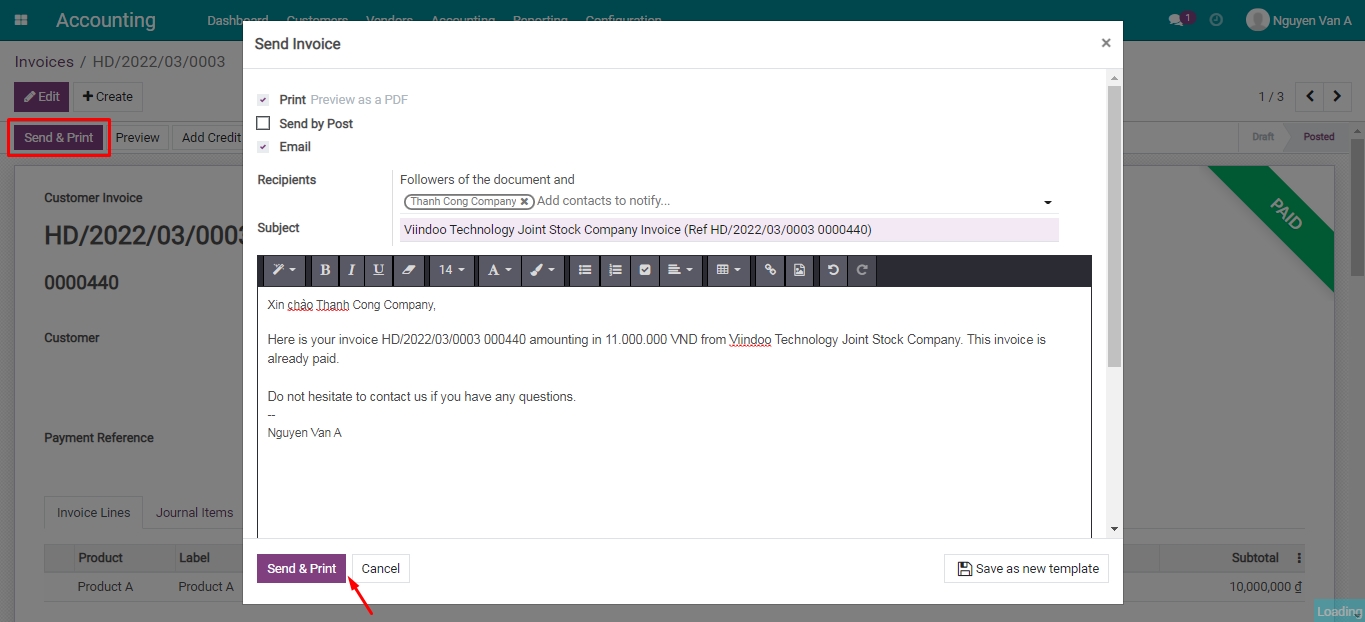
6. Gửi hóa đơn điện tử cho khách hàng.
- Gửi hóa đơn qua email không thay thế tệp PDF hóa đơn do Odoo tạo ra: các tệp pháp lý của nhà cung cấp được đính kèm thêm - tệp XML của VN-Invoice luôn được đính kèm, và tệp PDF của VN-Invoice cũng được đính kèm trừ khi Số nhật ký có bật tùy chọn Vô hiệu hoá hóa đơn điện tử qua email, khi đó chỉ tệp XML được đính kèm thêm bên cạnh tệp PDF của Odoo.
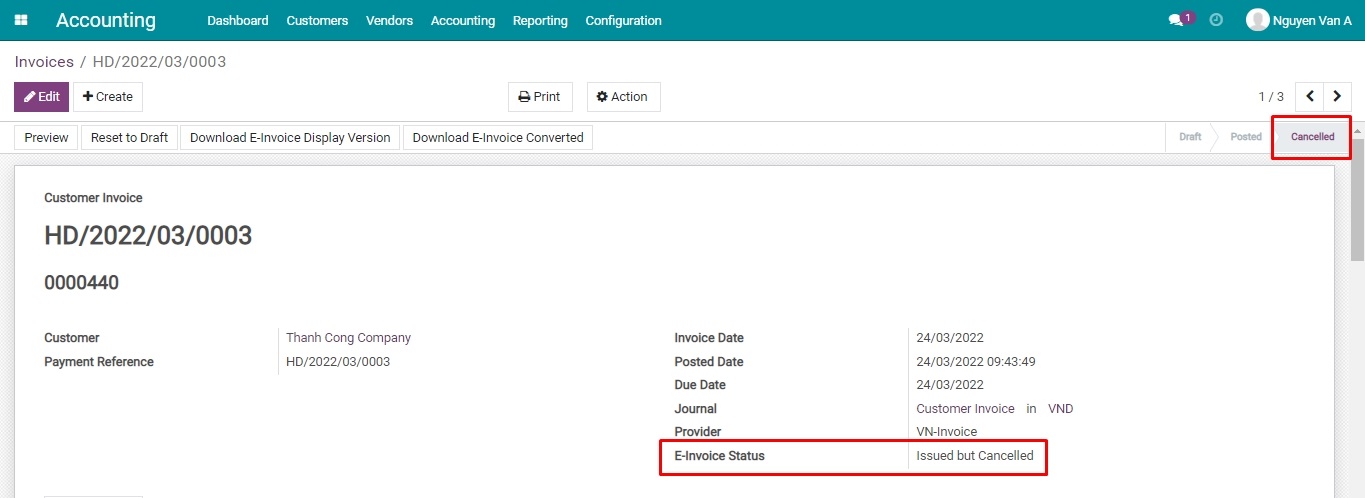
7. Điều chỉnh hoặc thay thế thay vì hủy - và hủy an toàn khi vẫn còn được phép.
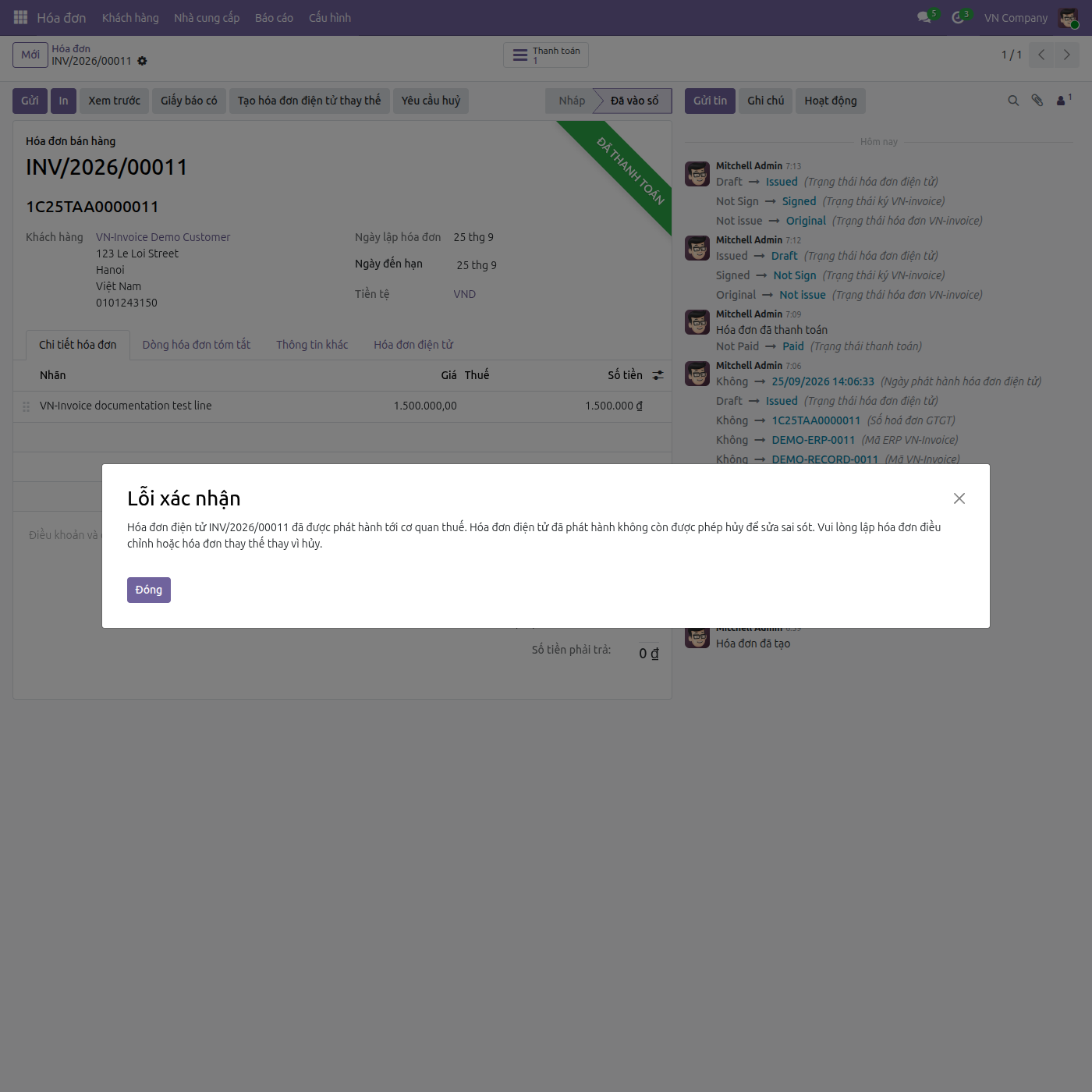
- Một hóa đơn điện tử đã phát hành không còn được hủy đơn thuần nữa, bất kể được phát hành khi nào - ấn Yêu cầu huỷ sẽ bị chặn và hệ thống hướng dẫn bạn phát hành hóa đơn điện tử điều chỉnh hoặc thay thế.
- Với hóa đơn còn được phép hủy, VN-Invoice thực hiện quy trình hủy 3 bước khi hóa đơn đã Đã ký (tạo thông báo sai sót, ký thông báo sai sót, rồi xóa bỏ), hoặc hủy 1 bước khi hóa đơn chưa ký. Hủy một hóa đơn đã ký bắt buộc phải nhập lý do hủy vào trường Mô tả lý do hủy hóa đơn điện tử.
Phần mềm này và các tệp liên kết ("Phần mềm") được sử dụng (chạy, tuỳ biến, chạy sau khi được tuỳ biến) chỉ khi bạn mua được giấy phép có hiệu lực từ tác giả, điển hình như qua các Ứng dụng Odoo, hoặc trong trường hợp bạn nhận được thoả thuận bằng văn bản từ tác giả của Phần mềm (chi tiết tại tệp COPYRIGHT).
Bạn có thể phát triển các phân hệ Odoo có sử dụng Phần mềm như một Thư viện (thường là phụ thuộc vào, nhập vào và sử dụng nguồn của nó) nhưng không sao chéo bất kỳ mã nguồn hay tài liệu nào thuộc Phần mềm. Bạn có thể phân phối những phân hệ này theo giấy phép mà bạn lựa chọn, miễn sao nội dung giấy phép đó tương tích với điều khoản của Giấy phép Phần mềm Độc quyền Odoo (ví dụ: LGPL, MIT hay bất kỳ loại giấy phép phần mềm độc quyền nào tương tự vậy).
Nghiêm cấm phát hành, phân phối, cấp phép lại hoặc bán bản sao của Phần mềm hoặc bản sao Phần mềm đã được sửa đổi.
Thông báo bản quyền và chấp thuận nêu trên buộc phải được bao gồm trong tất cả các bản sao hoặc các phần quan trọng của Phần mềm.
PHẦN MỀM ĐƯỢC CUNG CẤP "NGUYÊN TRẠNG", KHÔNG BẢO ĐẢM DƯỚI BẤT KỲ HÌNH THỨC NÀO, ĐƯỢC THỂ HIỆN RÕ RÀNG HOẶC NGỤ Ý, KHÔNG GIỚI HẠN ĐẢM BẢO VỀ CÁC BẢO ĐẢM NGỤ Ý VỀ KHẢ NĂNG THƯƠNG MẠI, PHÙ HỢP VỚI MỤC ĐÍCH CỤ THỂ VÀ KHÔNG VI PHẠM. TRONG MỌI TRƯỜNG HỢP SẼ KHÔNG CÓ TÁC GIẢ HOẶC CHỦ SỞ HỮU BẢN QUYỀN NÀO CHỊU TRÁCH NHIỆM VỀ BẤT KỲ KHIẾU NẠI, THIỆT HẠI HOẶC TRÁCH NHIỆM PHÁP LÝ KHÁC NÀO TRONG PHẠM VI HỢP ĐỒNG, CÁC THIỆT HẠI HOẶC CÁCH KHÁC, PHÁT SINH TỪ, NGOÀI HOẶC CÓ LIÊN KẾT VỚI PHẦN MỀM HOẶC VIỆC SỬ DỤNG HOẶC KINH DOANH KHÁC TẠI PHẦN MỀM.